18
FUNCTION KEYS
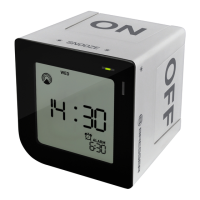
A. Alarm “ON /
9
” slide plate
Double-sided printing slide plate “ON /
9
”
allows you to select the alarm “ON” look as
per your preference.
B. Alarm “OFF / X” slide plate
Double-sided printing slide plate “OFF / X”
allows you to select the alarm “OFF” look
as per your preference.
C. Touch key
“SNOOZE/LIGHT”
• Turn on the backlight
• Switch to snooze mode when the alarm is
activated
D. [SET] button
• Set the date and time manually in Alarm
“OFF / X” mode.
Press and hold “SET” for 4 seconds
• Set the alarm time in Alarm “ON /
9
” mode
Press and hold “SET” for 4 seconds
E. UP (▲) button
• Increase the date, time and alarm during
setting.
• Switch between 12 hour or 24 hour display
format.
F. DOWN (
▼) button
• Decrease the date, time and alarm during
setting.
• Press and hold to enforce radio controlled
reception.
G. Alarm on/off indicator light
• Green indicator light (means alarm on) will
turn on for 3 seconds when you roll the de-
vice to Alarm “ON /
9
” mode.
• Red indicator light (means alarm off) will
turn on for 3 seconds when you roll the
device to Alarm “OFF / X” mode.


 To Next Page