7
Using the BRITA
®
Memo Function
It is important to change your BRITA
®
lter cartridge regularly
to enjoy the benets of BRITA
®
ltered water. Filtering your
water improves the look and taste of hot drinks by reducing
limescale, chlorine, metals and other impurities.
The BRITA® Memo automatically reminds you when your
lter cartridge needs to be changed. BRITA
®
recommend to
exchange the MAXTRA
®
cartridge every 4 weeks.
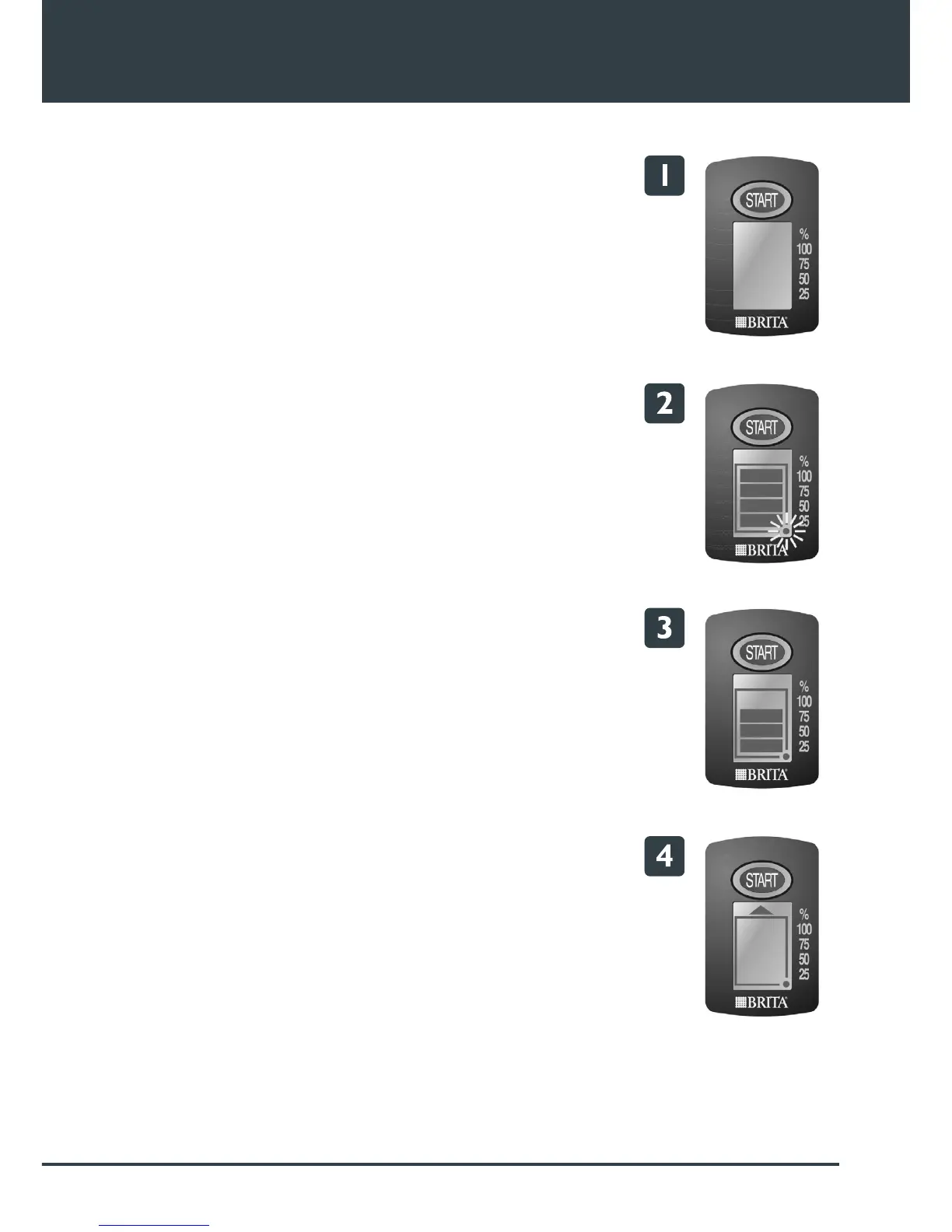
When you have tted and prepared your lter cartridge, start
the Memo as follows:
1. Press and hold the START button until 4 bars appear on
the display and ash twice. The Memo is now set.
2. The ashing dot in the corner of the display indicates that
the Memo is working.
3. Every week, one bar will disappear to indicate the
remaining cartridge life. When only one bar is showing,
check that you have a replacement lter cartridge available.
4. After 4 weeks, all four bars will disappear and a ashing
arrow will appear to indicate that the cartridge should be
replaced.
Wash and dry the lter funnel, insert a new cartridge and
restart the Memo as described above.
Please note that the Memo is only intended to be used with
BRITA® lter cartridges.
More information on the use of BRITA
®
water lter cartridges
and the Memo can be found in the BRITA
®
information guide.






 To Next Page