• ModeHAND1
pour over brewing
• ModeHAND2
fully manual
BSC2BNVWP
1
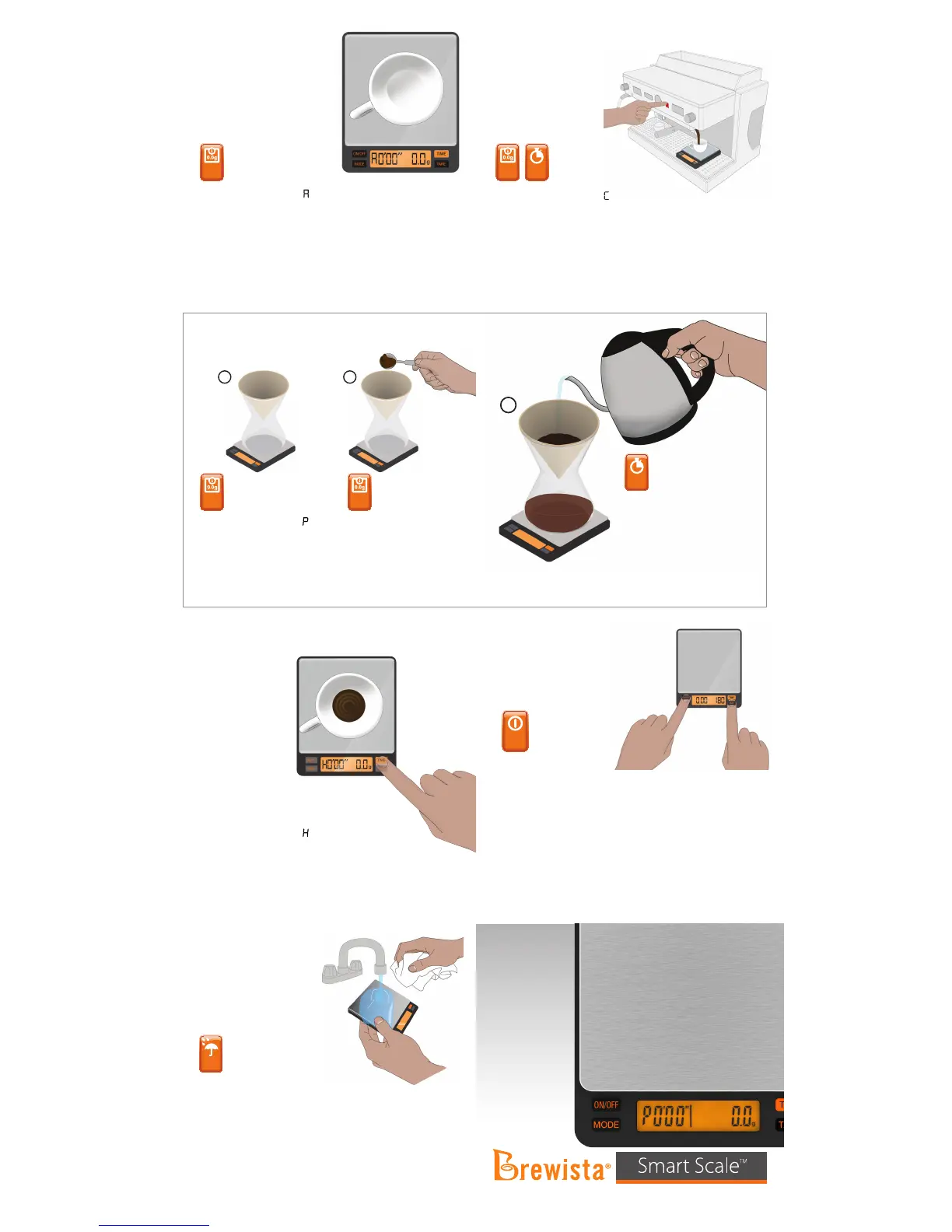
•Add coee grounds.
•Adjust amount of
coee grounds.
•Onceplatformisstable
for 3 seconds, weight
will automatically TARE.
3
•Add water.
•Display will ash once.
•Timer begins to count up.
•Weight is displayed as added.
•After cup is removed, last time
and weight are displayed for 5
seconds. Time then returns to
0’00”andweightreturnsto0.0g.
1133 W. 27th Street, Cheyenne, WY 82001, USA | www.mybrewista.com
TollFreeinNorthAmerica:888-538-8683 | Local:307-222-6086
•Modeindicatordisplays“
”
on the left of the LCD.
•Place brewing vessel
on platform.
•Weight will automatically TARE.
•Modeindicatordisplays“
”ontheleftoftheLCD.
•Noautomaticfunctions.
•User TARES and starts timer by pressing appropriate buttons.
•Timer is paused and restarted by pressing TIME button again.
• Washing
• Auto-oFunction
set to 180 seconds by default
•Handwashonlywithmildsoapywater.
•Donotsubmersethescaleinwater.Doingsomayrequire
excessivedryingtime.
•Washonlytheplatform.Rinseotherpartswithplainwater
if needed.
•Shakeoutexcesswaterbyrmlygraspingthescale
in one hand, and tapping it against your other hand.
•Donotpresshardontheplatform.
•Drytheexteriorofthescalewithasoftclothorleavetodry
on a dish rack.
• Turn o the scale.
• PressandholdON/OFFbutton.
• WhileholdingtheON/OFFbutton,presstheTAREbutton4-5
timesquicklyuntil“180”isdisplayed.
• Release both buttons.
• PresstheMODEbuttontoswitchbetween“0/60/120/180”.
(If “0” is selected, the Auto-o function will be disabled.)
• Afterchoosingdesiredtime,presstheON/OFFbuttonagain.
• Thedisplaywillshow“PASS”toconrmthissetting.
• The scale will turn o automatically.
• Please note: To keep a longer battery life, please turn o the scale
by pressing ON/OFF button after each use.
• ModeAUTO3
for making espresso
(Auto-tare only; timer is not
active)
• ModeAUTO4
for making espresso
(Auto-tare and Auto-timer
with timer starting when
liquid hits the cup)
•Modeindicatordisplays“”ontheleftoftheLCD.
•Place cup on platform.
•Weight will automatically TARE.
•Weight is displayed as added.
•After cup is removed, last weight is displayed for 5 seconds.
Weight then returns to 0.0g.
•Modeindicatordisplays““ontheleftoftheLCD.
•Place cup on platform.
•Weight will automatically TARE.
•When liquid hits the cup, the timer automatically starts to
count up.
•Weight is displayed as added.
•After cup is removed, last time and weight are displayed for
5seconds.Timethenreturnsto0’00”andweightreturnsto0.0g.


 To Previous Page
 Loading...