BSC2BNVWP
Two (2) Replacement
Silicone Gaskets
Mini Screwdriver
Large Protective
Cover/ Tray
Batteries
Scale
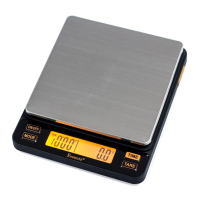
• What’sinthebox?
Platform
Mode
Indicator
Mode
Button
Tare
Button
Power
Button
Time
Button
WeightTimer
LCD
Readout
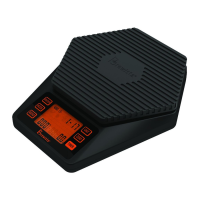
• Layout
front of scale
• Layout
back of scale
•Using the included screwdriver, remove the battery cover.
•Insert the batteries with the negative ends against the springs
•Replace battery cover.
•If silicone gasket is missing or damaged, replace it with one of
the included spares.
• Installthebatteries • ModeSetting
Battery
Compartment
QUICK START GUIDE
Small Protective
Cover/ Tray
StartHere
Scan for
Instructional video
•PressON/OFF”button.
•PressMODEbutton.
•Thedisplaywillread,“”,“”,“”,“”,
“”,“”.
•PresstheMODEbuttonagaintotogglethroughthesesixmodes.
•Mode indicator displays a square in the upper left of the LCD.
•Place cup on platform.
•Display will ash once.
•Weight will automatically TARE.
•Timer begins to count up.
•Weight is displayed as added.
•After cup is removed, last time and weight are displayed for
5seconds.Timethenreturnsto0’00”andweightreturnsto0.0g.
• ModeAUTO1
for making espresso
(Auto-tare and Auto-timer
with immediate timer start)
• ModeAUTO2
for making espresso
(Auto-tare and
manual timer start)
•Mode indicator displays a square in the lower left of the LCD.
•Place cup on platform.
•Weight will automatically TARE.
•Press start button on espresso machine
and TIME button on scale simultaneously.
•Timer begins to count up.
•Weight is displayed as added.
•After cup is removed, last time and weight are displayed for
5seconds.Timethenreturnsto0’00”andweightreturnsto0.0g.

 Need help?
 General

 To Next Page