3
Cold Pro 4™ Commercial Cold Brew System
Instructions
1) Wash bucket with warm soapy water. Rinse.
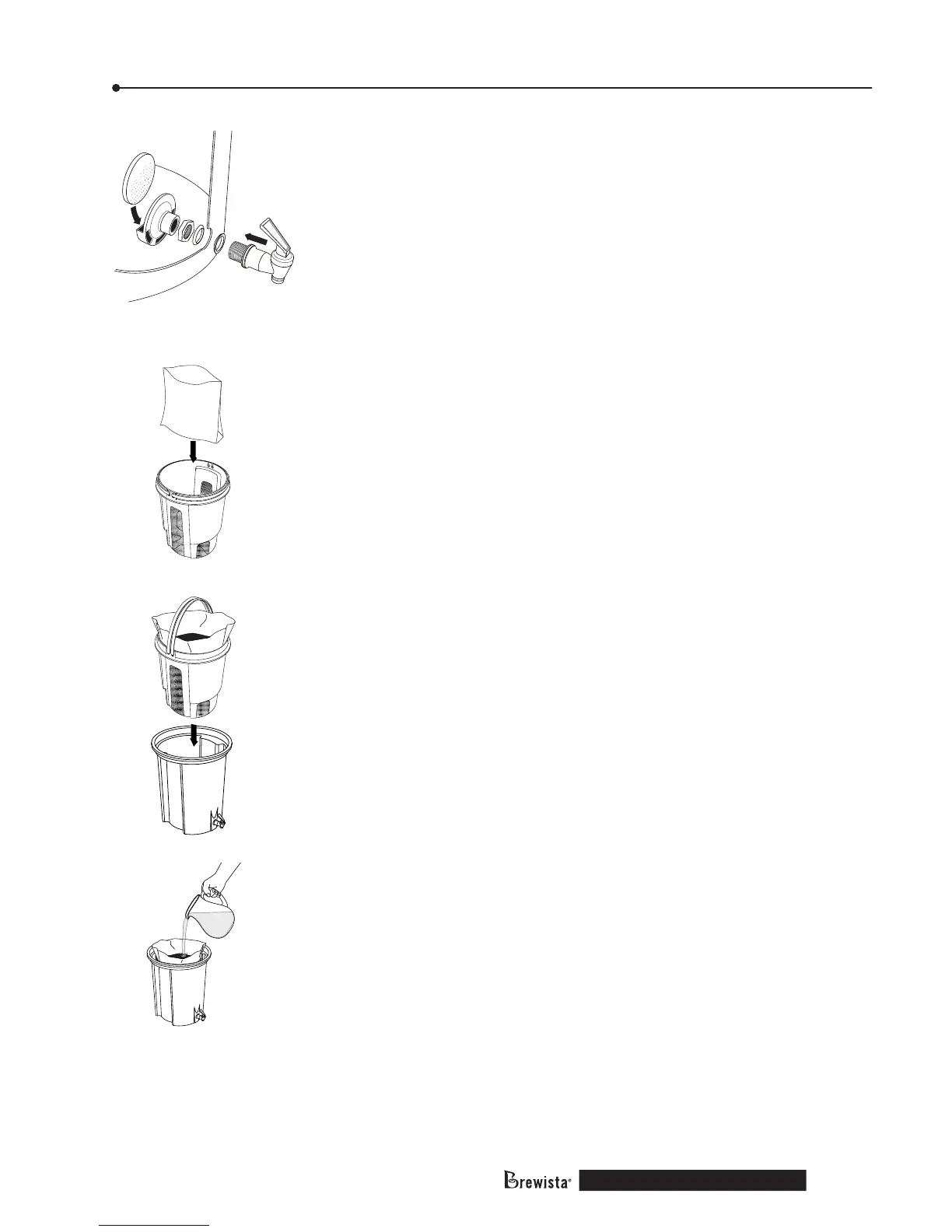
2) Install dispensing spigot.
◦ With only one rubber washer on the spigot threads
(tapered side toward the bucket surface), insert the
spigot into the hole near the base of the bucket.
◦ Slide the other rubber washer (tapered side toward the
bucket surface) onto the threads inside the bucket.
◦ Secure the spigot and washers with the plastic hex nut.
- Hand tighten only
- Tighten suciently to prevent leaking
3) Optional instructions for additional ltration:
◦ Thread the outlet lter holder onto the spigot inside
the bucket.
◦ Insert the polyber outlet lter into the outlet
lter holder.
4) If a paper or PLA lter is used, open it and place into the
permanent lter.
5) Place measured coee grounds into the paper lter (or directly
into the permanent lter if no paper lter is used).
6) Gently level the grounds in the permanent lter by tapping it
on a countertop surface.
7) Place permanent lter with coee in brew vessel and rotate to
lower it into steeping position.
8) Add water according to your preferred recipe.
◦ The water level should not go above the inner supports
of the 5 gallon brew bucket to prevent the grounds from
overowing during the bloom. This point is the level to
which water should be added for the suggested ratio of
4 pounds of coee to 4 gallons of water.



 To Next Page