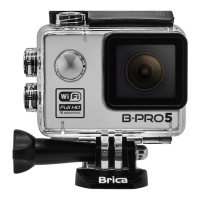
Need help?
Do you have a question about the Brica b pro5 alpha plus and is the answer not in the manual?
Instructions for correctly inserting a memory card into the camera's slot.
Steps for inserting and removing the camera's battery, with notes on long-term storage.
Procedure for charging the camera, including indicator light status.
Instructions on how to power the camera on and off, including auto-off settings.
How to switch between different camera modes like Video, Photo, and Playback.
Steps to start and stop video recording and take photos, including burst mode.
How to navigate, play, and stop video or photo playback.
Instructions for testing the waterproof casing for leaks.
How to navigate and enter the camera's settings menu.
Options for changing video resolution, listing available formats and frame rates.
Available photo resolutions and aspect ratios for image capture.
Settings for adjusting video quality levels: Super Fine, Fine, and Normal.
Settings for adjusting photo quality levels: Super Fine, Fine, and Normal.
Options to change the field of view between Wide, Medium, and Narrow.
How to activate and set the self-timer function for photo and burst modes.
Setting the number of photos to be taken in burst mode (3, 5, 10, 20).
Activating the auto-shoot function with various time delay settings.
Activating the time-lapse function for video recording with interval settings.
Option to display date and time stamps on recorded videos.
Option to display date and time stamps on photos and burst shots.
Enabling loop recording with adjustable clip durations (Off, 2, 3, 5 mins).
Activating automatic video recording upon motion detection with sensitivity settings.
Configuration options for the camera's indicator lights (LEDs).
Configuring the WiFi indicator light status when WiFi is active.
Enabling/disabling on-screen display of information like battery and resolution.
Enabling automatic power-on and recording when connected to a charger, ideal for car use.
Setting a delay for automatic camera shutdown after a specified time when Auto DVR is active.
Enabling TV output to display camera feed on a connected television via HDMI.
Configuring video output mode (NTSC/PAL) for regional compatibility on TV.
Automatically rotating video/photo recording 180 degrees for upside-down mounting.
Adjusting microphone volume level and turning it on/off.
Changing the camera's display language, defaulting to Bahasa Indonesia.
Synchronizing date/time with smartphone or setting manually.
Selecting the preferred date format (Year/Month/Day, Day/Month/Year, etc.).
Conserving battery by automatically turning off the LCD screen after a set time.
Power conservation by automatically turning off the camera after a set idle time.
Setting the LCD screen refresh rate to 50Hz or 60Hz.
Determining auto-settings for shutter speed/aperture based on light source (Center, Multi, Spot).
Configuring light sensitivity (ISO levels: Auto, 100-1600) for the image sensor.
Adjusting white balance settings (Auto, Daylight, Cloudy, Tungsten, Fluorescent).
Adjusting exposure value for brighter or darker image results.
Turning the 'Beep' sound effect on or off during camera operation.
Turning the WiFi connection on or off via settings or shutter button.
Changing the WiFi network name (SSID) for the camera.
Steps to change the default WiFi password for the camera's network.
Formatting the memory card, cautioning about data loss.
Reverting all camera settings back to their factory defaults.
Displaying firmware version and instructions for firmware updates.
 General
| Photo Resolution | 12MP |
|---|---|
| Image Sensor | 12MP |
| Display | 2-inch LCD |
| Waterproof | Yes (with case) |
| Field of View | 170 degrees |
| Storage | MicroSD |
| Connectivity | Wi-Fi |

 To Next Page