快速安装手册
http://www.whkj.com.cn010‐51655555
●色带 Ribbon
色带更换:
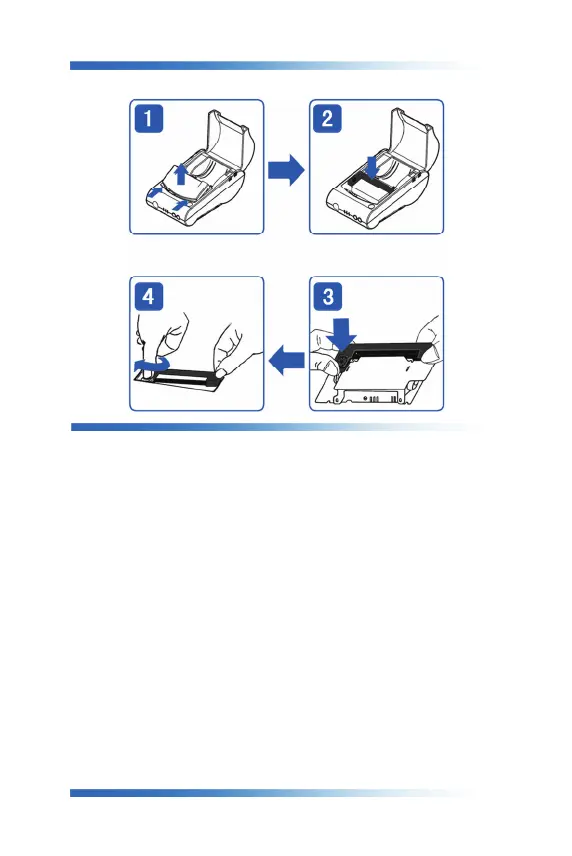
1.翻开纸仓盖,接着如图 1 箭头指示方向,向前推动活动盖板,推开后轻轻取下(注意整
个过程中要保护好撕纸用牙齿,小心碰伤)
2.从打印机头上轻轻取下旧色带盒。注意:请先抬起色带盒的左端,然后再抬起色带盒的
右端,取下色带盒。
3.换新的色带盒。首先将色带盒的右端轻轻放在机头右端的齿轮轴上,左端稍微抬起,不
要放下。如色带盒右端未落到底,请按住色带盒上的旋钮,顺时针方向稍微转动一下,
直到色带盒的右端落到底后再放下色带盒的左端。
4.装上活动盖板,并关上活动纸仓盖即可。
注意:T2 热敏型无需此步骤。我们建议您不定期做好清理。方法是打开纸舱
盖,用棉棒沾少许酒精,轻轻擦拭打印机热敏头,及纸仓上的滚轴。
Ribbon Installation
1.Open the paper cover of printer, and push the movable cover panel as shown in
the Fig.1 and then take it down. Take care of the sawtooth.
2.Take down the old ribbon cassette, notice: lift up the left end of the ribbon
cassette, then lift up the right end, and then take down the ribbon cassette.
3.Installing new one: put down gently the right end of ribbon cassette on the gear
wheel in the print head, lift up the left a little, don’t put down, if the right
edge is not down to the bottom, rotate the knob of the ribbon cassette slightly
in clockwise direction as shown in the image, until the ribbon cassette is down
to the bottom, then put down the left.
4.Install the movable cover panel and close the paper cover.
(Note: When use
T2 printer, no need to refer this step.).


 To Next Page