5.5
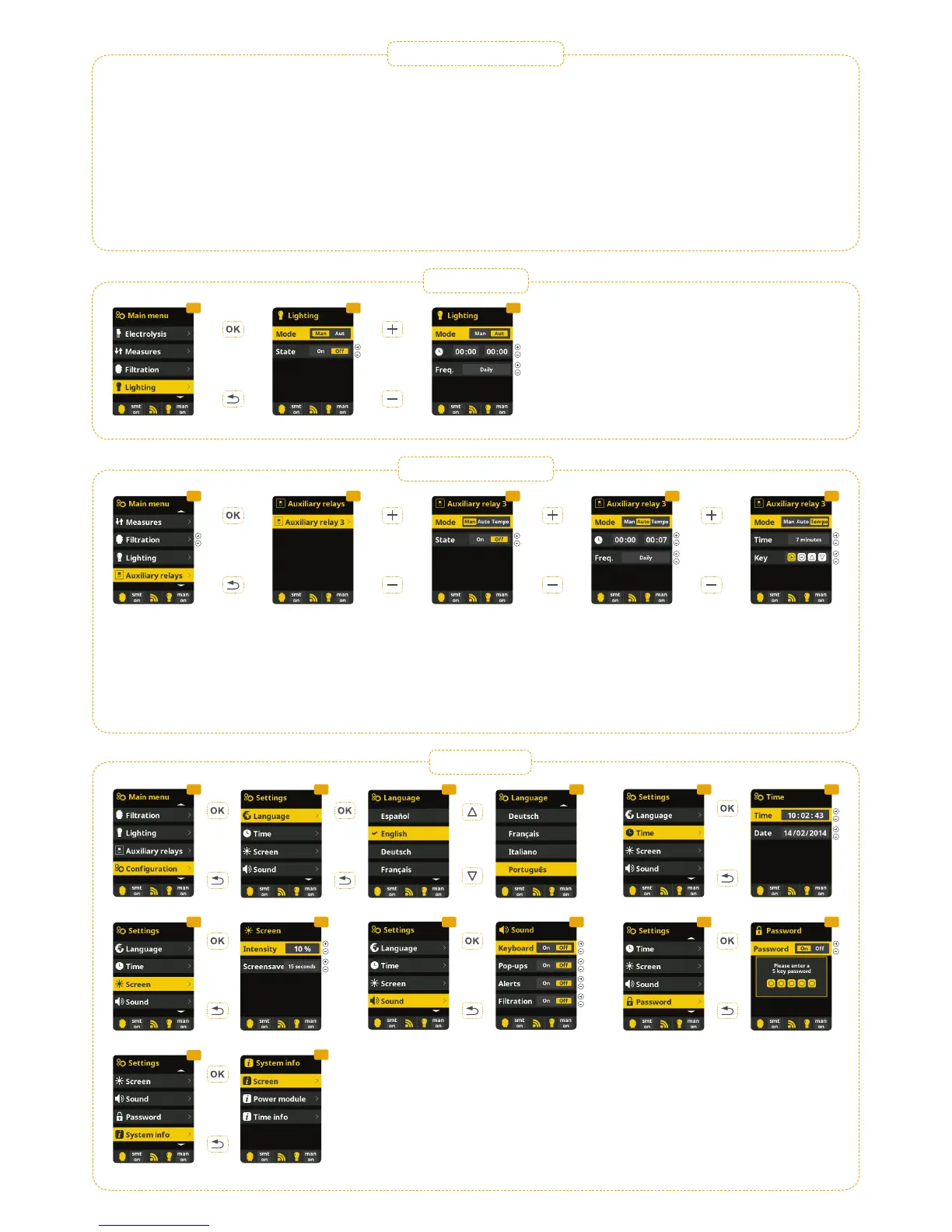
6.3 Setting of preferred language.
6.5 Setting of day and current time.
6.7 Setting of the intensity of the display lighting
(0-100%) and programming its ON and OFF time.
6.9 Sound: Programming of the system to emit sound
for the functions: Keyboard (buttons); Notices (pop-up
message); Alarms (working alarm); Filtration (start of
the filtration).
6.11 Password: Allows to protect the access to the
user´s menu by activating a password. To enter your
password press a combination of 5 buttons and the
system will memorize.
6.13 System info: Information of the available
software of the TFT display and the power module.
The system stores the working hour counters of
the different modules and they are displayed on
this screen.
4.4 Lighting
4.1 4.2 4.3
4.6 Settings
4.1 Lighting.
4.2 Manual mode (ON/OFF).
4.3 Automatic mode: Shuts lights ON/OFF according to a
timer. The timers can be configured with a frequency: Daily;
Every 2 days; Every 3 days; Every 4 days; Every 5 days;
Weekly; Every 2 weeks; Every 3 weeks; Every 4 weeks.
4.5 Auxiliary relays
5.25.1 5.3
5.1 Auxiliary relays.
5.2 It is possible to control up to 4 extra auxiliary
relays (water features, fountains, automatic irrigation
systems, built-in cleaning systems, air pumps for
spas, garden lighting, etc.). This menu displays the
relays which are still available on your device and
allow configuration.
5.3 Manual mode (ON/OFF).
5.4 Automatic mode: ON/Off according to a timer.
The timers can be configured with a frequency: Daily;
Every 2 days; Every 3 days; Every 4 days; Every 5
days; Weekly; Every 2 weeks; Every 3 weeks; Every
4 weeks.
5.5 Timer mode: Working time is programmed in
minutes. Each time the button on the front panel in
relation to the relay is pressed, it will start up for the
time programmed. This function is recommended for
the timing of air pumps for spas.
5.4
4.3 Filtration
(continuation)
›› Clima ON: Keeps the filtration working when the filtration period is finished
if the water temperature is below the setting temperature. When the setting
temperature is reached the filtration and the heating will stop and will not switch
on till the next programmed filtration period.
3.6 Intelligent*: In this mode the user has 2 working parameters: The desired
water temperature and the minimum filtration time is selected (minimum value of
2 hours and maximum of 24 hours). The filtration will work for at least 10 minutes
every 2 hours to check the temperature. The selected minimum filtration time is
divided in 12 fragments and is added to the 10 minutes. Example 1: In 12 hours,
the time is divided by 12 times per day when the filtration pump starts up to
check the water temperature.
Example 2: 12 hours x 60 minutes) / 12 = 60 minutes every 2 hours. This is the
filtration and heating time every 2 hours.
If the filtration time finishes, without the temperature reaching the desired level,
the filtration/heating continues until the desired temperature is accomplished. In
order to keep the filtration-electricity-cost to a minimum, this additional filtration
time is subtracted from the following filtration periods of the day.
* Note: Modes only visible if the option to use temperature and/or heating probe
is activated in INSTALLER´S menu.
6.1 6.3 6.3
6.12
6.13
6.4 6.5
6.8 6.96.6 6.116.7
6.2
6.10


 To Next Page
 Loading...