INSTRUCTIONS
42-1006
MINI ANALOG TIMER
MINITEMPORIZADOR ANALÓGICO
The electrical system and the method of connecting this timer to the system must be in accordance with local, state,
and national electric codes.
• 1 polarized (2 pole) socket outlet
• Turns lights/appliances ON and OFF at programmed
daily settings
• Programmable in 30 minutes intervals
• Max. 24 ON/OFF per day
• CFL Compatible
• Manual Override switch
FEATURES
WARNINGS
• Do not use with any appliance which exceeds the capacity of the Timer.
• Always ensure that the plug of any appliance is fully inserted into the Timer.
• If you need to clean the Timer, remove from the mains and wipe with a dry cloth. Do not immerse in water or any liquid.
• Fan heaters and heaters with exposed elements should not be left unattended, and it is recommended that these type of
appliances are not to be connected to timers.
CAUTIONS
• This unit is to be connected to a 125V, 60Hz
power source only.
• Total Capacity: 15A 1875W Resistive, 1250W
Tungsten (Lighting). 1/2 HP. Do not exceed
rated capacity.
• FOR INDOOR USE ONLY.
• Do not attempt to disassemble unit. There are
no serviceable parts inside.
• RISK OF ELECTRIC SHOCK:
o Keep children away.
o Unplug timer before cleaning.
o Do not use in wet locations.
• RISK OF FIRE: Do not use to control appliances
that contain heating elements (Cooking appliances,
heaters, irons, etc…)
• PLEASE READ THROUGH THE INSTRUCTIONS
PRIOR TO USE.
FULL LIFETIME WARRANTY
This product is fully warranted to be free of defects in material and workmanship for the life of the product. If a defect in material or workmanship occurs, call 800-562-5625 for instructions on how to have it replaced
or repaired free of charge. This warranty is null and void if the product was used for purposes for which it was not designed, is abused, misused, modied or improperly installed, operated, maintained, and/or
repaired. NOT LIABLE FOR INCIDENTAL, INDIRECT, OR CONSEQUENTIAL DAMAGES. Some states do not allow the exclusion or limitation of incidental or consequential damages, so the above limitation or
exclusion may not apply to you. This warranty gives you specic rights, and you may also have other rights that vary from state to state.
1. Turn the dial clockwise until the current time lines up with the “Time Now” indicator arrow.
NOTE: The dark area on the dial denotes nighttime hours. The white area denotes daytime hours.
2. Set the switch to the TIMER ON position.
3. With your nger pull up all the tabs. Determine your desired ‘ON’ period and press down all tabs corresponding to the required ‘ON’ period. For example, if you want your
appliance to turn ‘ON’ at 6:00pm and ‘OFF’ at 10:00pm, push down all the tabs between the 6pm and the 10pm in the BLACK section on the dial.
4. Connect appliance to the timer and plug timer into power source and making sure the appliance is turned on.
5. The pre-set On/Off commands can be interrupted by using the manual override switch located on the top of the unit. When switched to the OUTLET ON position, the connected
appliance is switched on permanently. To reactivate the timer’s control of the appliance, turn the appliance switch on and set the timer’s override switch to TIMER ON.

 Need help?
 General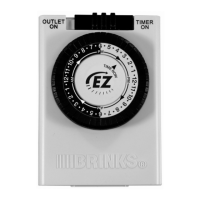

 To Next Page