9 L-1681BH-M
English Manual
15
16
18
17
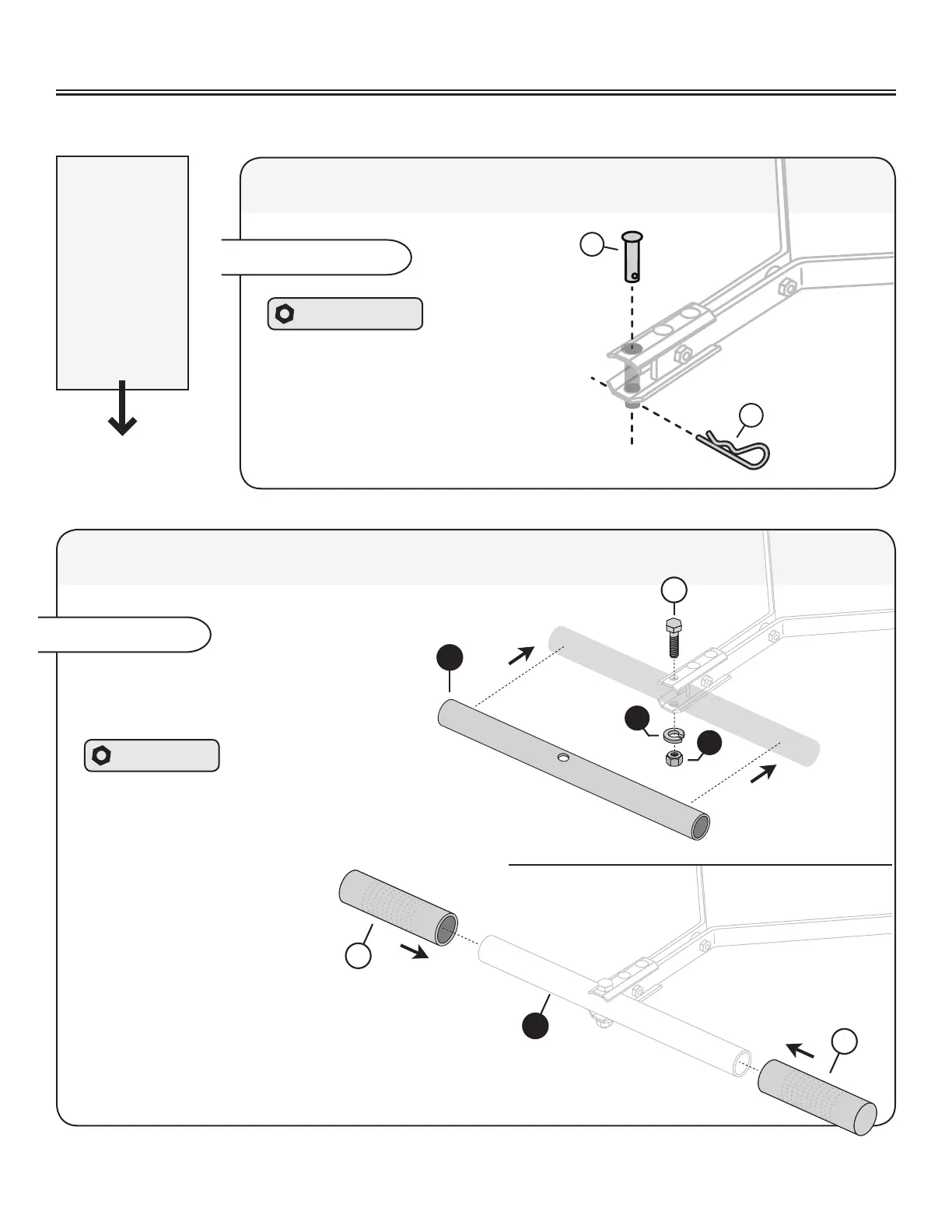
Slide the Handle (15) between the Clevis
plates as illustrated. NOTE: Be sure to align
the openings of the clevis and handle.
Hardware Bag
Run a 1/2 x 2-1/4” Hex Bolt (16) through the Clevis
plates and handle. Secure with a 1/2” lock washer (18)
and a 1/2” lock nut (17).
Slide the grips (19)
over the ends of the
handle (15).
Assembly Step 6
If you are
assembling
PRC-241BH or
PRC-241BH-A:
Skip Step 5
and continue
to Assembly
Step 6
13
14
Assembly Step 5
Add the hitch pin (13) through remaining
openings of the Clevis (20) and secure
with a Hitch Pin Cotter (14).
Skip Step 6 and continue to Assembly Step 7.
Hardware Panel D
PRT-361 BH, PRT-361S BH & PRT-481S BH: Attaching the Clevis
PRC-241 BH: Attaching the Handle
15
19
19
ASSEMBLY


 To Next Page