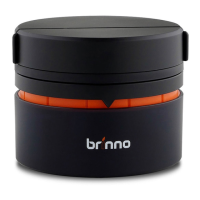
The Brinno Pan Lapse is a device designed to facilitate time-lapse photography and video recording with panning motion, offering users the ability to capture dynamic scenes with a moving perspective. It is a compact and portable accessory that can be used with smartphones and various cameras, enhancing their capabilities for creative content creation.
Function Description
The primary function of the Brinno Pan Lapse is to provide controlled rotational movement for a camera or smartphone, enabling the creation of panoramic time-lapse videos or continuous panning shots. The device operates by rotating a mounted camera or smartphone at a user-defined speed and over a specified angle, or continuously. This rotational capability allows for capturing a wider field of view over time, adding a professional and dynamic element to time-lapse sequences that would otherwise be static.
The device is controlled via a dedicated Brinno Pan Lapse smartphone application, which connects to the Pan Lapse unit via Bluetooth. Through the app, users can precisely configure the panning parameters, including speed, time interval, and panning angle. This level of control allows for customization based on the specific requirements of the time-lapse project or video recording.
For time-lapse recording, the Pan Lapse can be set to rotate at a specific speed and for a defined time interval, ensuring that the camera captures frames at regular intervals while moving. The panning angle can also be set to sweep back and forth, providing a smooth, repeatable motion. For continuous video recording, the device can be set to rotate non-stop, offering a continuous panning shot.
Usage Features
The Brinno Pan Lapse is designed for ease of use, making it accessible to both amateur and experienced content creators.
Physical Setup:
The device consists of two main parts: the base unit and a removable top clamp/mount.
- Smartphone Clamp: This accessory is designed to securely hold a smartphone in an upright position on top of the Pan Lapse unit. Users simply slide their smartphone into the clamp, which then attaches to the Pan Lapse.
- Tripod Mount for Camera: For use with cameras, the Pan Lapse features a standard tripod mount screw on its top surface. Cameras can be directly screwed onto this mount, providing a stable platform for rotation.
- Tripod Mount (Base): The base of the Pan Lapse unit also includes a tripod mount, allowing the entire device to be securely attached to a tripod or other mounting accessories. This ensures stability during operation, especially when capturing longer time-lapse sequences.
Powering On:
The Pan Lapse is powered by AAA batteries. To power on the device, users need to open the battery cover, insert the batteries with the correct polarity, and then slide the power ON/OFF switch to the "ON" position.
Status LED Indicator:
The device provides visual feedback through a status LED indicator, which helps users monitor its operational status:
- Red Light: Indicates low battery, prompting users to replace the batteries.
- Green Light (Solid): Signifies that the device is powered on and ready for operation, or that it is rotating non-stop.
- Green Light (Blinking): Indicates that a time-lapse sequence is actively being recorded, with the device performing its programmed panning motion.
- Blue Light: Shows that the device is actively connecting via Bluetooth to a smartphone.
Smartphone Application Control:
The core functionality and control of the Brinno Pan Lapse are managed through its dedicated smartphone application.
- App Installation: Users must first download and install the Brinno Pan Lapse APP from their smartphone's app store (e.g., Google Play for Android). A QR code is provided in the manual for easy access to the app.
- Bluetooth Connection: Upon opening the app, users will be prompted to enable Bluetooth if it's not already on. The app then scans for available Brinno Pan Lapse devices.
- Device Selection: Once the device is detected, users select their specific Pan Lapse unit from the list. The device can be renamed within the app for easier identification, with a limit of six characters for the name.
- Setting Parameters: The app provides a user-friendly interface to set the panning parameters:
- Speed: Users can choose a speed from 1 (slow) to 10 (fast), or select "∞" for non-stop rotation.
- Time Interval: This setting defines the delay between each movement increment. It's crucial to match this setting with the time interval set on the time-lapse camera being used to ensure synchronized capture. A setting of "0" is used for continuous video recording.
- Panning Angle: Users can define the total angle over which the device will pan. This can be set for a specific sweep or for continuous rotation. The app also supports back-and-forth sweeping.
- Start/Stop Control: After setting the desired parameters, users press "OK" and then select the direction of rotation (clockwise or counter-clockwise) to start the panning motion. A "Stop" button is available to halt the operation at any time.
Tips for Optimal Use:
- Video Recording: For continuous video recording, the speed setting should be "∞" (non-stop rotation), and the time interval should be "0". This configuration ensures smooth, uninterrupted panning.
- Time Lapse Recording: For time-lapse, the speed setting should not be "∞", and the time interval should not be "0". This allows for discrete movements between captures, creating the time-lapse effect.
- Perfect Panning Angle: The manual provides guidance on calculating the ideal panning angle based on the camera's field of view (FOV) and the desired total sweep angle. For example, if a camera has a 120° FOV and the user wants a 180° panning time-lapse, the panning angle should be set to 60° (180° - 120°). This ensures that the entire desired scene is captured without excessive overlap or missed areas.
- Recommended Settings: The manual offers suggested settings for different scenarios:
- Scenery (Time Lapse): Speed 3-5, Time Interval 3-5, Panning Angle "On demand".
- Party (Time Lapse): Speed 7, Time Interval 1, Panning Angle 345°.
- Video: Speed "∞", Time Interval 0, Panning Angle "On demand".
Maintenance Features
The Brinno Pan Lapse is designed to be a low-maintenance device.
- Battery Replacement: The primary maintenance task involves replacing the AAA batteries when the red low-battery indicator illuminates. This ensures continuous operation.
- Cleaning: The device can be wiped clean with a soft, dry cloth to remove dust or smudges. Avoid using harsh chemicals or abrasive materials that could damage the surface.
- Storage: When not in use, it is recommended to store the Pan Lapse in a dry, cool place, away from direct sunlight and extreme temperatures, to prolong its lifespan. Removing batteries during long periods of inactivity can prevent potential damage from battery leakage.
- Careful Handling: The device should be handled with care to avoid drops or impacts that could damage its internal mechanisms or external casing.
- Appropriate Load: The caution section of the manual indicates that the device is suitable for smartphones and small cameras. It explicitly warns against using heavy cameras, such as DSLRs with large lenses, or tablets, as these could exceed the device's weight capacity and potentially damage it or lead to unstable operation. Adhering to these load limits is crucial for the device's longevity and proper functioning.

 Need help?
 General

 To Next Page