19
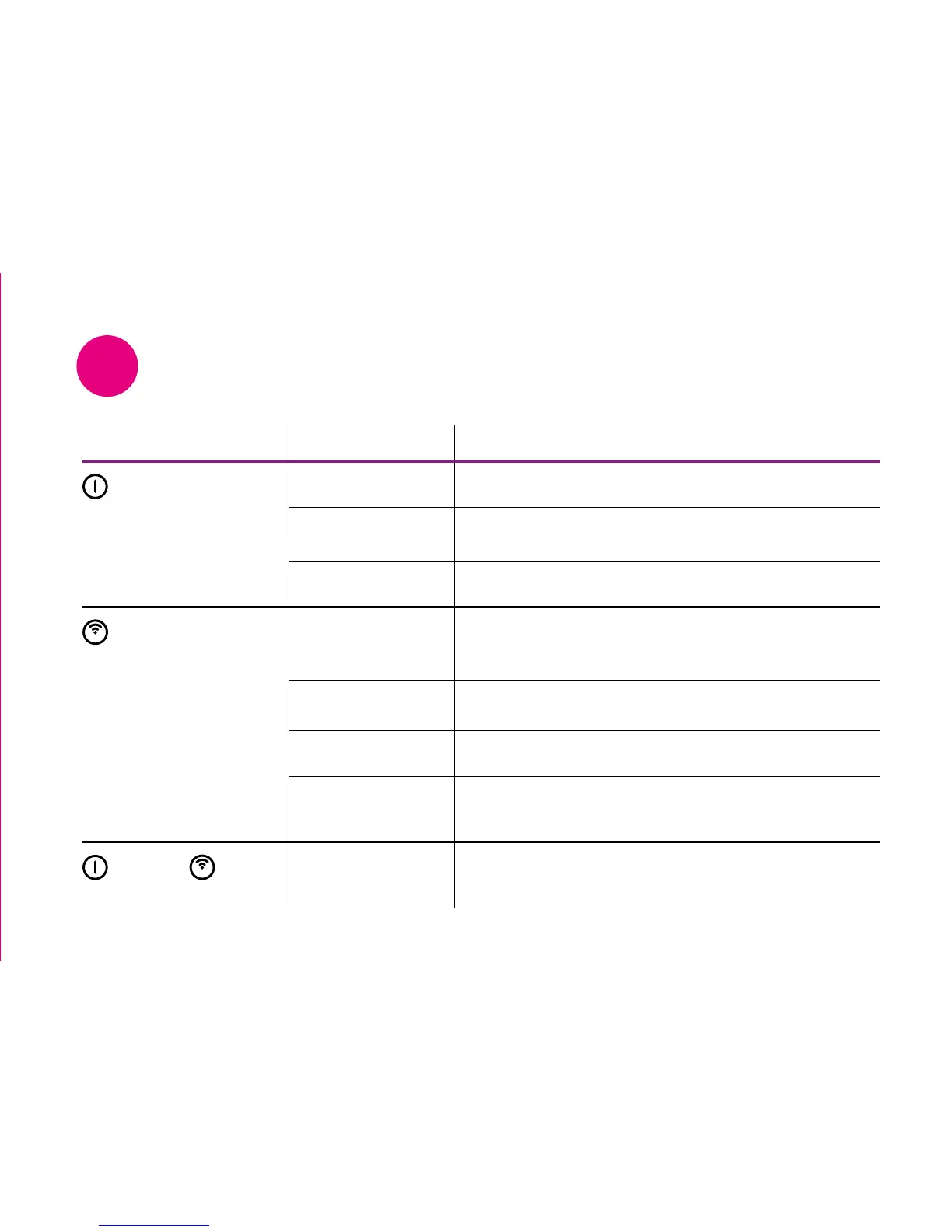
Icon guide
1
Icon Status What it means
Power
Off No Power to Wireless Booster. Check the black power
cable is plugged in and switched on at the mains
Amber solid Power on. Boot-up in progress
White solid Wireless Booster is powered on
White flashing Wireless Booster is upgrading software. Do not unplug
from power or interrupt until the icon goes solid white
Wireless
Off No wireless connection established. Make sure Wireless
Booster is connected to your Broadband Router
Amber flashing WPS in progress
Amber flashing
(rapid flash)
WPS error. Re-start WPS session by pressing and holding
the WPS button on Wireless Booster for 2 seconds
White solid Wireless connection established and device is fully
operational
White flashing Wireless Booster configured but signal from your
Broadband Router is weak. Move the Wireless Booster
closer to your Broadband Router until icon goes solid white
Power and Wireless
simultaneously
Rapid white flashing Factory reset performed successfully


 To Next Page