2
© 2024 Brivo Systems LLC. All rights reserved. PUB-Brivo Door Station Installation Guide_v1.5
6
8
7
9
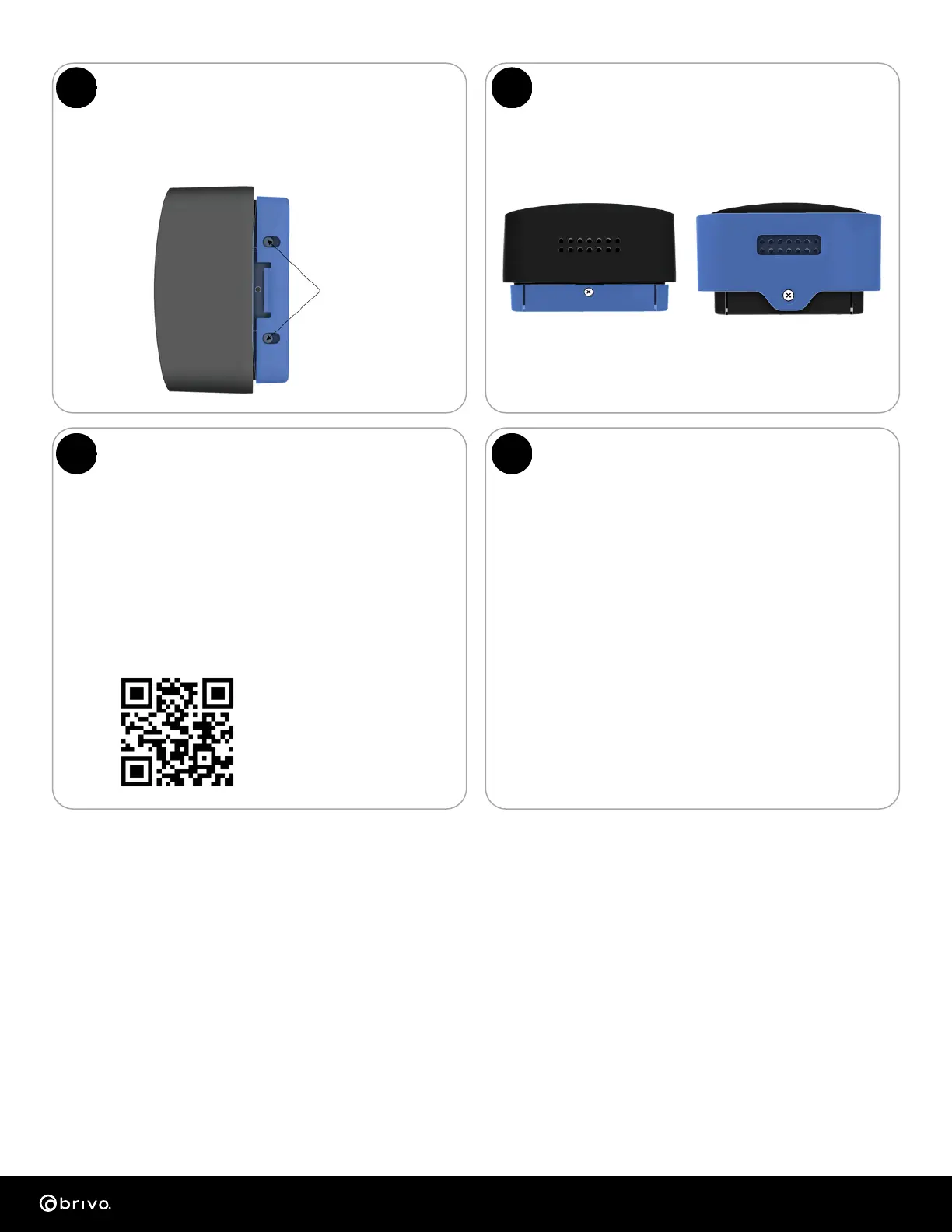
Security screw
without hood
Security screw
with hood
Attach the Brivo Door Station
to the Wall Plate
Install the Brivo Door Station
security screw
Align the Brivo Door Station so that the tabs at the top back
of the unit slide into the slots at the top of the wall plate and
slide/push the bottom of the Brivo Door Station into position.
Install the security screw at the bottom
of the Brivo Door Station.
Note: On ACS6000 panels, set the RS485 switch to ON.
Note: The Brivo Door Station does not support Wiegand
wiring.
• After powering up and OSDP communication has been
established, the LED will display the current door status
(the default is blue for idle state).
• Refer to the appropriate control panel installation guide or
Brivo online help for configuring your OSDP installation.
• Default IP setting uses DHCP. For setting a static IP address,
refer to the Panel Networking Guide.
Door Station
Mounting Tabs
Brivo documentation
can be found at
https://resources.brivo.com.
Startup:
• Flashing blue LED to solid blue LED after booted and IP
address established.
OSDP Operation:
• The Brivo control panel drives the LED Operation of
the Brivo Door Station.
Credential Presentation:
• Card swipe/BLE BMP/Successful Face Recognition; Flash
green, beep once before returning to OSDP control.
• Face Detection: As user approaches the reader, it will
begin to flash yellow once a face is detected. If the user
continues and is known, a facial recognition will be made.
Pinhole Operation:
• Reboot: Press and hold 2-4 seconds. Blink green.
• Install mode (OSDP): Press and hold 4-7 seconds.
Blink blue. Beep once.
• Factory Reset: Press and hold 8-10 seconds. Blink red.
Beep twice. It will beep twice more after factory reset
completes successfully.
OSDP/Network Setup Reader LED Operations
To Test:
Power the Brivo Door Station and wait for the power up LED beep sequence to
complete. Present a valid credential to the reader and the light-bar will turn
green. If this test fails, check the wiring. All wiring methods used shall be in
accordance with the National Electrical Code, ANSI/NFPA 70.
Performance Levels:
• Destructive Attack: I
• Line Security: I
Approvals:
FCC part 15, CE, Met Mark Safety, UL294
This device complies with Part 15 of the FCC Rules. Operation is subject to the
following two conditions: (1) This device may not cause harmful interference, and
(2) this device must accept any interference received, including interference that
may cause undesired operation. This equipment has been tested and found to
comply with the limits for a Class B digital device, pursuant to Part 15 of theFCC
Rules. Thse limits are designed to provide reasonable protection against harmful
interference in a residential installation. This equipment generates, uses, and can
radiate radio frequency energyand, if not installed and used in accordance with
the instructions, may cause harmful interference to radio communications.
However, there is no guarantee that interference will not occur in a particular
installation. If this equipment does cause harmful interference to radio or
television reception, which can be determined by turning the equipment off and
on, the user is encouraged to correct the interference by one of the following
measures:
• Endurance: IV (13.56 MHz, I (BLE)
• Standby Power: I
• Reorient or relocate the receiving antenna.
• Increase the separation between the equipment and receiver.
• Connect the equipment into an outlet on a circuit different from that to which
the receiver is connected.
• Consult the dealer or an experienced radio/TV technician for help.
FCC Caution:
Any changes or modifications not expressly approved by the party responsible for
compliance could void the user’s authority to operate this equipment. This
transmitter must not be co-located or operating in conjunction with any other
antenna or transmitter.
This device complies with Industry Canada licence-exempt RSS standard(s).
Operation is subject to the following two conditions: (1) this device may not cause
interference, and (2) this device must accept any interference, including
interference that may cause undesired operation of the device. Le présent
appareil est conforme aux CNR d'Industrie Canada applicables aux appareils
radio exempts de licence. L'exploitation est autorisée aux deux conditions
suivantes: (1) l'appareil ne doit pas produire de brouillage, et (2) l'appareil doit
accepter tout brouillage radioélectrique subi,
même si le brouillage est susceptible d'en compromettre le fonctionnement.
Radiation Exposure Statement:
The product complies with the FCC portable RF exposure limit set forth for an
uncontrolled environment and are safe for intended operation as described in
this guide. The further RF exposure reduction can be achieved if the product can
be kept as far as possible from the user body or set the device to lower output
power if such function is available.


 To Previous Page
 Loading...