EasyManua.ls Logo

BRKT ARM3780HD - Step 6: Adjust Tilt Tension and Level; Adjusting Tilt Mechanism Tension; Post-Installation Level Correction

Default Icon
12 pages
Print Icon
To Next Page IconTo Next Page
To Previous Page IconTo Previous Page
Loading...
P 11
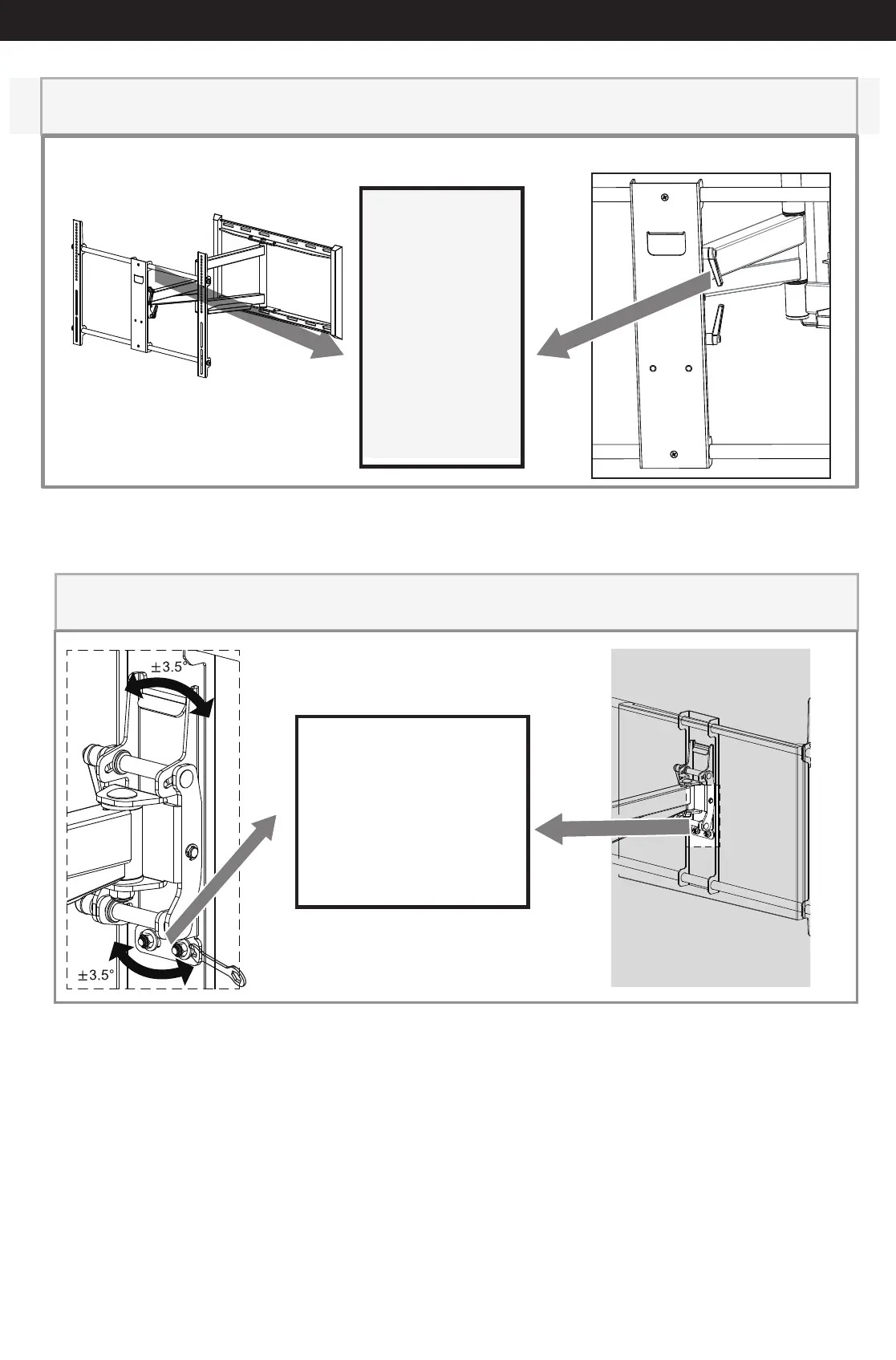
Adjust tilt mechanism tension with ratchet handle
lever
Rotate ratchet
handle lever
clockwise for
tensioning tilt
mechanism.
For additional
tension pull
lever laterally,
rotate counter
clock wise and
repeat and
repeat tension
a) Rotate handle
clockwise as far as
possible.
b) Pull handle to side
laterally (against
spring tension) and
rotate
counter-clockwise as
far as possible.
c) Repeat steps a)
and b) until panel
holds desired tilt.
STEP 6 - ADJUST TILT TENSION/ POST INSTALLATION LEVEL
Built-in level feature for post installation correction
If necessary, adjust the
2 acorn nuts to snug,
not tight, tension. Slots
on head assembly are
wider than bolts. This
allows monitor plate
and television to move
3.5˚ in either direction.