41
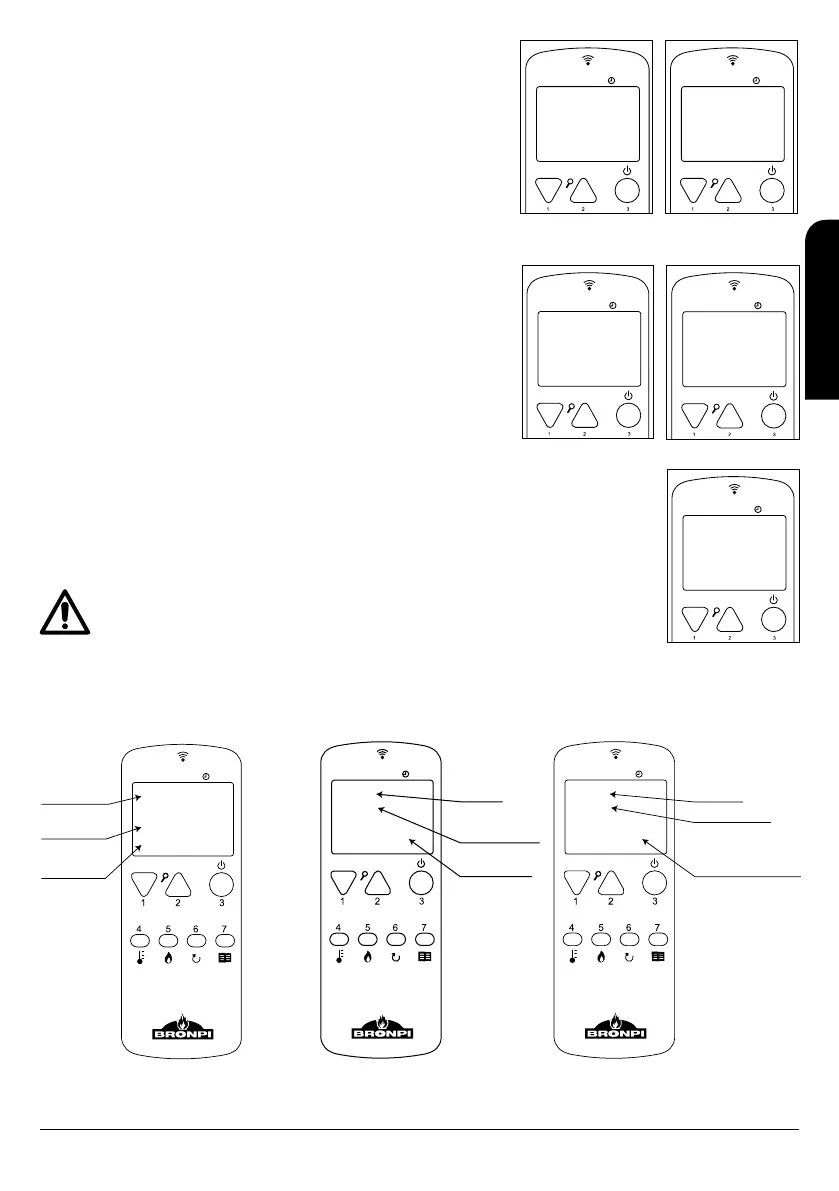
9.4.5 MENU 4. SELECT LANGUAGE
It allows selecting the languages among those available. To access this menu you have
to confirm with button nº 7 and then, choose the selected language among available:
Spanish, Portuguese, Italian, French, English and Catalan with buttons nº 1 and 2 (see
drawing D77).
9.4.6 MENU 5. CHOOSE PROBE
It allows us to select the probe to control the operation of the stove or insert (the one
in the equipment or the one on the remote control). It is advisable to select the option
“Internal probe (stove or insert probe)” so that the stove works depending on the
temperature where it is installed and not the temperature of the room where the remote
control is. See drawing D78.
9.4.7 MENU 6. STAND-BY MODE
The stove or insert with the “stand-by mode” activated (see drawing D79) will turn off
when the temperature reaches the temperature set plus a differential (2º C). When the
ambient temperature falls to the set temperature minus a differential (2ºC) the stove
automatically restarts an ignition cycle. It means that if you choose a set temperature
of 22ºC the stove wills turn-off when the room temperature is 24º C and it will restart
automatically when the ambient temperature falls to 20ºC.
In case of the “Stand-by Mode” is deactivated (by default) the stove will work in
“modulation work” when it reaches the set temperature and that allows the temperature
set could be higher.
9.4.8 MENU 7. SOUND MODE
By activating this modality, the stove or insert will emit a sound when the system detects
a fault and goes into the alarm state. To access to this menu you have to confirm with button nº 7 and then, choose
“on” with buttons nº 1 and 2 (see drawing D80).
9.4.9 MENU 8. INITIAL LOAD
In case of the stove have no more fuel during the operation, to avoid an anomaly in the next ignition, it is possible
to do a fuel pre-load for maximum time of 90 seconds to load the screw-type conveyor when the stove is switched
off and cold. To start the load press button nº 2 and to stop it press button nº 3. (See drawing D81).
It is very important that the burner is totally clean when you start the stove or insert. So, when the initial
load is finished, you must check the burner is clean of fuel to do correctly the ignition of the stove.
9.4.10 MENU 9. STOVE STATE
It shows up the current state of the stove or insert and provides information about the devices connected. Therefore, the user can get a
technical information. The next screens are seen automatically (see drawing D82, D83, D84).
MENU
D77
MENU
D78
Menu 04
SPANISH
Menu 05
SELECT
SENSOR
MENU
D79
MENU
D80
ON
Menu 06
MODE
STAND-BY
ON
Menu 07
MODE
SOUND
MENU
76”
22º C
D81
LOAD
INITIAL
D82
MENU
29ºC
1.0b
3.7
AMBIENT
SPEED
OPERATIONAL
STATE 5
MENU
99ºC
2600
D83
STATE 6
SPEED EXTR.
SMOKE
OPERATIONAL
MENU
10”
80”
194 V RETE
00 A 19.7 V
D84
TIME-OUT
TIME CLEANING
FAN
CHARACTERISTICS
INSTALLATION, OPERATING AND SERVICING INSTRUCTIONS RADIOFREQUENCY SERIES
EN



 To Next Page