INSTALLING SPARE PROPELLERS
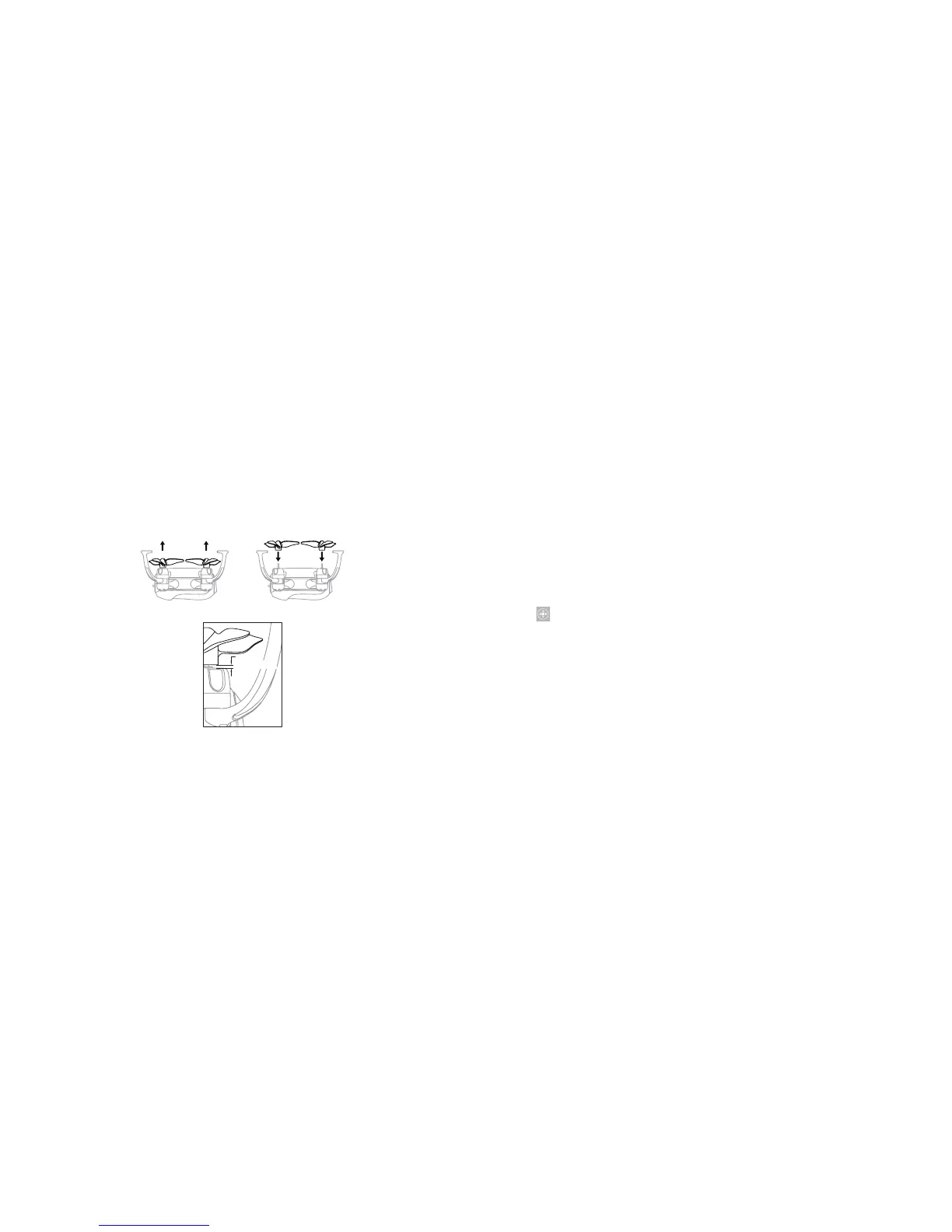
During drone accidents, propellers may become damaged. They can be easily replaced, as
shown in the following diagrams.
Note: Be sure to keep a gap between the propellers and the motor housing.
About 0.5m
20
USING THE ZOOM BEE™ APP
You can control your drone with your smartphone or tablet using the Zoom Bee™ app. Go to
the App Store
SM
(for Apple devices) or Google Play™ (for Android™ devices) to download the
app.
PAIRING YOUR DEVICE WITH THE DRONE
1. Power on the drone. Put the drone on a flat surface in a horizontal position.
2. Enter your device's set up screen, turn on WiFi (WLAN), and choose Zoom Bee™. Return
to the main screen after succesful connection.
3. Tap the Zoom Bee™ icon and tap Controls to enter the remote control interface for real
time transmission.
4. Tap to enter the Virtual Control Interface. The drone's LED lights will change from
flashing to solid, indicating successful frequency pairing. The drone is ready to be
controlled via the app.
App Store is a service mark of Apple Inc., registered in the U.S. and other countries.
Android and Google Play are registered trademarks of Google, Inc.
21


 To Next Page
 Loading...