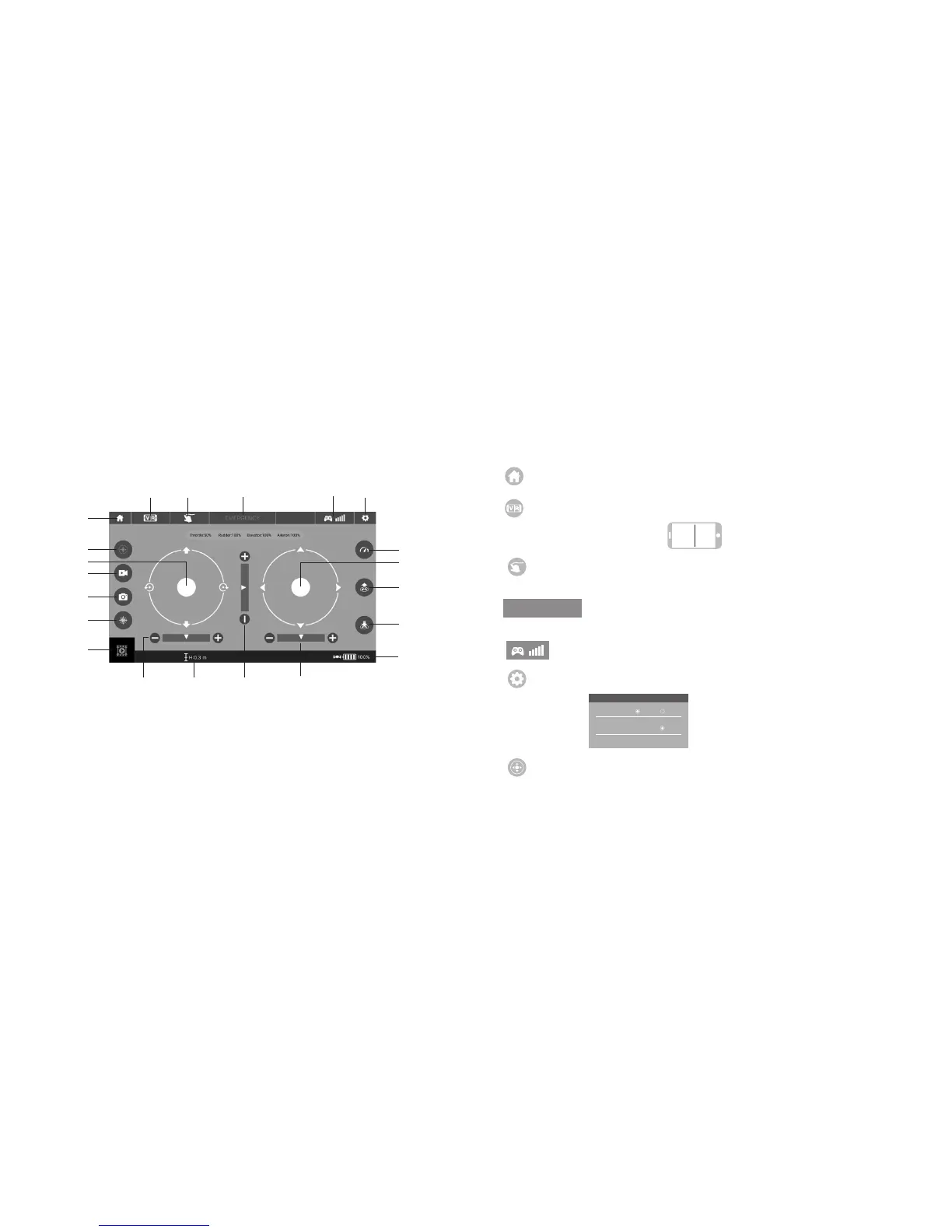
Virtual
Reality Mode
Record Video
Access Media
Speed Selection
Show/Hide Controls
Parameter
Settings
Take Off
Land
Forward/
Backward Trim
Direction
Throttle
Left/Right
Rudder Trim
Left/Right
Flying Trim
Custom Route
Brake Hard
Signal
Strength
Take Photo
Headless Mode
Flight Altitude
Drone Battery Level
Home Page Icon. Tap to go back to the Home Page.
Virtual Reality Mode. Tap to enter virtual reality mode to experience first person view (only
available when using a VR headset). Tap again to exit from virtual reality mode.
Brake Hard. The icon is red by default. Tap and the propellers will stop
immediately. The drone will fall straight to the ground. Do not use the Brake
Hard function except in an emergency.
Custom Route Mode. Tap and the icon turns red. Draw a flight route. The drone will fly according
to the flight route. Tap again to exit from Custom Route Mode. The icon turns white.
RL
EMERGENCY
SETTING
Trimming Save Reset
Transmission quality 480P
Signal Strength. This icon displays the drone's WiFi signal strength.
Tap this icon to set parameters. Tap again to exit.
Tap Save to save setting.
Tap Reset for factory reset.
Show/Hide Controls. The virtual remote controller is hidden by default. Tap the icon to
display the virtual remote controller.


 To Next Page
 Loading...