9
CHARGING THE DRONE'S BATTERY
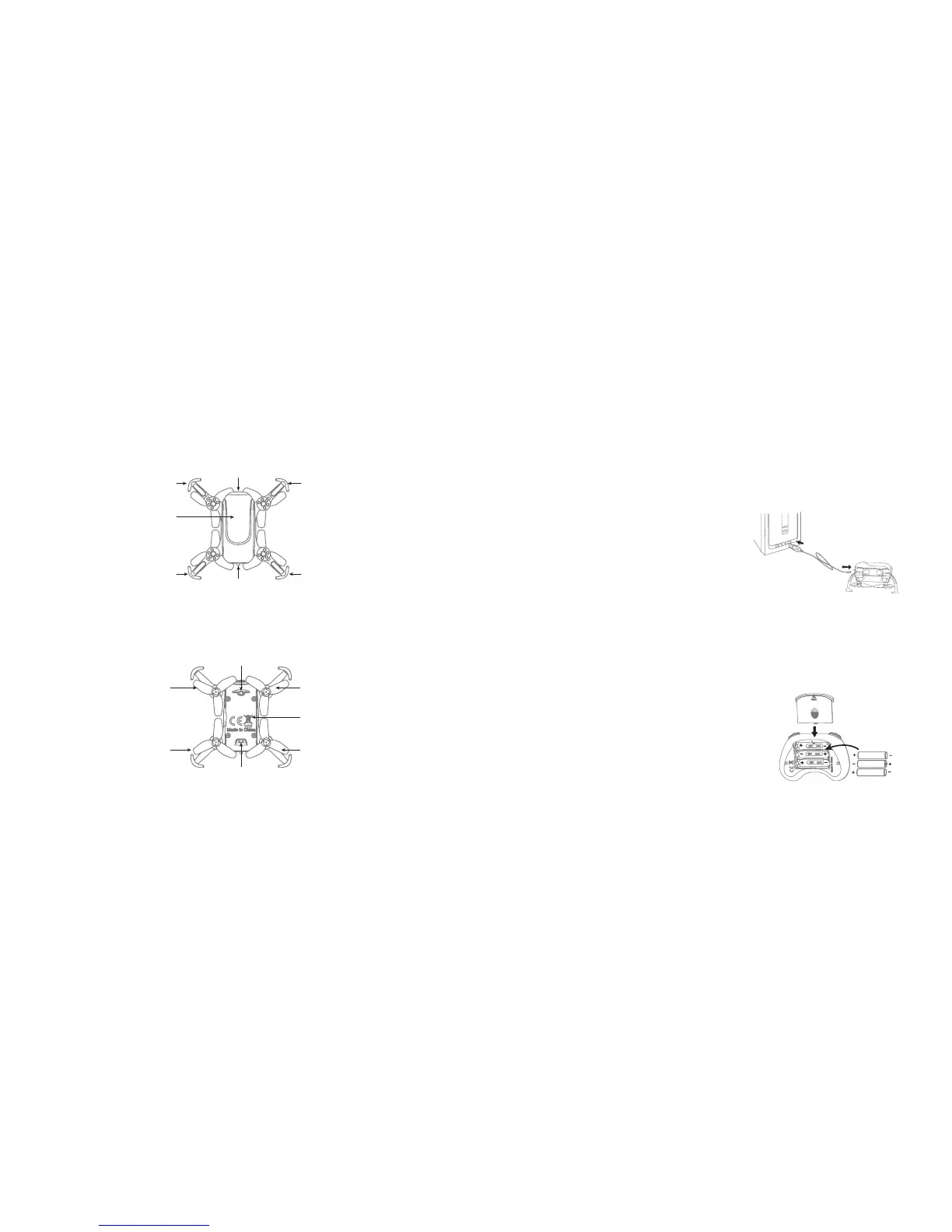
The Zoom Bee™ Drone includes a rechargeable Lithium-Polymer battery. Charge the
battery before first use.
To charge the drone's battery:
1. Ensure that the drone's power switch is in the
OFF position.
2. Insert the charging cable's connector into the
port on the rear of the drone.
3. Insert the charging cable's USB connector
into a USB port on an active device, such
as a computer, USB adapter, or power bank.
For fastest charging, us a device with 5V 2A
output current (not included).
4. The USB indicator is red while charging, and turns green when the drone is fully
charged.
INSERTING THE CONTROLLER BATTERIES
The controller uses 3 AAA batteries (included) which must
be inserted before first use.
To insert the controller's batteries:
1. Open the battery cover on the back side of the
controller.
2. Insert 3 AAA batteries, following the polarity indicators.
3X1.5V
Alkaline Bat
Battery Cover
8
Propeller Guard
Propeller Guard
Propeller Guard
Propeller Guard
Switch
Rear
RightLeft
Camera
Front
Drone Cover
Housing
B Propeller
A Propeller
Drone Bottom
Housing
A Propeller
B Propeller
Rear LED (Red)
Front LED (Green)
DRONE PARTS


 To Next Page
 Loading...