5
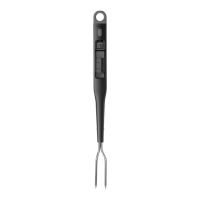
USING THE CHEF’S FORK
1. Remove protective covers from TEMPERATURE PROBES.
2. Press SELECT to turn the unit on.
3. Press SELECT repeatedly until your desired entrée illuminates: Beef,
Chicken, Hamburger, Pork, Fish, Turkey, Veal, Lamb or Baked Potato.
4. Insert the TEMPERATURE PROBES into the center of the thickest portion
of your entrée.
5. Hold the unit in position for 6-10 seconds for an accurate measurement.
Notes:
• Ensure the TEMPERATURE PROBES are inserted at least 1/2" deep into
the meat to give a more accurate temperature readout. Avoid touching
bone or heavy fat areas. Do not leave TEMPERATURE PROBES inserted
when the entrée is cooking.
• The unit turns off automatically after two minutes of inactivity.
• When powered on, the unit defaults to the entrée selected the last time
the unit was used.
• The color-changing LED alerts you to your food's progress.
Green: Just Started; Blue: Medium Rare; Purple: Medium; Red: Well Done/
Done; and Flashing Red: Over Cooked.


 To Next Page