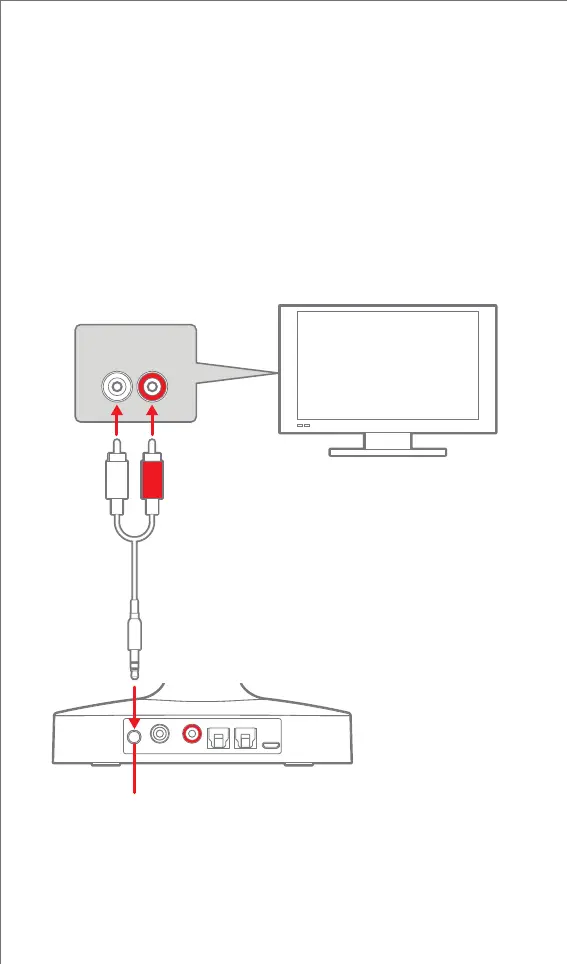
Using the RCA/3.5mm Audio Cable
1. Connect the white and red plugs of the supplied RCA/3.5mm
Audio Cable to the (L) and (R) audio out on your television's
connection panel.
Note: Ensure the cables are NOT plugged into the TV’s audio input.
2. Connect the 3.5mm stereo plug to the Charging Base's Stereo
In 3.5mm audio jack as shown below.
Note: You can also use a 3.5mm/3.5mm audio cable (not included)
to connect from a TV’s 3.5mm output to the Charging Base’s 3.5mm
stereo input.
CONNECTING THE CHARGING BASE TO A TV
L R
RCA/3.5mm Audio Cable
Stereo In
(3.5mm audio jack)
Charging Base
RCA AUDIO OUT
TV
6


 To Next Page