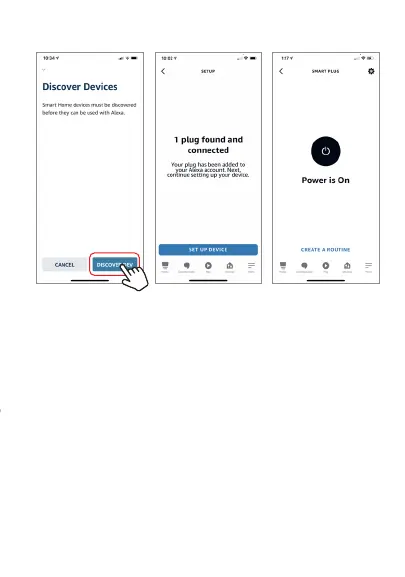
After Step E is done, you can now control the Smart Plug with
Alexa app from the devices page.
Step F. Now you are able to control the Smart Plug via
Amazon Alexa with your voice.
Try these commands and see what happens by
asking Alexa:
• Alexa, turn on “Smart Plug”
• Alexa, turn off “Smart Plug”
Note: The device name is the one you give to the
smart plug on “Brookstone Smart” app. Let’s name it
“Living Room”.
For example, now you can say:
• “Alexa, turn on the Living Room”,
• “Alexa, turn off the Living Room”, etc.
Any device you connect to the Brookstone Smart App
should automatically be added to Alexa. If it does not
add automatically, ask Alexa to discover devices.


 To Next Page