8
CHARGING THE DRONE'S BATTERY
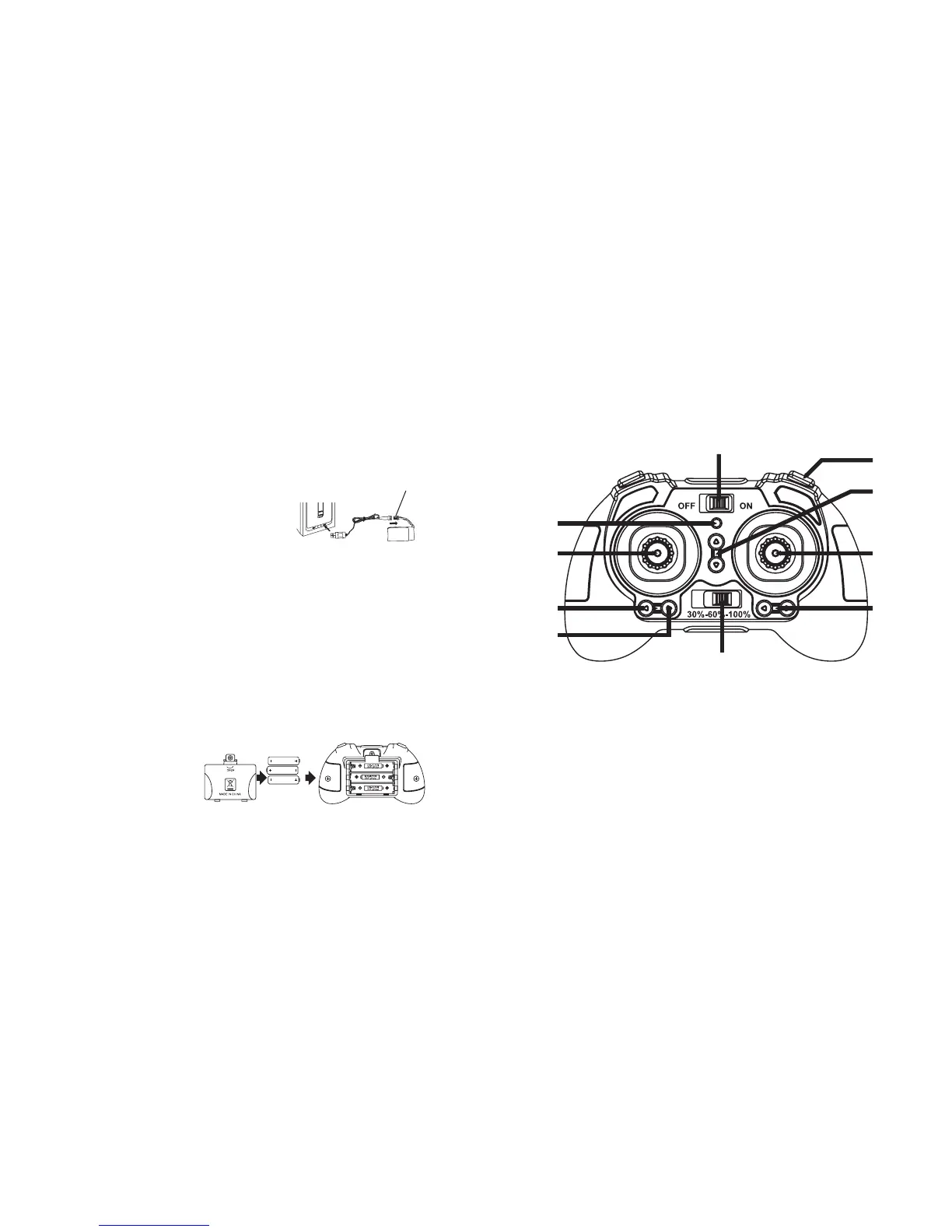
The Micro Hover Drone includes a rechargeable Lithium-Polymer battery. Charge the
battery before first use.
To charge the drone's battery:
1. Connect the charging cable to the Charging/
Power Connector on the battery. You
can charge the battery while it is in its
compartment on the underside of the drone,
or remove it from the drone before charging.
2. Insert the charging cable's USB connector into a USB port on an active device,
such as a computer, USB adapter, or power bank.
3. The Charging Indicator in the USB end of the charging cable is red while
charging, and turns off when the battery is fully charged.
INSERTING THE CONTROLLER BATTERIES
The controller uses 3 AAA batteries (included) which must be inserted before first
use.
To insert the controller's batteries:
1. Using a screwdriver, open the battery cover on the back of the controller.
2. Insert 3 AAA batteries,
following the polarity
indicators.
3. Replace the battery cover.
9
CONTROLLER
1. Power Switch
2. Power Indicator
3. Left Joystick
4. One Key Takeoff Button
5. One Key Landing Button
6. Speed Selector
7. Left/Right Trim Button
8. Right Joystick
9. Forward/Backward Trim Button
10. Headless Mode Button
1
10
9
8
7
6
5
4
3
2
Charging/Power
Connector


 To Next Page