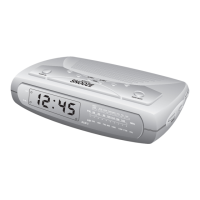
Checking The Wake-Up Times And Alarm Mode
Whenever you want to check the wake-up time or the alarm mode
settings, simply press either the ALM 1 or ALM 2 setting buttons. The
display will change from correct time to wake-up time and the day
indicators will show you the alarm mode which is currently selected.
Release the ALM 1 or ALM 2 setting buttons to return to correct time.
Listening To The Radio
1. Press the POWER ON/OFF button on the top panel. The display
will change from time to radio frequency. The first time you turn
your unit on, the display will show FM 87.5 MHz.
2. To switch between the FM and AM bands press the AM/FM
button. The first time you select the AM band the display will
show AM 520 KHz.
3. Tune to the desired station with the or buttons on the
top panel as follows:
• Manual Tuning
Repeatedly press either the or button until the display
shows the frequency of the desired station.
• Automatic Tuning
Depress and hold either the or button until the display
begins to move, then release the button. The tuner searches down
or up until it finds a strong signal and then stops on that station.
Repeat this process until the tuner stops on the desired station.
26
467522_INS_SmartSet CD Alarm 3/22/07 9:25 AM Page 27



 To Next Page