1
PCI-e Adapter
Installation
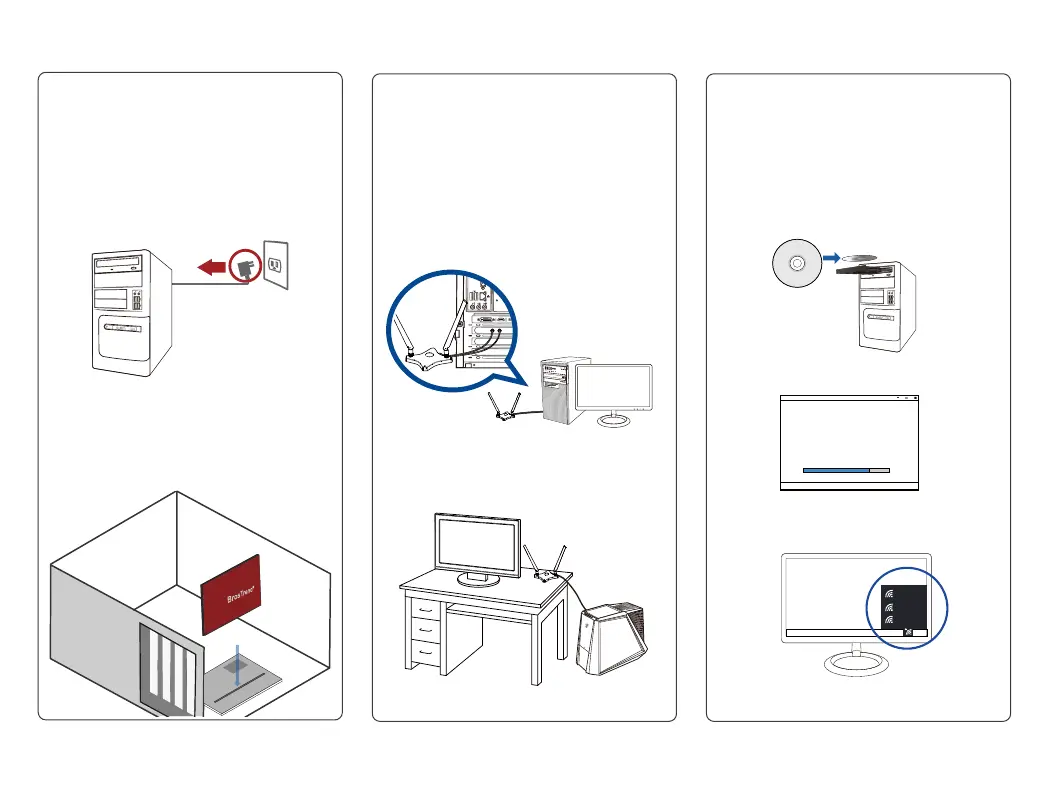
Insert the network adapter into
the PCI-E slot, ensuring that it
is completely seated on the slot.
Turn off your computer, unplug
the power cord, and open the
system cover.
3
Driver
Installation
When the setup is completed, you
can now connect to your Wi-Fi
network for Internet connection!
24/7 Technical Support email
address: support@brostrend.com
Double click Setup.exe to install
the driver.
InstallShield Wizard
2
Antennas
Installation
To install the antennas properly:
1. Install the antennas to the
antenna base.
2. Connect the antenna base with
AC6 network card
Adjust the magnetic antenna base
to get the best signal with your
router.
P 2
Turn on your computer. Insert the
support CD into the optical drive or
download the driver from:
www.brostrend.com



 To Next Page