13
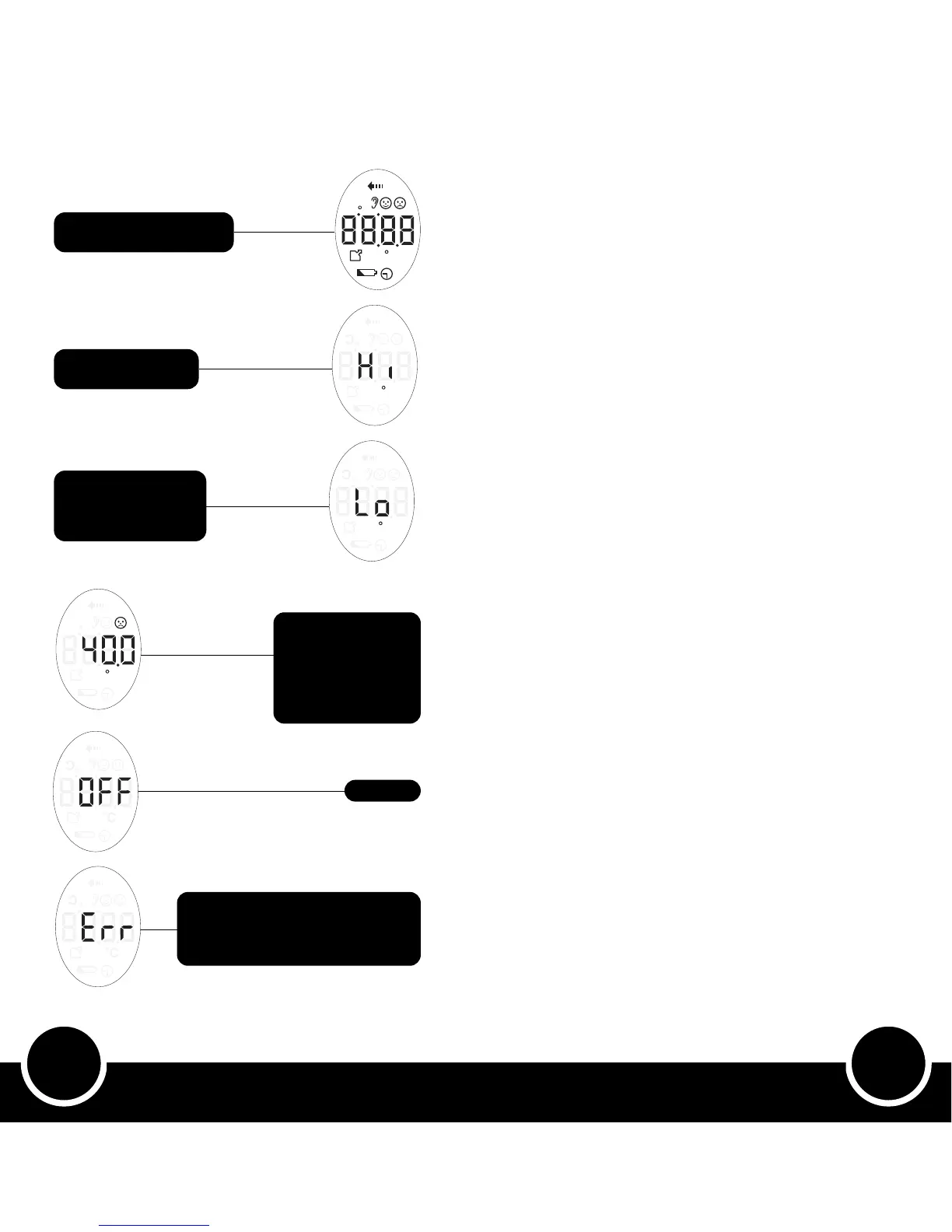
Screen Displays
How to Use the Thermometer
Our product is supplied with a battery. Before first use, pull to remove the tab
from the battery cover on the rear of the product.
1 Switching Thermometer ON:
• The thermometer can be switched ON in either temperature
modes – Forehead or Ear.
• Start by briefly pressing ‘On/ Take Temp’ button which turns
on the thermometer. All icons will display on the screen for 2
seconds followed by a short beep sound indicating that the
thermometer is now ready to use.
• Once ON, the screen displays the last ear or forehead
temperature taken. Briefly pressing the ‘On/ Take Temp’ button
now will measure ear or forehead temperature (assuming device
is the correct location).
2 Switching Thermometer OFF:
• Without any operation for 30 seconds i.e. left idle, the thermometer
will automatically turn OFF. This is a power-save feature.
3 Measuring Ear or Forehead Temperature:
• The thermometer is in either Ear or Forehead temperature
mode. The side switch will indicate which temperature mode it is
currently in and this will be confirmed on the LCD screen display.
• If it is in Ear mode but you want Forehead or vice versa, slide
the button up or down to switch between modes.
Measuring Ear Temperature:
• Place the probe gently in to the ear, briefly press the ‘On/ Take
Temp’ button and leave the probe in contact with the ear until a
beep sounds. Then remove the probe and read the temperature
on the screen.
Measuring Forehead Temperature:
• Place the probe gently on your left temple, press and KEEP pressed
the ‘On/ Take Temp’ button, move the probe across your forehead
to the right temple - always keeping the probe in contact with your
forehead - and then let go of the ‘On/ Take Temp’ button. Once
a beep sounds, remove the probe from your forehead to read the
temperature on the screen.
Note: Make sure you are in the correct mode before taking the temperature by
checking if the screen is displaying an Ear or Forehead icon.
It takes 1 second to read forehead temperature and 1 - 2 seconds to read ear
temperature.
4 Switching Between Ear and Forehead Temperature
Modes:
• Slide the ‘Ear/Forehead’ switch up to the Ear icon for Ear mode
or down to the Forehead icon for Forehead mode. The screen will
display an Ear or Forehead icon to indicate which temperature
mode it is in. It will also show the last temperature taken in that
mode.
5 Switching Between Celsius and Fahrenheit:
• The Celsius/Fahrenheit button can be found inside the battery
compartment. With the device turned on, briefly press C/F button
to convert between Celsius and Fahrenheit. The screen icon and
temperature will change and a beep will sound to confirm this
change.
Displays for 2 seconds when
thermometer is turned on
Te m pe ra t u re i s ab ove
maximum range
Probe not in contact
with ear or forehead,
or temperature is
below minimum range
When reading
child’s temperature,
if display shows
40ºC or 104ºF or
more, consult your
doctor immediately
Unit is off
If room temperature is higher than
40ºC or lower than 10ºC, the screen
will display ‘Err’ when you take either
ear or forehead temperature


 To Next Page