57
3
——————————————————————————————————————————————————————————————————————————————————————————————————————————————————————
Button sewing
Buttons can be sewn on with the sewing machine.
Buttons with 2 or with 4 holes can be attached.
a
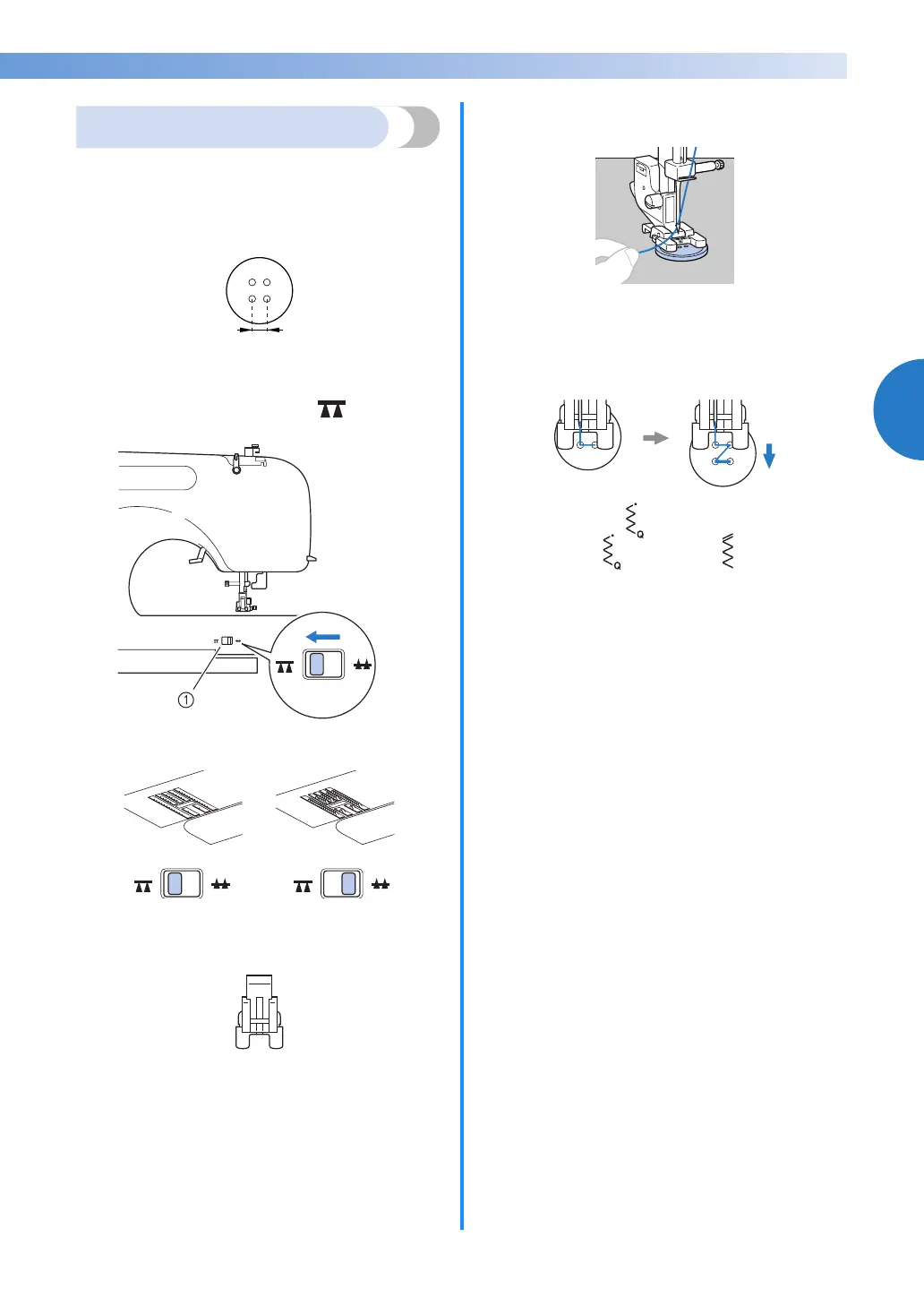
Measure the distance between the holes in the
button to be attached.
b
Raise the presser foot lever, and then slide the
feed dog position lever, located at the rear of
the machine on the base, to (to the right
as seen from the front of the machine).
a Feed dog position lever
(as seen from the rear of the machine)
X The feed dogs are lowered.
c
Attach presser foot “M”.
a Button fitting foot “M”
d
Place a button between the presser foot and
the fabric.
• When attaching four-hole buttons, first sew
the two holes closest to you. Then, slide the
button so that the needle goes into the two
holes toward the rear of the sewing machine,
and then sew them in the same way.
e
Select a stitch . (With models not provided
with stitch , select stitch .)
f
Adjust the stitch width so that it is the same as
the distance between the holes in the button.
g
Set the stitch length to the shortest setting by
pressing the stitch length adjustment key.
1



 To Next Page