EasyManua.ls Logo

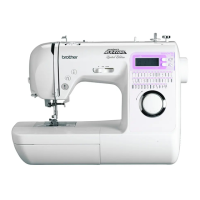
Brother Innov-is 40 - User Manual

Brother Innov-is 40
102 pages
Print Icon
To Next Page IconTo Next Page
Loading...
US_low_coverENPANTONE 285 Black
English
885-V12
XE2426-001
1
Printed in China
Operation Manual
Computerized Sewing Machine
GETTING READY
SEWING BASICS
UTILITY STITCHES
APPENDIX
885-V12
Operation Manual

Table of Contents

Other manuals for Brother Innov-is 40

Questions and Answers

  • A
    April SmithAug 15, 2025
    Why my Brother Sewing Machine does not operate?
    • C
      Colleen TurnerAug 15, 2025
      Here are a few things to check if your Brother Sewing Machine isn't turning on: * Make sure the power cord is plugged into a working electrical outlet. * Ensure the machine is turned on. * Verify the bobbin winder shaft is slid to the left, not the right. * Lower the presser foot lever. * Raise or pull down the buttonhole lever, depending on the selected stitch. * If the foot controller is connected, do not use the start/stop button; disconnect the foot controller to use the start/stop button.
  • A
    Ashley MartinezAug 18, 2025
    Why is my Brother Innov-is 40 Sewing Machine skipping stitches?
    • P
      pleeAug 18, 2025
      If your Brother Sewing Machine is skipping stitches, consider the following: * Make sure the upper thread is correctly installed. * Ensure you're using the right combination of fabric, thread, and needle. * Replace the needle if it's bent or blunt. * Verify the needle is correctly installed. * Clean any accumulated dust from under the needle plate or in the bobbin case.
  • D
    David HollandAug 21, 2025
    Why is the fabric not feeding through my Brother Innov-is 40?
    • R
      russoangelaAug 21, 2025
      If your Brother Sewing Machine isn't feeding fabric, here's what to check: * Ensure the feed dogs are raised. * Lengthen the stitch length if it's too short. * Use the correct combination of fabric, thread, and needle. * Remove any tangled thread from the bobbin case and clean the race.
  • K
    kathleen25Aug 25, 2025
    What to do if the thread does not pass through the eye of the needle of my Brother Innov-is 40 Sewing Machine?
    • S
      Steven VanceAug 25, 2025
      If the thread isn't passing through the eye of the needle on your Brother Sewing Machine: * Raise the needle by pressing the needle position button once or twice. * Make sure the needle is correctly installed.
  • R
    Rodney BennettAug 27, 2025
    Why does the needle keep breaking on my Brother Innov-is 40 Sewing Machine?
    • T
      timothyfisherAug 28, 2025
      If the needle on your Brother Sewing Machine is breaking, consider these potential causes: * The needle might be incorrectly installed; make sure it's properly installed. * A loose needle clamp screw can cause breakage; tighten it firmly with a screwdriver. * A bent or blunt needle should be replaced with a new one. * Ensure you're using the correct combination of fabric, thread, and needle. * Use the appropriate presser foot for the stitch you're using. * If the upper thread tension is too tight, loosen it. * Avoid pulling the fabric too much; guide it lightly. * Using a bobbin not specifically designed for your machine can cause issues; use only the correct bobbin.
  • D
    Daniel SummersAug 30, 2025
    Why is the upper thread breaking on my Brother Innov-is 40 Sewing Machine?
    • J
      Jennifer ColeAug 30, 2025
      If the upper thread keeps breaking on your Brother Sewing Machine, check the following: * Ensure the upper thread is correctly threaded, with the spool properly installed and the thread correctly placed in the needle bar thread guide. * Remove any knots or tangles in the thread. * Use a needle appropriate for the thread you're using. * Loosen the upper thread tension if it's too tight. * Remove any thread tangled in the bobbin case and clean the race. * Replace a bent or blunt needle with a new one. * Make sure the needle is correctly installed. * Use only a bobbin designed specifically for your machine.
  • C
    cochranpaulSep 2, 2025
    Why is my Brother Innov-is 40 making a rattling noise?
    • J
      Jamie RhodesSep 2, 2025
      If your Brother Sewing Machine is making a high-pitched or rattling noise, try the following: * Clean the bobbin case. * Ensure the upper thread is correctly installed. * Use a bobbin designed specifically for this machine.
  • R
    Randy HutchinsonSep 5, 2025
    What to do if the lower thread is tangled in my Brother Innov-is 40 Sewing Machine?
    • S
      Samantha SmithSep 6, 2025
      If the lower thread on your Brother Sewing Machine is tangling or breaking, check these potential causes: * Ensure the bobbin thread is correctly installed and wound. * Replace the bobbin if it's scratched or doesn't rotate properly. * Remove any tangled thread and clean the race. * Make sure you are using a bobbin specifically designed for your machine.
  • K
    Kyle FaulknerSep 8, 2025
    Why is the fabric puckered when I sew with my Brother Innov-is 40?
    • J
      Jason BranchSep 8, 2025
      If the fabric is puckering while using your Brother Sewing Machine, consider the following: * Ensure both the upper and bobbin threads are correctly installed. * Make sure the spool is correctly installed. * Use the appropriate combination of fabric, thread, and needle. * Replace the needle if it's bent or blunt. * If sewing thin fabrics, use stabilizer material under the fabric. * Adjust the thread tension.
  • L
    lduncanSep 12, 2025
    What to do if the stitch is not sewn correctly on my Brother Sewing Machine?
    • A
      Alexandra SheltonSep 12, 2025
      If the stitch isn't being sewn correctly by your Brother Sewing Machine: * Attach the appropriate presser foot for the stitch you want to sew. * Adjust the thread tension. * Remove any tangled thread from the bobbin case and clean the race.

Summary

Important Safety Instructions

Introduction

Names of Machine Parts and Their Functions

Identifies and explains the various parts of the sewing machine.

Getting Ready

Turning the Machine On;Off

Instructions for powering the sewing machine on and off.

Preparing for Upper and Lower Threading

Detailed steps for winding and installing the bobbin and threading the needle.

Replacing the Needle

Guidelines and procedures for safely replacing the sewing machine needle.

Replacing the Presser Foot

Steps for removing and attaching different presser feet.

Using the twin needle

Instructions for setting up and using a twin needle for parallel stitching.

Sewing Basics

Starting to Sew

Overview of the basic sewing procedure and precautions.

Selecting a stitch

How to choose and set different stitch patterns on the machine.

Adjusting the stitch length and width

Guide to modifying stitch length and width for desired results.

Securing the stitching

Techniques for reinforcing stitches at the beginning and end of seams.

Adjusting the thread tension

How to balance upper and bobbin thread tension for optimal stitching.

Utility Stitches

Overcasting

Instructions for sewing overcasting stitches to prevent fabric fraying.

Basic Stitching

Details on using straight stitches for plain seams and other applications.

Blind Hem Stitching

Procedures for creating blind hems on skirts and pants.

Buttonhole Stitching

How to sew various types of buttonholes with different fabrics.

Zipper Insertion

Step-by-step guide for inserting centered and side zippers.

Appendix

Stitch settings

Table listing stitch names, patterns, and recommended settings.

Maintenance

Instructions for cleaning and maintaining the sewing machine.

Removing the needle plate

Steps to remove the needle plate for cleaning or thread removal.

Troubleshooting

Error messages

Explains error codes displayed on the LCD and their causes/solutions.

Operation beep

Information on machine beeps and how to disable them.

Brother Innov-is 40 Specifications

General IconGeneral
TypeComputerized Sewing Machine
Stitch Options40
Buttonhole Styles5
DisplayLCD
Foot ControlYes
Sewing Speed850 stitches per minute
Needle ThreaderAutomatic
Feed SystemDrop Feed
Stitch Width7 mm
Stitch Length5 mm
LCD ScreenYes
Built-in MemoryNo
USB PortNo
Presser Feet7
Warranty3 years

Related product manuals