REAR PANEL
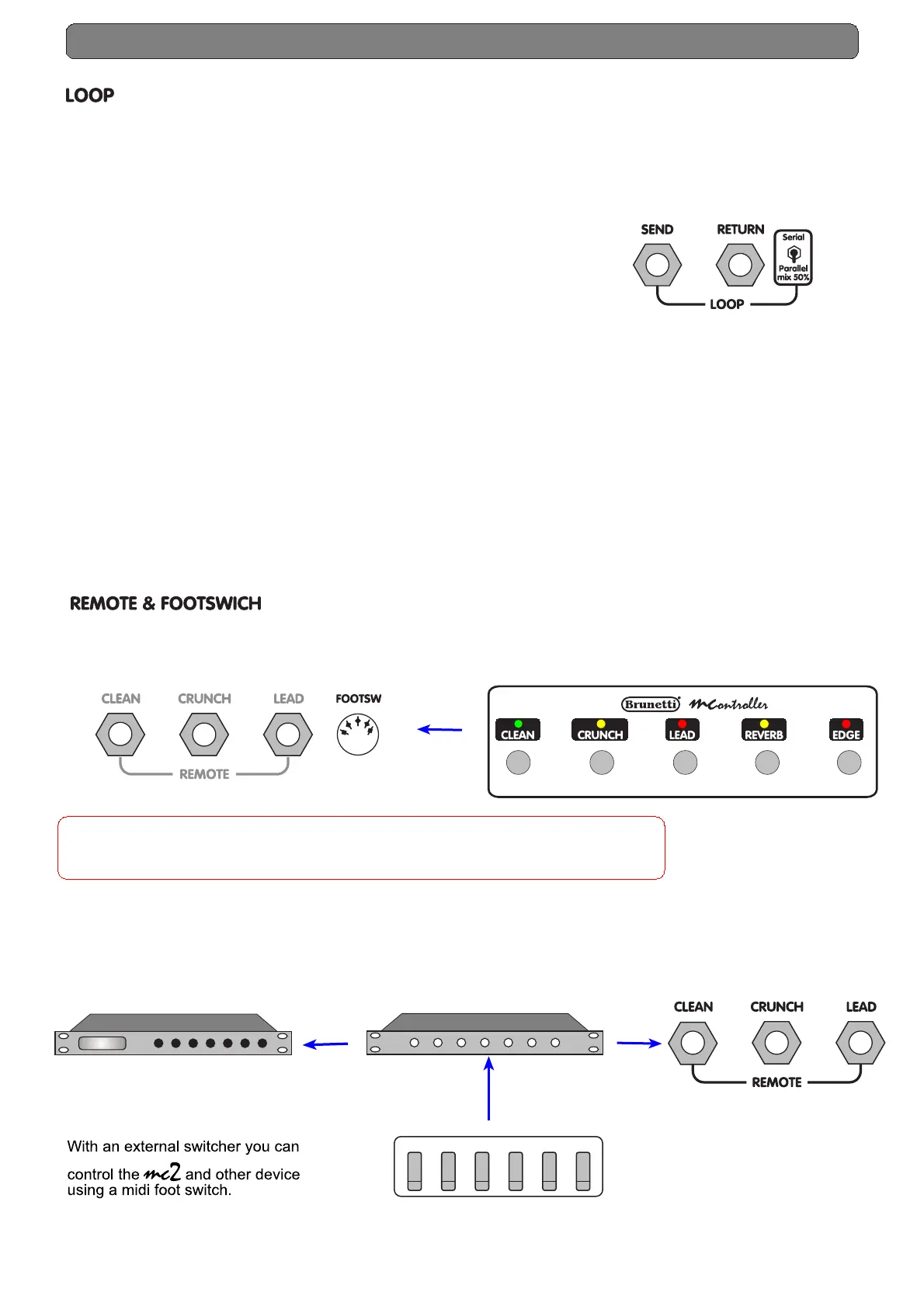
On the rear panel there is a Loop section that allows you to mix the original sound of the combo with
your effect, at 50%.
The Send has been studied to serve stomp efx and rack efx, to obtain always the maximum sound result.
The Send level depends by the volume control level of the two channels.
MIX control settings :
- parallel loop (50%). Set the switch on Parallel mix 50% position.
- serial loop. Set the switch on Serial position (100%).
- three jack input, used as remote switch.
MIDI OUT
MIDI THRU
Effects
MIDI IN
MIDI IN
Switcher
A/B 1 2 3 4 5
Midi Footswitch
- foot pedal supplied with the amplifier.
Warning!
FOOT socket is for the supplied MC2 footswitch only! . Using other footswitch
(i.e. midi footswitch) the Remote system can be damaged.
FOOT PEDAL EFFECTS (Stomp efx)
To achieve the maximum sound result we suggest
that you insert in the loop only modulation effects
(i.e. chorus, flanger, delay, reverb etc.)
Set the switch on Serial position (serial mode),
in this way the signal will be completely processed
by the effect. On the pedal modulation effects usually
there's a Level control, adjust it as per the effect
quantity you desire.
RACK EFFECTS (Rack efx)
We suggest that you set on zero "0" the Direct (Dry) on
your effect and set the switch on Parallel mix 50% position.
In this way you have the mix at 50% between
the original sound of the head and your effect (Wet).
Channel switching, can be controled by :
ATTENTION!!
If you don't use effects set the switch on ''Parallel mix 50%'' position.
In Serial position there's no sound


 To Next Page