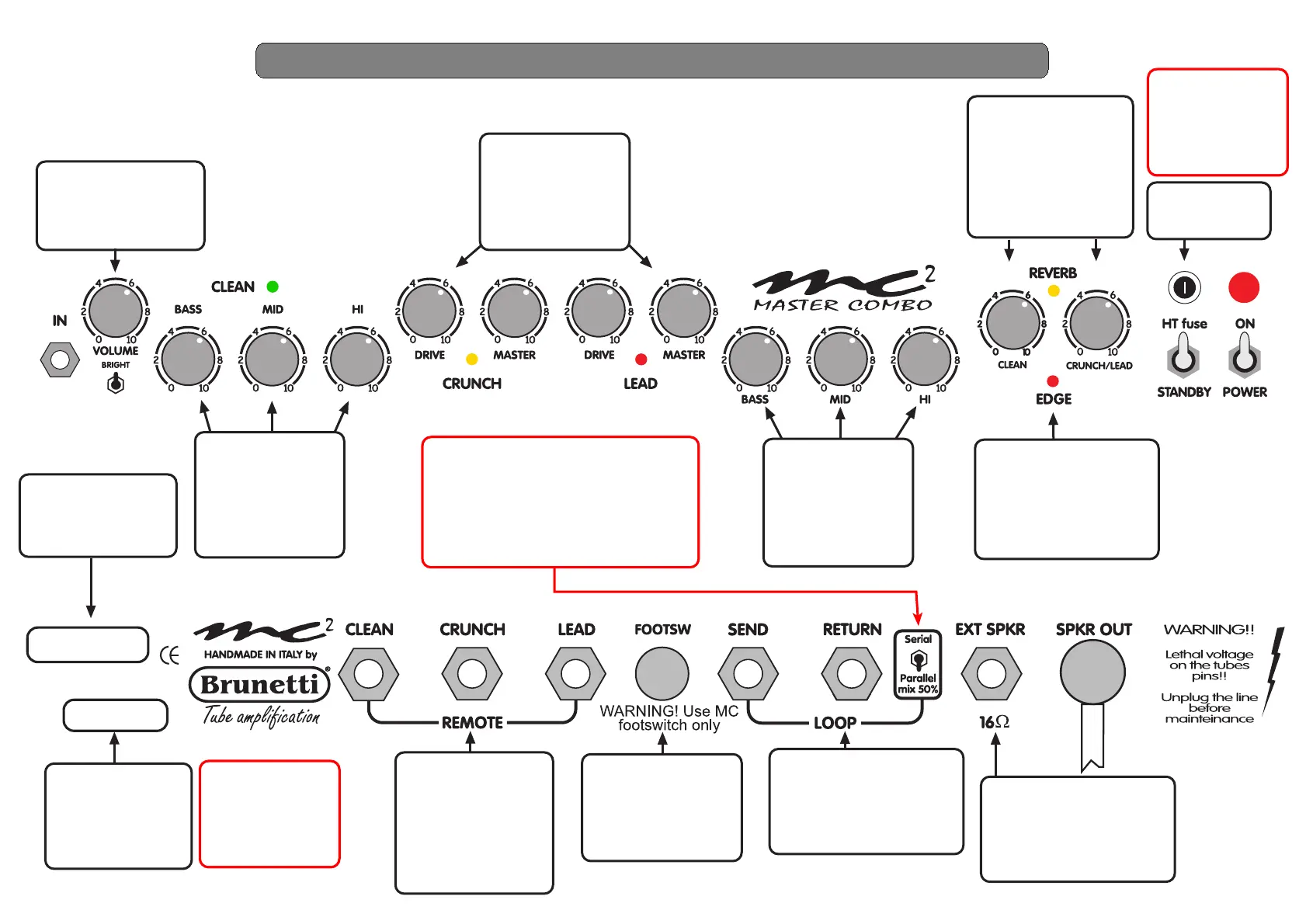
This knob controls the
VOLUME of the
CLEAN channel.The
BRIGHT switch delivers
a brighter sound.
These knobs control
the equalization of
the CLEAN sound.
Each knob is like a
volume in its band.
On 0 position there
is no sound.
These knobs control
the equalization of
the drive sounds.
Each knob is like a
volume in its band.
On 0 position there
is no sound.
The DRIVE knobs
control the Gain
quantity of the
CRUNCH and
LEAD channels.
MASTER knobs set
the volume.
The REV knobs
control the level of
reverb for the CEAN
or CRUNCH/LEAD
channels.
The yellow led
shows the function
is on.
The red led shows the
EDGE function is on. This
special function able to
change the harmonic ratio
of the sound. You can add
it to all the channels.
With these mono
jacks you can control
the channel switching
in case of breakdown
of your footswitch.
The REV and EDGE
funtcions are not
controlled.
Warning! Use this
outlet only with the
supplied footswitch.
Other systems can
cause damages to
MC2.
The effect loop can
accept signals from rack
processors with -10db
level.You can choose the
option you prefer
(serial/parallel).
HT Fuse
Type: SB500mA
EXT SPKR allows you to
use an external speaker
together to the internal
one. Pay attention to set
the right impedance.
Line voltage value,
power fuse value,
serial number and
production date,
are printed on
the label.
FRONT PANEL - CONTROLS
Empty area reserved
to the head's owner
(i.e. You can
write your name)
ATTENTION!!
To replace the
HT fuse use a
SB (slow blow)
type with the
same value.
ATTENTION!!
To replace the
power fuse use a
SB (slow blow)
type with the
same value.
ATTENTION!!
If you don't use effects
set the switch
on ''Parallel mix%' position,
in Serial position there's no sound


 To Next Page