5
A — Green = Data A
B — Yellow = Data B
C — White = 24VAC (Com)
D — Red = 24VAC (Hot)
NOTE: It is not mandatory that the above color code be used, but
each ABCD connection in the system MUST be wired consistently.
A separate ABCD Connector comes inside packaging and should
be used when connecting to furnace (or fan coil). Ensure connector
is inserted properly into circuit board. (See Fig. 11.)
ABCD
A03193
Fig. 11 -- Wire ABCD Connector
ELECTRICAL OPERATION HAZARD
Failure to follow this caution may result in equipment damage
or improper operation.
Improper wiring of the ABCD connector will cause the
Evolution Zone System to operate improperly. Check to make
sure all wiring is correct before proceeding with installation or
turning on power.
CAUTION
!
9. Push any excess wire into the wall. Seal hole in wall to pre-
vent any air leaks. Leaks can affect operation.
10. Attach Evolution Zone Control to the mounting plastic by
lining up the plastic guides on the back of the control with
the opening on the mounting plastic and push on.
11. Perform installation of all other system equipment (i.e.
dampers, humidifier, ventilator, UV lights, etc.).
12. Turn on power to equipment.
See wiring diagrams Fig. 8, 9, and 10 for connecting the Evolution
Zone Control and Smart Sensors to the Damper Control Module.
More information regarding Damper Control set--up and wiring
can be found in Damper Control Module Installation Instructions.
See wiring diagram, Fig. 8, which includes an indoor
communicating furnace or FE fan coil, with a 2-- stage Puronr
refrigerant communicating outdoor unit. No additional OAT
(outdoor air temperature) sensor is required because the Evolution
Zone Control will use the temperature sensor inside the outdoor
unit.
In a hybrid heat installation with a non --communicating heat pump,
an OAT sensor must be installed or the heat pump will not run.
See wiring diagram, Fig. 9, for connecting an indoor
communicating furnace or FE fan coil with a 1 --stage air
conditioning unit (non--communicating outdoor). An Outdoor Air
Temperature (OAT) sensor may be installed (but is not required) at
the indoor furnace or fan coil OAT terminals. When OAT sensor is
applied, the Evolution System will provide enhanced system
features and benefits.
See wiring diagram Fig. 10 for connecting an FE fan coil with a
1--stage heat pump (non--communicating outdoor unit). When
OAT is applied, the Evolution System will provide enhanced
system features and benefits.
NOTE: For other applications not listed, refer to the Network
Interface Module (NIM) Installation Instructions.
Humidifier Connection
A 24VAC bypass or fan powered humidifier may be installed.
NOTE: Do No t Use a traditional humidistat to control humidifier
operation. If a humidifier is installed, let the Evolution Zone
Control operate humidifier.
Bypass Humidifiers
A bypass humidifier should be wired directly to the furnace or fan
coil HUM and 24VAC COM terminals. The Evolution Zone
Control will automatically energize the HUM output during a call
for humidification.
Fan Powered Humidifiers
Most fan powered humidifiers produce internal 24VAC in order to
energize upon a switch or contact closure. For this application, a
24VAC N.O. Isolation Relay (DPST) MUST be used to prevent
mixing the internal humidifier power with the indoor equipment
transformer. Applying 24VAC isolation relay coil to furnace or fan
coil HUM and COM terminals will allow the Evolution Zone
Control to automatically energize the HUM output during a call for
humidification. The N.O. relay contacts will be used to energize the
humidifier. See fan powered humidifier installation instructions for
more details.
EQUIPMENT HAZARD
Failure to follow this caution may result in equipment damage.
Do not apply 24VAC fan powered humidifier (with internal
power supply) direct to indoor unit HUM and COM terminals.
CAUTION
!
INITIAL POWER--UP
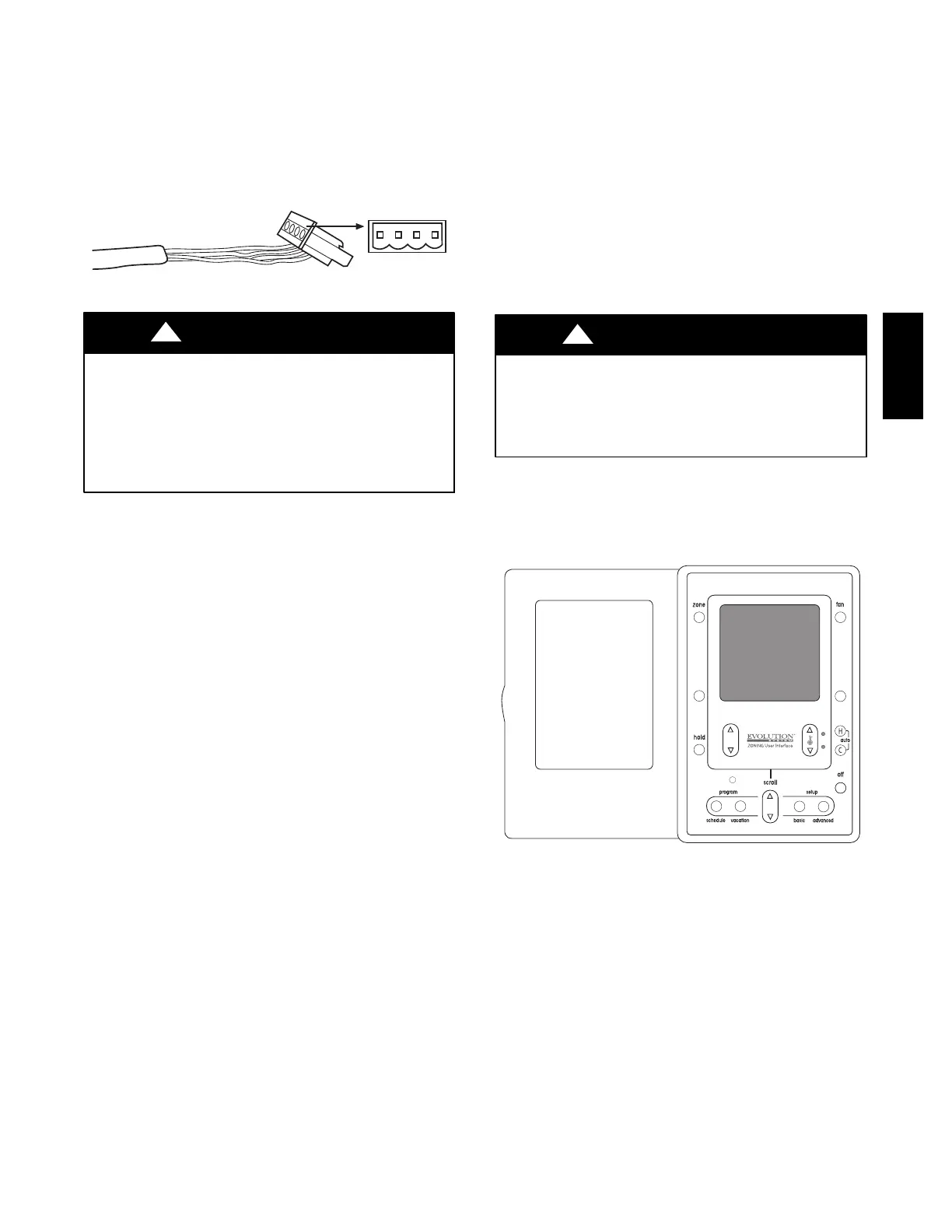
NOTE: Refer to Functional Overview (Fig. 12) to become
familiar with key function buttons such as “System On/Of f”,
“Zone”, “Fan”, “Left--Side” and “Right--Side” buttons, etc. These
function buttons will be used frequently during setup.
A09482
Fig. 12 -- Functional Overview
Power Up Sequence
This section addresses initial power up (or commissioning) of a
new Evolution Zone Control. The User Interface will communicate
and identify all Evolution components in the system. The
following is a typical example for a communicating
Variable--Speed Furnace / Fan Coil with a 2--stage Air Conditioner
/ Heat Pump (including Hybrid Heat).
The User Interface display will light up and indicate that it is now
“ESTABLISHING COMMUNICATIONS WITH EQUIPMENT
PLEASE WAIT”. The User Interface will automatically continue
by “SEARCHING FOR EQUIPMENT”, followed by
“SEARCHING FOR OUTDOOR EQUIPMENT” (See Fig. 13).
Once the indoor and outdoor equipment has been found, the
Installer will be asked to select Accessories. Packaged Products
will be automatically identified and the Installer will be asked to
select Accessories. Proceed to Selecting Accessories.
UIZ01-- D


 To Next Page
 Loading...