REAR PANEL CONNECTIONS
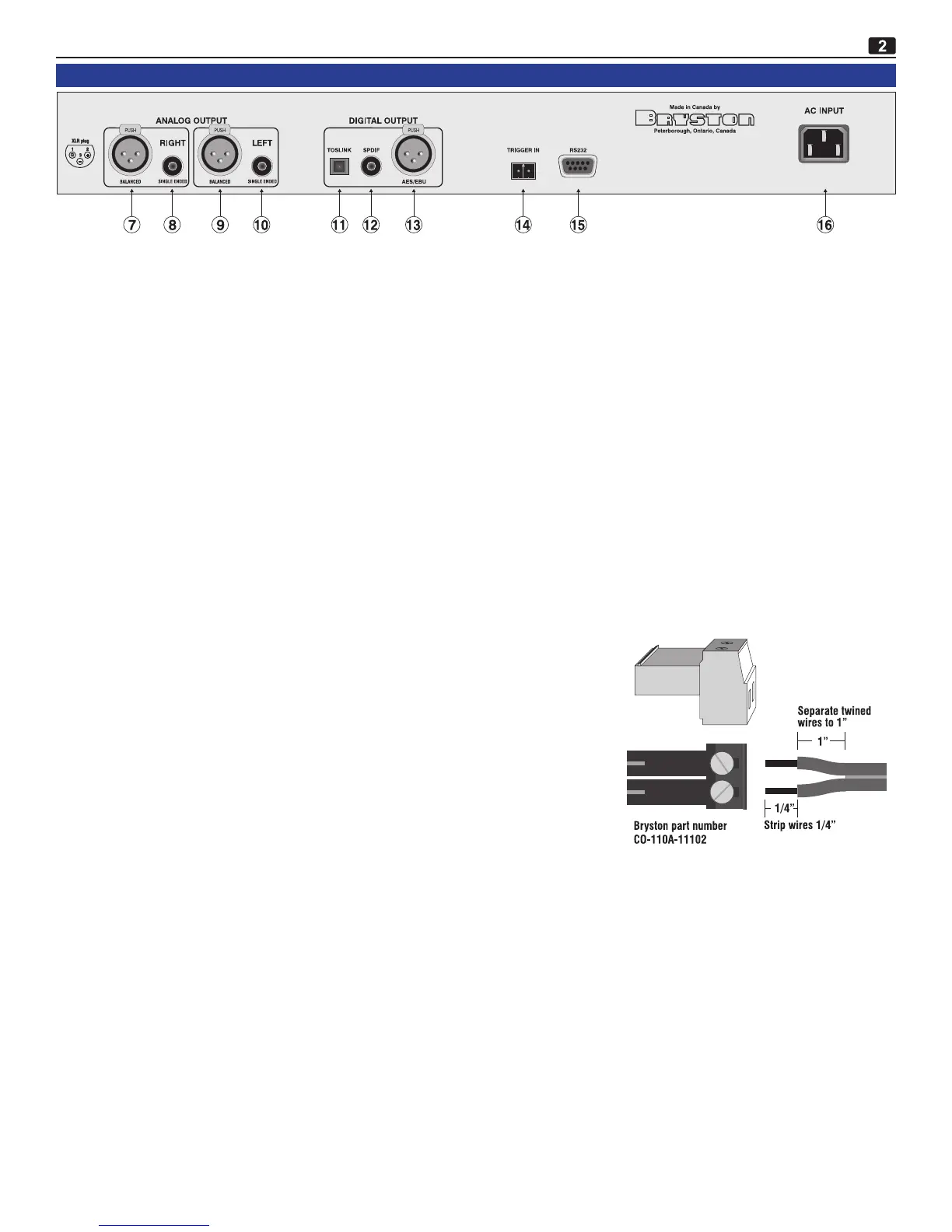
7/9: BALANCED OUTPUT CONNECTORS
TheBCD-1issuppliedwithonepairofgoldplated3pinmaleXLRjacks(pin1isground,pin2ispositive&pin3isnega-
tive)whicharedrivenbyfullydiscreteactiveampliercircuitryprovidingabufferedbalancedoutputsignal.
8/10: SINGLE-ENDED OUTPUT CONNECTORS
TheBCD-1issuppliedwithonepairofgoldplatedRCA(phono)jacksprovidingabuffered,singleendedoutputsignaldriven
byfullydiscreteamplierstages.
11: TOSLINK opticalconnectorprovidingfullyisolateddigitalbitstreamoutputconformingtoEIAJopticalinterfacestandard.
12: SPDIF (Sony/PhilipsDigitalInterFace)digitalbitstreamoutputconnector(goldplatedRCAorphonojack)
13: AES/EBU digitalbitstreamoutputconnector(goldplated3pinmaleXLRjack)conformingtoAES3standard.
14: TRIGGER IN socket.ThistwopinsocketmateswiththeCO110A-11102bare-wireterminalblockconnectorsupplied
withyourBCD-1.SupplyingaDCcontrolvoltagebetween3and12volts(atgreaterthanorequaltoapproximately3mA)
willallowyoutoremotelypoweryourBCD-1onoroff.WhentheExternal Triggeroperationisenabledthepresenceofan
appropriatecontrolvoltagewillcausetheBCD-1tobepoweredup.WithdrawingthecontrolvoltagewillturntheBCD-1off
(i.e.itwillreturntostandbymode).
ToenabletheExternal Trigger operation:
1st: PlacetheBCD-1instandby.ThePOWERbuttononeitherthefrontpaneloftheBCD-1orontheremotecontrolcan
beusedtodothis.TheLEDonthefrontpanel,abovethePOWERbutton,willlightredwhentheunitisinstandby
mode
2nd: Ontheremotecontrol,pressCODEmomentarily.TheredLEDonthe
remotecontrolwilllight.
3rd: WhiletheredLEDisstilllit,press2 4 1ontheremotecontrol.When
enteredcorrectlytheredLEDwillashtwiceandthenextinguish.The
alpha-numericdisplayonthefrontoftheBCD-1willdisplayoneoftwo
messages.IFtheExternal Triggeroperationhasbeeninvokedthedisplay
willread“ExtTriggerEntered”.IftheunitwasalreadyinExternal Trig-
germode,thedisplaywillread“ExtTriggerDisabled”indicatingthat
theBCD-1isnolongerinExternalTriggermodeandthatthefrontpanel
andremotecontrolPOWERbuttonswillnowoperateagainandthatthe
TriggerInconnectorhasbeendeactivated.Besuretopointtheremote
controlattheBCD-1whiledoingthisandensurethatthereislineof
sight.
4th: TotoggletheExternal Triggermodeonoroffjustrepeatsteps1through3above.IftheunitisinExternalTrigger
mode,removetheDCcontrolvoltagetoplacetheunitinstandbymodebeforebeginning.
15: RS232 port. ForuploadingnewsoftwareintotheBCD-1.ConnectstoanRS232serialportonacomputercapableofrun-
ningaWindowsexecutableprogram.
BRYSTON BCD-1 CD PLAYER FIRMWARE UPDATES
BCD-1rmwareupdateswillperiodicallybeavailablefromBrystondealersorfromBrystonLtd.directly.Thesermware
updateswillbesuppliedasanexecutablele(program)which,whenexecutedonyourPC,willsearchforavailableserial
portsonyourcomputerandthensearchfortheBCD-1CDplayerbeforeuploadingandautomaticallyinstallingthenew
rmwareinyourBCD-1.
1) IftheBCD-1isON,placeitinstandbybypressingthePOWERbuttoneitheronthefrontpanelorontheremotecon-
trol.WhentheLEDabovethePOWERbuttonlightsred,theBCD-1isinstandby.
2) ConnectasuitableRS232cablebetweenyourPC(sorry,butMAC’sarenotsupportedatthistime)andtheBCD-1.In
mostcases(dependingonyourcomputer)thiscablewillbeaDB9-maletoDB9-femalestraightthroughcable.
3) IFyourcomputerdoesnotcontainanRS232serialport,butdoescontainaUSBport,therearemodestlypricedUSBto
RS232serialportadaptorsavailable.
BCD-1 CD PLAYER


 To Next Page