6!
%
%
3.%Installation%
!
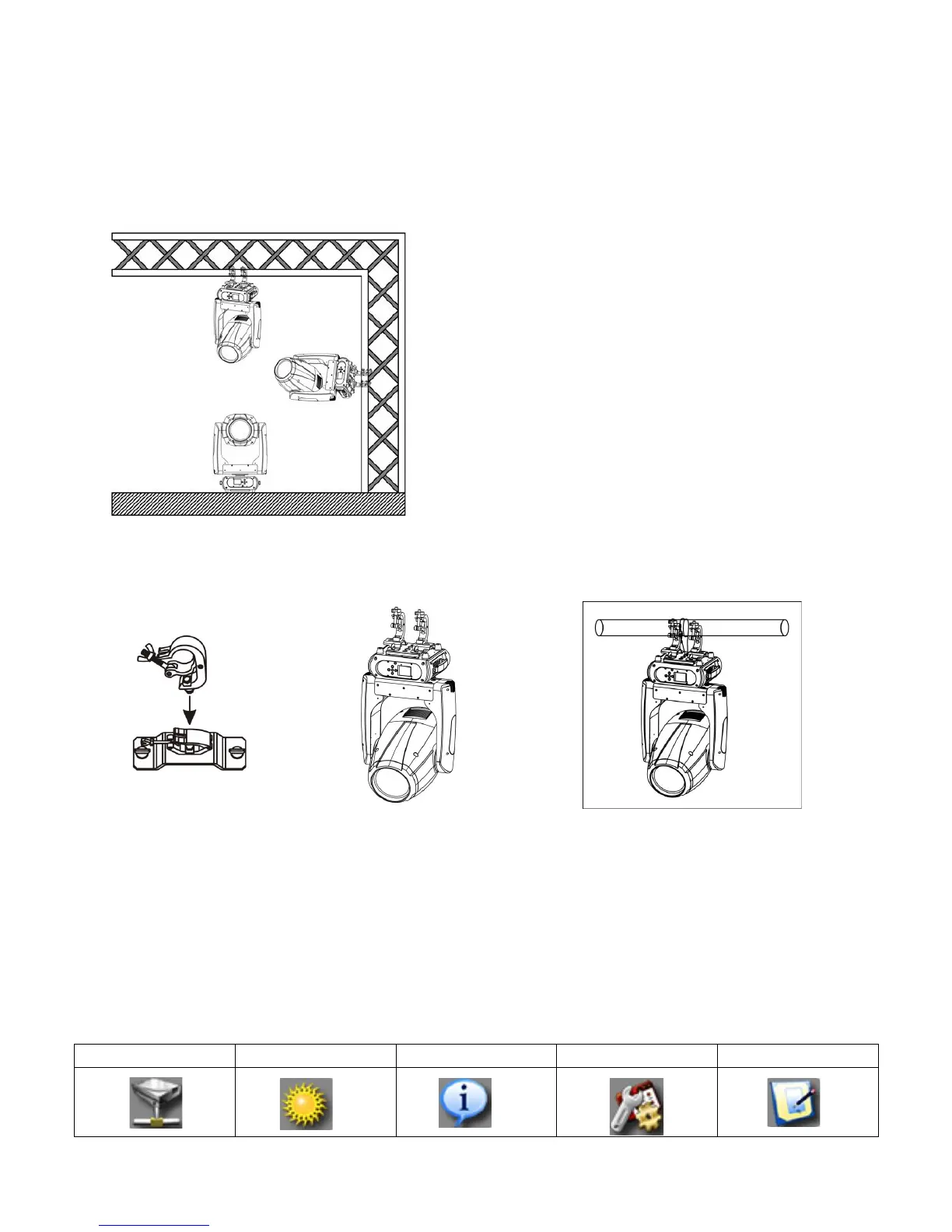
3.1!The!device!could!be!either!put!on!a!solid!and!
even!Surface,!or!mounted!upside!down!or!sideways!
like!left!picture.!
!!!!!!!!!!!!!!!!!!!!!!!!!!!!!!!!!!!!!!!!!!!!!!!!!!!!!!!!3.2!The!mounting!place!must!be!sufficient!stable!
and!be!able!to!support!a!weight!of!10!times!of!the!
unit’s!weight.!When!the!fixture!is!hanged,!always!
additionally!secure!the! device!with!the!safety!chain,!
fasten!the!safety !rope !at!a!su itab le!position!so!that!
the!maximum!fall!of!the!projector!will!be!20!cm!
3.3!How!to!do!mounting!installation.!
!
Step!one:!Installation!th e!clam p !on to!th e!om e ga!b rack et;!
Step!two:!Install!the!clamp!and!bracket!on!the!bottom!of!panel,!fasten!the!quick-locks;!
Step!three:!Install!the!whole!device!onto!appropriate!truss!and!fasten!the!clamps,!tight!the!safe t y!r o p e !with!the!t ru s s!or!
other!fixing!point!at!a!suitable!position!that!drop!down!distance!not!exceed!20!cm.!
!
4.%Control%menu%
!
4.1!Meaning!of!the!icon!in!menu!


 To Next Page