8
Functions
Read DTC
• Connect PPC
®
Diagnostic System to the car and turn ignition on.
• When ”Read DTC?” is showed, press Enter.
• Choose year model with the menu button (1999-2004 or 2005 and forw.), press Enter.
Now PPC
®
automatically starts searching through all control units of the car, one at a
time. When a DTC is found it is showed in the display. Press Enter to continue the sear-
ching.
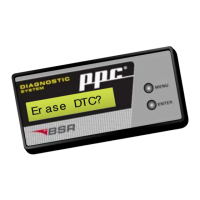
Erase DTC
• Connect PPC
®
Diagnostic System to the car and turn ignition on.
• Browse to ”Erase DTC?” with the menu button, then press Enter.
• Choose year model with the menu button (1999-2004 or 2005 and forw.), press Enter.
• The message ”Erasing DTC...” shows that PPC
®
is erasing the DTCs of the car.
PPC
®
erases a limited amount of DTCs at a time. By large amounts of DTCs, it might be
necessary to repeat the erasing procedure to get all DTCs erased.
Reset SRL
• Connect PPC
®
Diagnostic System to the car and turn ignition on.
• Browse to ”Reset SRL?” with the menu button, then press Enter.
• Choose year model with the menu button (1999-2004 or 2005 and forw.), press Enter.
• The message ”SRL Reset...” shows that the service indicator is reset.
”SRL” means Service Reminder Lamp, also known as Service Reminder Indicator, SRI.


 To Next Page