©Copyright LOTRONIC 2017 PH-12BT / PH-15BT 3
• MIC & Line inputs
• 3x individual volume controls for mic, MP3 player & Line input
• Output to an external amplifier or mixer
• Output to a passive speaker
• Heavy-duty cabinet for better basses
• Built-in class H amplifier 250+50W
OPERATION
• Prior to switching the unit on, turn the volume down to minimum.
• Connect your audio source to the appropriate input socket.
• Connect the unit to the mains supply.
• Switch on the audio source first, followed by the active speaker.
• Set the volume with the applicable control.
• Adjust the bass & treble.
CONTROLS AND CONNECTIONS
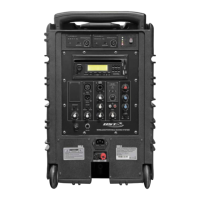
1. MP3 controls
MODE: USB/ FM/BT/ SD selector. Press
MODE button once to display the BT
function if you wish to pair it with a
Bluetooth enabled device. Press MODE
again and the display will be dedicated to
the USB/SD/FM modes.
Play/Pause
Stop
Repeat
: previous song
: next song
2A. SD card input
2B. USB input
3. Channel Level / Volume Controls: These
are used to adjust the signal level from each
individual channel.
3A. MP3 volume control
3B. MIC input level control
3C. Line input level control
3D. Bass control for low frequencies
3E. Treble control for high frequencies
3F. Master Volume control
4. MIC/LINE inputs
The input connectors include a balanced XLR
and accepts balanced microphones and line
level input from a CD player or any other line
device.
4A. XLR microphone input
4B/4C. (R+L) line inputs via RCA
4D. XLR line input for a CD player, tuner or mixer



 To Next Page