13
DP12VL
OPERATING INSTRUCTIONS
WARNING
!
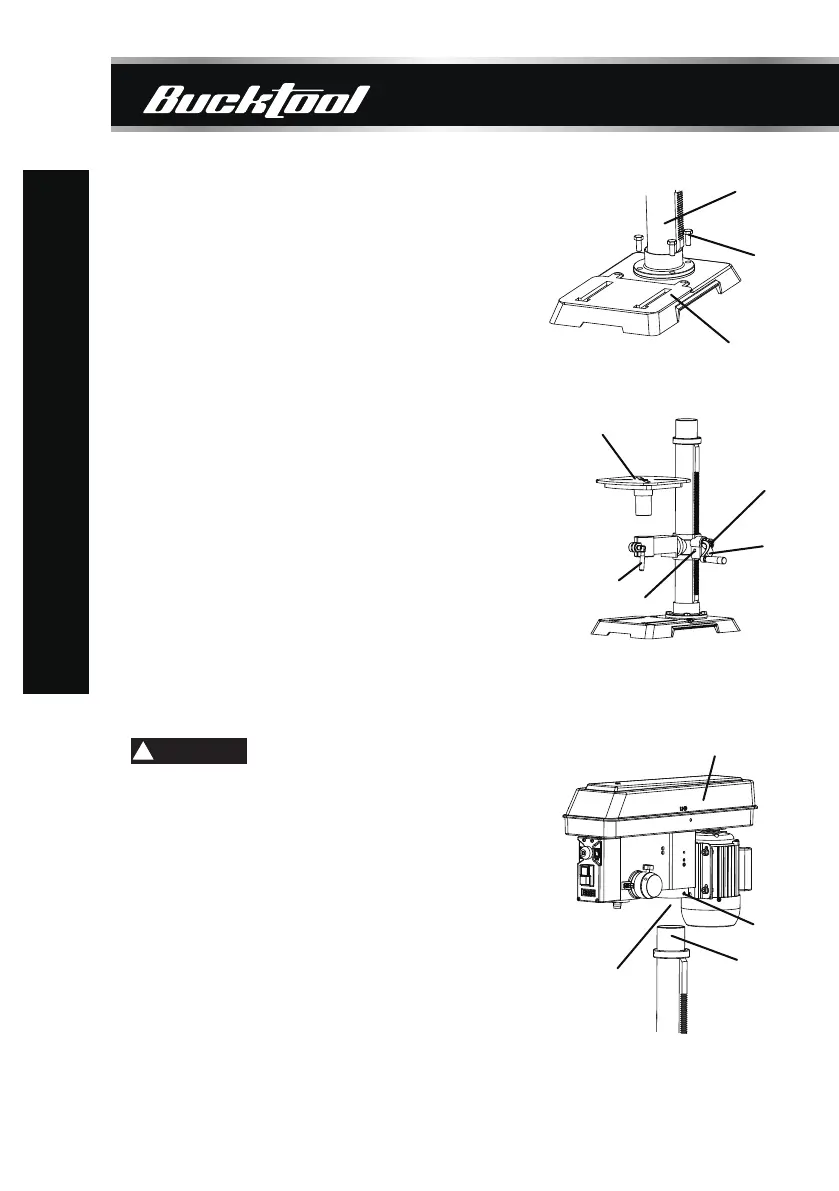
ATTACHING COLUMN TO BASE
1. Place the column assembly (1) on the base (2),
aligning the column support holes to the base
holes.
2. Install a hex head bolt (3) in each column
support hole and tighten bolts using the
adjustable wrench (not included).
TABLE TO TABLE SUPPORT BRACKET
DRILL PRESS HEAD TO COLUMN
1. Place the crank handle (1) onto the shaft (2)
of the table bracket so the flat of the shaft is
under the set screw (3). Tighten the set screw.
2. Thread the table lock handle (4) into the front
of the table support bracket.
3. Thread the table support lock handle into the
rear of the table support bracket (not shown).
4. Position the table (5) in the same direction as
the base. Install the table and tighten the table
lock handle (4) and support lock handle.
1. Carefully lift the drill press head assembly (1)
and position it over the column (2).
2. Place the mounting opening (3) on the drill
press head over the top of the column. Make
sure the drill press head is seated properly
on the column.
3. Align the direction of the drill press head with
the direction of the base and the table.
4. Tighten the set screw (4) using the included
hex wrench.
The drill press head is heavy. To avoid
injury, two people should lift it into position.
1
5
4
3
1
1
2
4
3
2
3
2


 To Next Page
 Loading...