11. Programming Mode
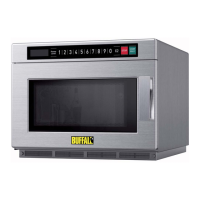
This mode allows the user to assign cook times and power levels to the once touched button.
1) Open the door and press
"1" for 5 seconds, the buzzer will sound once and enter
Programming Mode.
2) "ProG" displays.
3) Press "
" button, LED will display the saved time, then you can input the desired time
4)
Press " ", " ", " " or " " to input the power level.
LED will display the related power. If the same button pressed twice, the power will
change to PL10. If no power chosen, "PL10" is default.
5) To change the cooking factors: If pressing "X2", LED will display "CF:XX". The default
factory is 80%. "CF:80" displays. If you need to change the cooking power, just
press one of the number buttons to set.
6) After setting the time and power, press " ", the cooking program will be saved.
When the program saved, "ProG" displays.
7) If all the cooking time exceeds the MAX. time User Option 7, when pressing
" " to save the program, the buzzer will sound three times briefly and LED will diaply
"00:00" to tell you the time is no use. And then LED turns back to show "ProG". The time
set before will have no change.
8) Close the door, the oven will turn back to Ready Mode.
If pressing " " button during setting process, the oven turns to Door Open Mode.
The program that not saved will be lost. If there is program saved as memory procedure,
press the related number button, the saved program will start. If no saved program,
the buzzer will alarm when pressing number button and it will not work.
For example: set the program as memory cooking.
Program; Power level PL7 and cooking time is 1 minute and 25 seconds.
Step1: In waiting state, press number button "1" for 5 seconds, "ProG" displayed.
Step 2: Press number button "3", the program will be saved in "3".
Step 3: Press " ", "00:00" displayed.
Step 4: Press number buttons "1", "2" and "5" to input the cooking time.
Step 5: Press "
Step 6: Press "
" button, "PL7" displayed. Setting finished.
" to save. When to use the program next time, just press "3",
the related program will start.
Note:
1. If the electricity is cut off, the saved program will not be lost.
2. If the program needs to reset , just repeat the above steps.
3. If pressing " " at the last step, it will return to Ready Mode. The setting will have no use.


 To Next Page