18
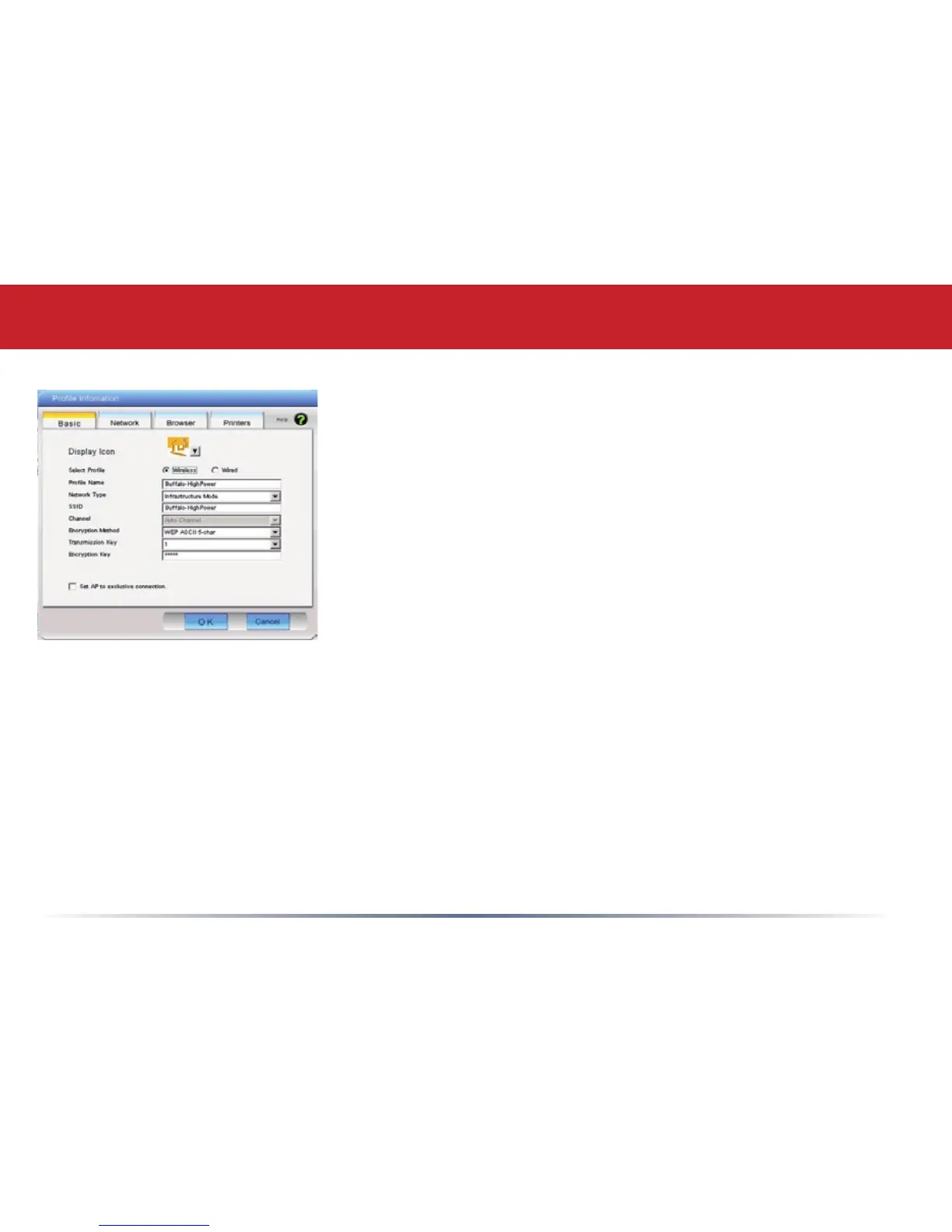
New Profile Dialog Box
• Select Profile – Select whether the prole is for a wireless or
wired connection.
• Profile Name – Enter the name you want to associate with
the new prole.
• Network Type – Select the network mode you want to
associate with the new prole. Select Infrastructure if your
network consists of both wired and wireless devices that
communicate through a central device, such as an access
point. Select Ad-hoc if your network consists of only wireless
devices that communicate with each other directly.
• Network Name SSID – Enter the SSID of your network. The
SSID is the name of your wireless network. All wireless
devices on a network must use identical SSIDs to successfully associate with other devices on
the network. MYSSID is an example of a valid SSID.
• Channel – The channel setting is only used for Ad-hoc connections. When using an Ad-hoc
connection, select a channel and make sure the other Ad-hoc devices are congured to use the
same channel. Otherwise, use Auto-Channel.
• Encryption Method – Displays the types of encryption available. Once encryption is selected,
you will be required to enter an Encryption Key. For the Transmission Key Number, 1 is
recommended.
• OK – Click OK to save your specications and return to the Proles page.
Client Manager Configuration


 To Next Page