

EasyManua.ls Logo

BUFFBEE RS11 - User Manual

BUFFBEE RS11
17 pages
Print Icon
To Next Page IconTo Next Page
Loading...
RS11 User Manual
please email us at Contact@buffhomes.com
If a faulty product is found when setting up
TIPS: Battery backup is for saving TIME and ALARM settings only.
Question and Answer IconNeed help?

Do you have a question about the BUFFBEE RS11 and is the answer not in the manual?

Summary

Device Features

FM Radio Functionality

Details the built-in FM radio capability and its operation.

Colorful Night Light

Explains the operation of the 7-color night light feature.

12;24 Hour Time Display

Covers the selection between 12-hour and 24-hour time formats.

Snooze Function

Describes the 9-minute snooze interval for alarms.

Adjustable Display Dimmer

Details the display brightness control from 0% to 100%.

Adjustable Volume Control

Explains the 0-16 level adjustable volume setting.

Sleep Timer Operation

Covers the functionality of the sleep timer.

Battery Backup for Settings

Explains the battery backup for retaining time and alarm settings.

Power Specifications

Device Views and Controls

Front View Diagram

Identifies key display elements and indicators on the front of the device.

Top View Control Layout

Details the buttons and functions located on the top panel.

Device Views and Components

Back Panel Components

Identifies the display dimmer and power connector on the back panel.

Bottom Panel Battery Compartment

Shows the battery compartment on the bottom of the device.

Getting Started and Initial Setup

Initial Power and Battery Setup

Instructions for plugging in the device and preparing the battery.

Important Usage Notices

Key operational notes regarding display, battery, antenna, and buttons.

Setting the Time

Setting the Hour

Steps to set the hour digits using the time setting button.

Setting the Minutes

Instructions to set the minute digits after setting the hour.

Selecting Time Format

How to choose between 12-hour and 24-hour time formats.

Confirming Time Settings

Procedure to save the set time and exit the setting mode.

Alarm Configuration

Setting Alarm Hour and Minutes

Instructions for setting the desired alarm hour and minute.

Choosing Wake-Up Sound

Selecting the alarm sound from available options.

Exiting Alarm Setting Mode

Procedure to confirm and exit the alarm setup.

Alarm Volume and Snooze

Adjusting Alarm Volume

How to set the alarm volume level from 0 to 16.

Stopping and Snoozing Alarms

Options to stop a ringing alarm or activate snooze.

Alarm and Nightlight Control

Turning Alarm On and Off

Procedure to enable or completely disable the alarm function.

Nightlight Operation

Instructions for turning the nightlight on, off, and changing colors.

FM Radio Operations

Tuning and Storing FM Stations

Steps to turn on/off, scan, and auto-store FM radio stations.

Adjusting FM Radio Volume

How to adjust the volume of the FM radio.

Advanced Settings

Wake Up Radio Alarm Setup

Procedure to save a radio station as the wake-up alarm sound.

Sleep Timer Functionality

Description of using the sleep timer to turn off features.

Timer and Brightness Adjustment

Setting the Sleep Timer

How to select and manage sleep timer durations.

Adjusting Display Brightness

Using the back slider to control display brightness.

Battery Operation and Support

Battery Backup Details

Information on installing and the purpose of the battery backup.

Customer Support Contact

Contact information for issues and warranty support.

Overview

The BUFFBEE RS11 is a versatile alarm clock with a range of features designed for convenience and functionality. It serves as an FM radio, a colorful night light, and a digital alarm clock with battery backup for essential settings.

Function Description:

The RS11 operates primarily as a digital alarm clock, displaying the time in either 12-hour or 24-hour format. It includes an FM radio function, allowing users to tune into their favorite stations. A key feature is the integrated night light, which offers 7 different colorful options. For alarm functionality, it provides a 9-minute snooze feature and allows users to select from various wake-up sounds, including bird chirping, piano sound, beep sound, or the last-tuned FM radio station. The device also incorporates a sleep timer, which can automatically turn off the night light and radio after a preset duration.

Important Technical Specifications:

  • Power Input: AC100-240V, 50/60Hz
  • Power Output: 5V/1A
  • Battery Backup: 1x CR2032 battery (built-in), for saving TIME and ALARM settings only. The display will go blank and the alarm will not sound under battery power alone.
  • Volume Levels: 0-16 adjustable levels for both alarm and FM radio.
  • Display Dimmer: 0-100% adjustable brightness via a slider on the back.

Usage Features:

  • Time Setting:

    • To set the hour, press the "Time Setting" button. The hour digits will flash. Use the "Vol -" (down) or "Vol +" (up) buttons to adjust the hour.
    • Press the "Time Setting" button again to confirm the hour and enter minute setting. The minute digits will flash. Use the "Vol -" or "Vol +" buttons to adjust the minutes.
    • Press the "Time Setting" button once more to confirm minutes and enter time format (12/24H) setting. Use the "Vol -" or "Vol +" buttons to select the desired format. In 12-hour mode, AM/PM icons will appear.
    • Press the "Time Setting" button to confirm and exit time setting mode. The clock will automatically exit time setup if no action is taken within 5 seconds.
  • Alarm Setting:

    • To set the alarm hour, press the "Alarm Setting On/Off" button. The alarm hour digits will flash. Use the "Vol -" or "Vol +" buttons to adjust the hour.
    • Press the "Alarm Setting On/Off" button again to confirm the hour and enter minute setting. The alarm minute digits will flash. Use the "Vol -" or "Vol +" buttons to adjust the minutes.
    • Press the "Alarm Setting On/Off" button once more to confirm minutes and enter wake-up sound setting. The alarm icon will flash. Use the "Vol -" or "Vol +" buttons to choose from bird chirping, piano sound, beep sound, or FM radio (last tuned station or a station set as "Wake Up Radio Alarm").
    • Press the "Alarm Setting On/Off" button to confirm and exit alarm setting mode. The clock will automatically exit alarm setup if no action is taken within 10 seconds.
  • Alarm Volume Setting:

    • When the radio is OFF, press the "Vol -" or "Vol +" buttons to select the alarm volume level (0-16). The selected number will be shown on the display.
  • Alarm Pause & Snooze:

    • When the alarm sounds, press the "Alarm Setting On/Off" button to stop the alarm. It will sound again the next day.
    • To snooze, press the "Snooze & Nightlight" button. The alarm indicator will flash, and the alarm will sound again after 9 minutes.
  • Alarm On/Off:

    • Press the "Alarm Setting On/Off" button to turn the alarm on.
    • Press and hold the "Alarm Setting On/Off" button for 2 seconds to completely turn off the alarm. The alarm indicator will disappear from the display, and the alarm will NOT sound the next day.
  • Nightlight Setting:

    • Press the "Snooze & Nightlight" button to turn on the nightlight.
    • Press the "Snooze & Nightlight" button repeatedly to change the color of the night light.
    • Press and hold the "Snooze & Nightlight" button for 2 seconds to turn off the night light.
  • FM Radio Setting:

    • Extend the FM antenna on the back of the clock.
    • Press the "Radio On/Off" button to turn the FM radio ON/OFF.
    • Press and hold the "Radio On/Off" button for 2 seconds to scan and auto-store FM stations. The first scanned station will play automatically.
    • Use the "Vol -" or "Vol +" buttons to tune between auto-stored stations.
    • Use the "Vol -" or "Vol +" buttons to adjust the FM radio volume (0-16 levels).
  • Wake Up Radio Alarm Setting:

    • When the radio is on, tune to your desired radio station using the "Vol -" or "Vol +" buttons.
    • Press and hold the "Time Setting" button until "AL" appears on the display. This station is now saved as the Wake Up Radio Alarm Sound.
  • Sleep Timer:

    • Press the "Sleep Timer" button repeatedly to select a sleep timer duration: OFF, 15, 30, 60, 90, or 120 minutes. The selected timer will be shown on the display.
    • To turn off the sleep timer, select "OFF" and wait 3 seconds, or press and hold the "Sleep Timer" button for 2 seconds.
    • When the sleep timer is active, press the "Sleep Timer" button to view the remaining time.
  • Display Brightness Setting:

    • Slide the "DISPLAY DIMMER" slider on the back of the clock to adjust the display brightness from 0% to 100%.

Maintenance Features:

  • Battery Backup: The built-in CR2032 battery provides backup for TIME and ALARM settings during a power outage. It's important to note that the display will be blank and the alarm will not sound when operating solely on battery power.
  • Troubleshooting: If the display is blank after plugging in, check if the "DISPLAY DIMMER" on the back is at the HIGH position.
  • Antenna: Ensure the FM antenna on the back of the clock is extended for optimal radio reception.
  • Button Backlight: All buttons will light up when pressed and turn off automatically after 5 seconds.
  • Support: The product comes with a one-year warranty. For any issues, customers can contact Contact@buffhomes.com for assistance, with a response expected within 24 hours.
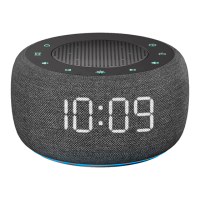
BUFFBEE RS11 Specifications

General IconGeneral
BrandBUFFBEE
ModelRS11
CategoryRadio
LanguageEnglish