6
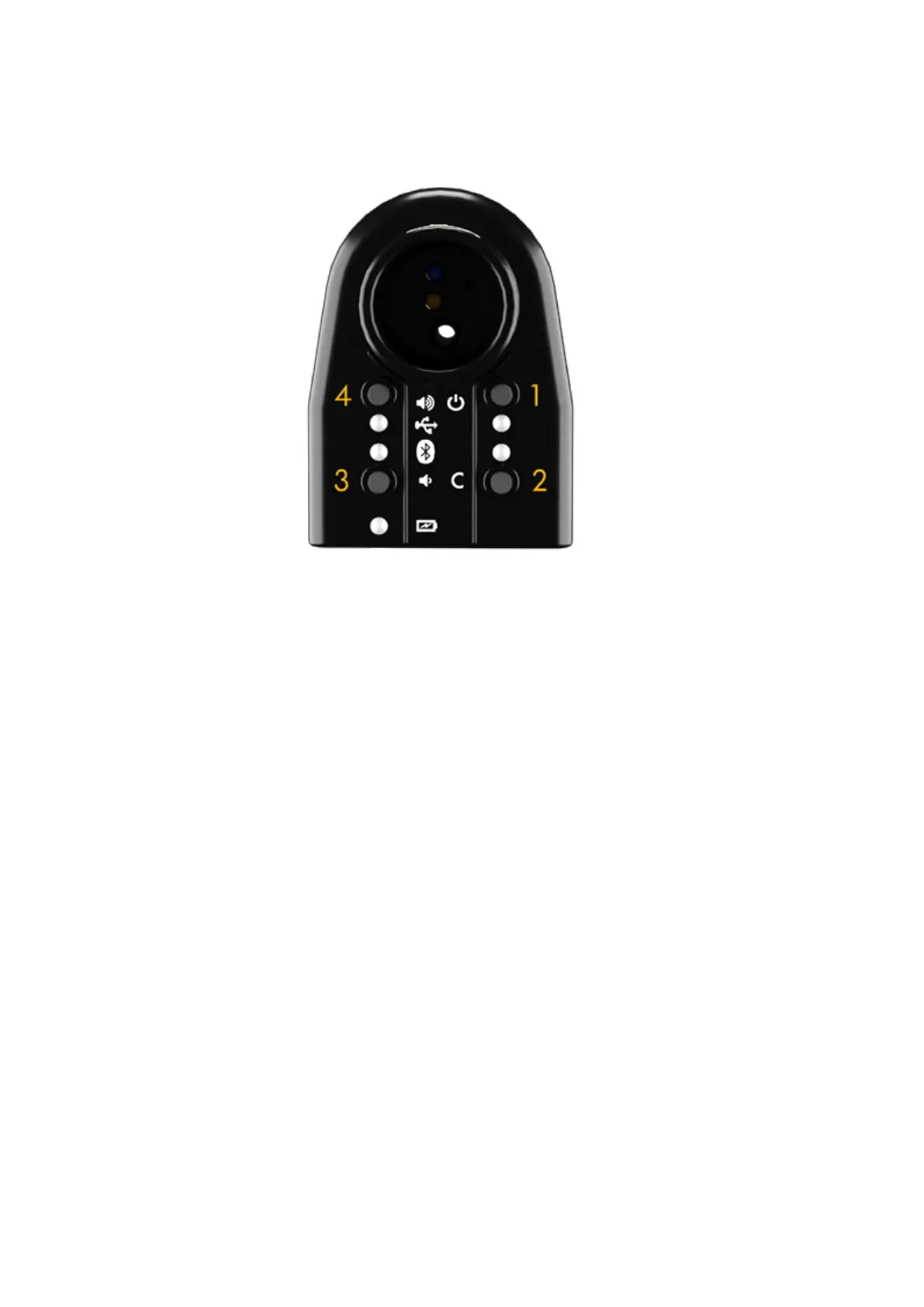
C. Button and LED functions summary
1. Power on in standalone mode. Power off. Turns on the orange LED.
2 + 1. Power on in reed calibration mode.
2. Validate open and closed reed calibrations (only while ClariMate is turned
on in reed calibration mode)
3 + 1. Power on in bluetooth mode. Turns on the blue LED.
3. Volume down.
3 + 2. Activate bluetooth for playalong (only while the ClariMate is turned on in
standalone mode).
4 + 1. Power on in USB mode. Turns on the green LED.
4. Volume up.
4 + 3 + 1. Power on in safe mode. Turns on the yellow led Useful only when your
ClariMate is not responding.
D. App Overview
The ClariMate app allows you to adjust all the ClariMate settings in one place. Available on
your phone and on your computer, you can connect to it via bluetooth or USB.
The ClariMate app has 4 different screens: Note display (home), Note Training, Synth Controls,
and Breath Controls


 To Next Page