10
BUICK INFOTAINMENT SYSTEM
Interaction
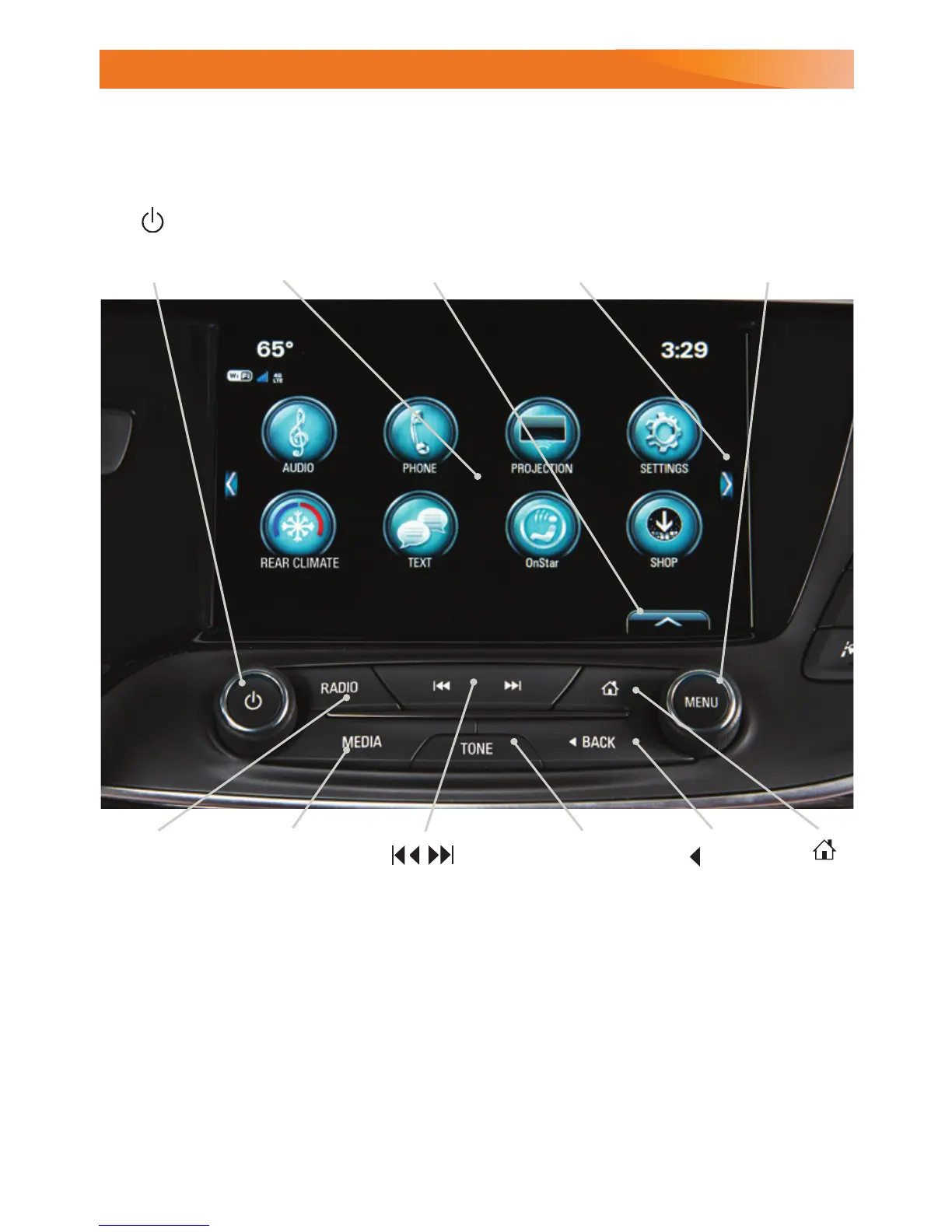
Selector:
Display the
favorites list
TUNE/MENU
Turn the knob to tune
radio stations and
highlight items/press to
open and select items
Applications:
Touch the icon
to open the
application
Additional Pages:
Touch to view
additional pages
of applications
(if available)
Power/
Volume
BACK
Return to
previous menu
Home
page
MEDIA
Select the
audio source
TONE
Open the Tone
settings menu
RADIO
Select AM,
FM, SiriusXM
F
SEEK
Previous or next
radio station or
track
The infotainment system uses a Bluetooth or USB connection to link to a compatible
device, such as a smartphone, cell phone, USB ash drive or portable audio player/
iPod
®
, and offers hands-free voice control. For assistance with the infotainment system,
contact Customer Assistance at 1-855-4-SUPPORT (1-855-478-7767) or go to
my.buick.com/learn.
Refer to your Owner’s Manual for important information about using the infotainment system while driving.
F
Optional equipment















 To Next Page