EasyManua.ls Logo

Burco 5L - Appliance Operation

Burco 5L
24 pages
Print Icon
To Next Page IconTo Next Page
To Previous Page IconTo Previous Page
Loading...

Ensure boiler is connected to the mains water supply.
Operating the Appliance


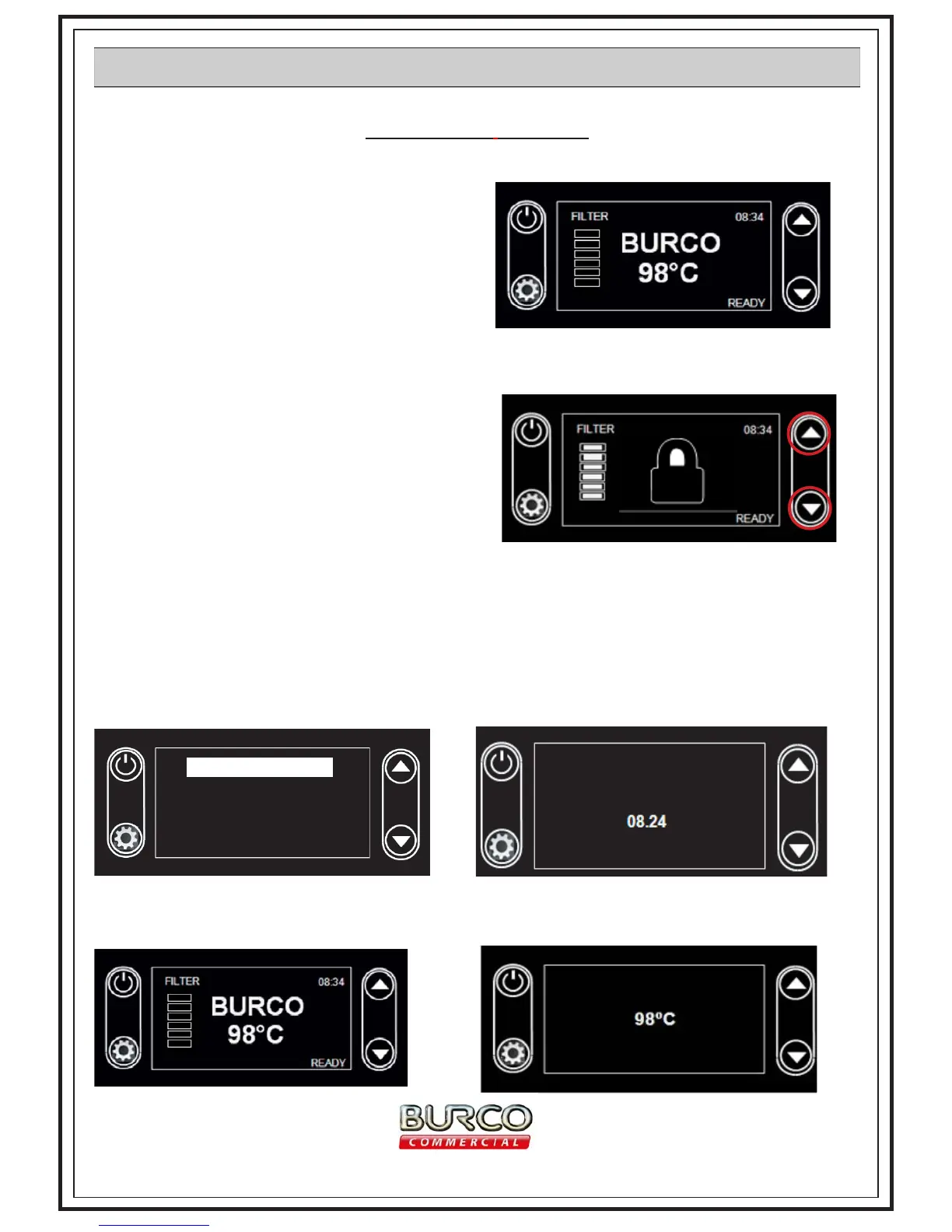
brand logo. The default temperature and


MENU to set when the correct time is shown.

arrows to adjust to required temp.
Child Lock:
By pressing and holding the MENU and the up scroll





of seconds when you press any button.

Press Menu and the SET CLOCK will be highlighted. Press MENU to enter the SET CLOCK menu. The





SCREEN SETTINGS
LANGUAGE
ECO MODE
SET CLOCK

-
ture. The down scroll button will decrease the temperature. Press the MENU button to set.
SET CLOCK
13
www.gdpacatering.com

Related product manuals