1.Auxiliary analogue audio equipment can be connected and amplified
via the turntable
2.Connect the auxiliary equipment using a 3.5mm jack cable into the
Line In
jack next to the mode knob
3.Press the PLAY button on the auxiliary equipment and use the track
controls as usual on the auxiliary device
4.The volume can be adjusted using the volume knob on the turntable
or the controls on the connected auxiliary device.
5.To turn off the unit at any time, turn the volume knob fully anticlockwise
Using Headphones (not included)
A stereo headphone jack has been provided so that the turntable can be
used without disturbing others. Plug in the headphones at the point
marked "HEADPHONE" near the volume knob and adjust the listening
volume to your chosen level. Excessive sound pressure from earphones
and headphones can cause hearing loss. The turntable speakers will not
operate when earphones are fitted
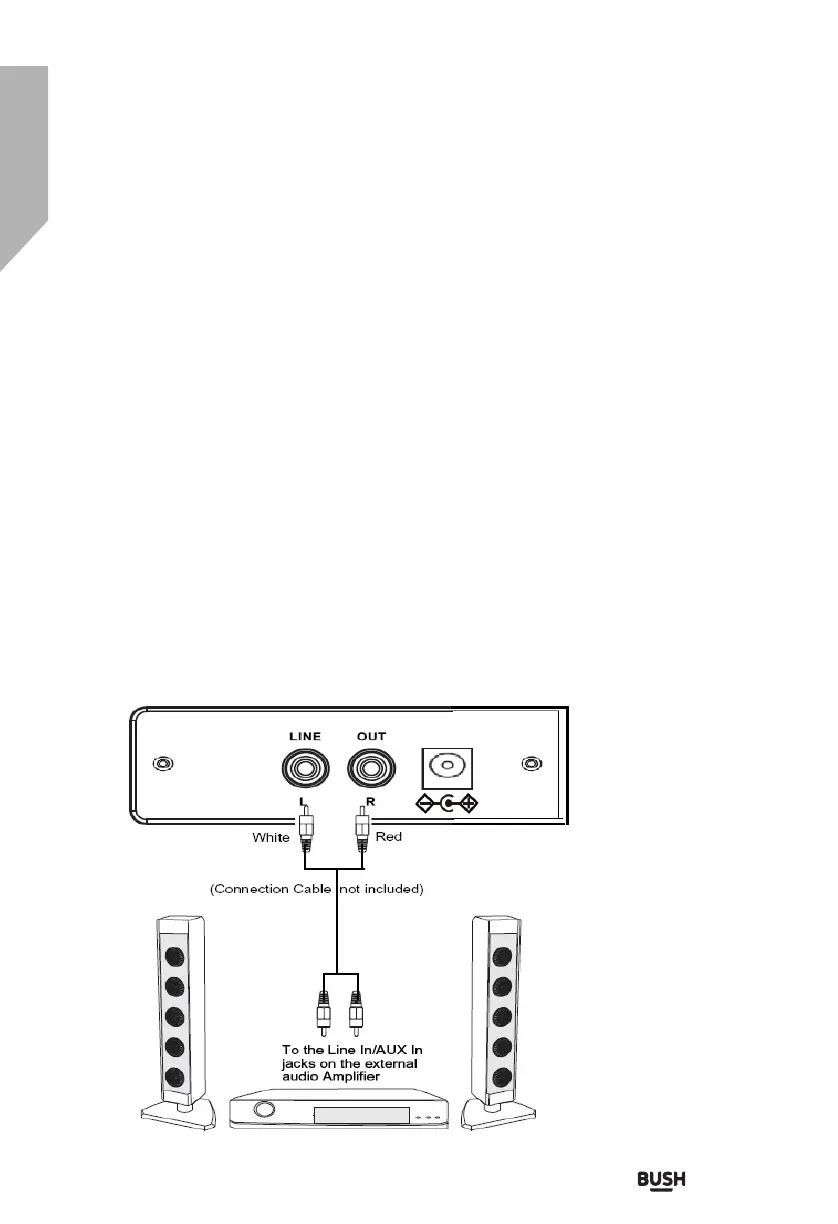
Connecting the Turntable to External Speaker
If connecting the turntable to external speakers (via a suitable amplifier)
use a twin phono to twin phono lead (not included) to connect the RCA
output jacks to the AUDIO IN of the amplifier (see Fig. 5).Ensure red
plugs are inserted into the red sockets and white into white.
Fig 5
11
Using With Auxiliary Device
DC-5V
W ood en Turntable W ith L eg s Instruction Manual


 To Next Page