10
For any help concerning set up and use of your TV please call the Customer Helpline: 0871 2000 463
Detaching The Stand And Securing The TV
To A Wall
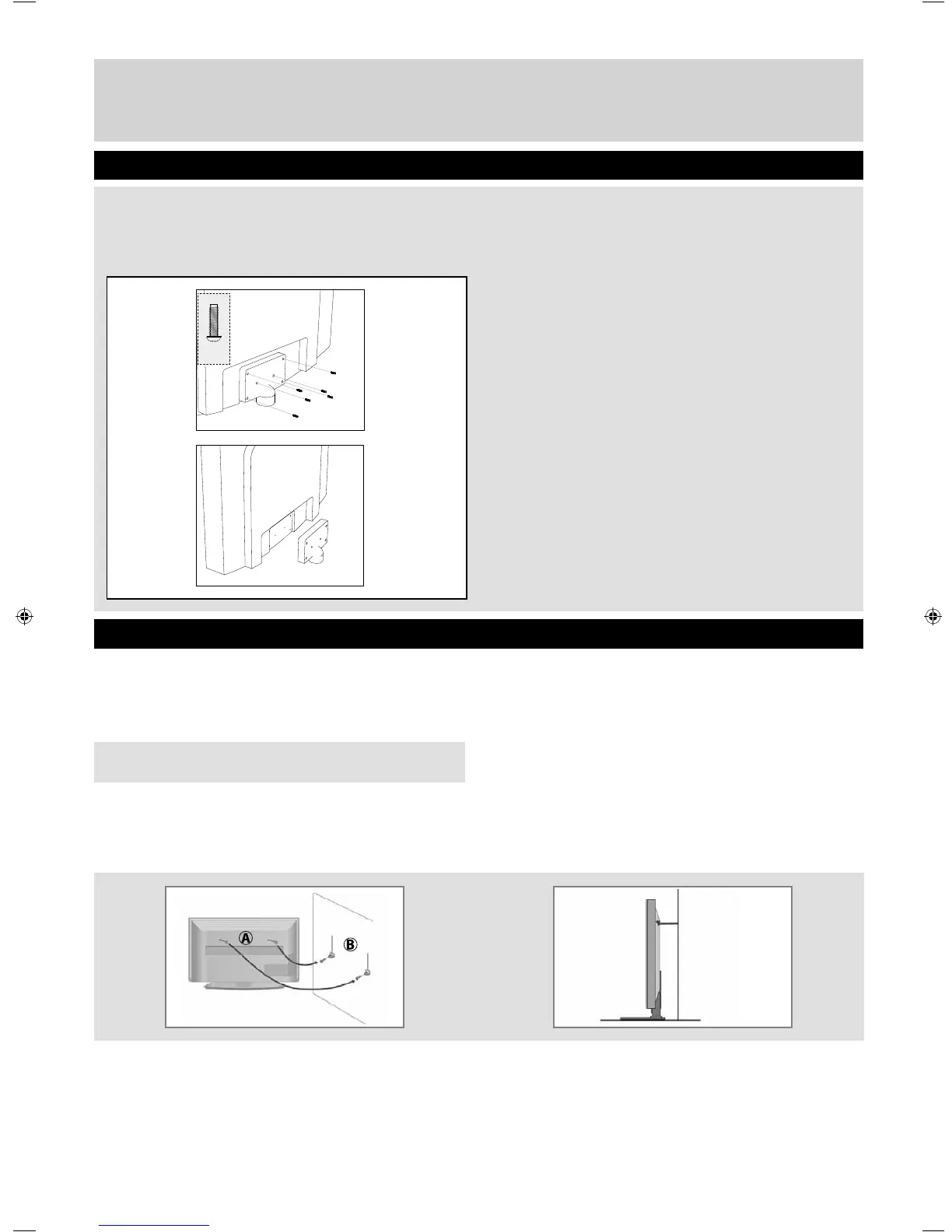
Detaching the Stand
Securing the TV to a Wall
6 x
M (4x14)
For maximum security in the home when using a TV with its stand anti-tip straps should be fi tted. These are
available from supermarket websites and other websites and are an easy, inexpensive and effective way of
ensuring your TV stays safely upright. Straps are designed to be attached to the rear of the TV and then tethered to
the wall of the furniture the TV is stood on, if wood. (The 2 images should appear underneath this text).
The Royal Society for the Prevention of Accidents is urging people to take care with fl at-screen televisions.
RoSPA stated in 2010 that “Toddlers are particularly at risk of pulling fl at-screen televisions on to themselves. They
are unsteady on their feet and are attracted by colourful television images.”
The risk is increased as televisions become lighter.
A) Using one or both of the top wall-mounting holes
and screws (the screws are already supplied in the
wall mounting holes) fasten one end of the
fastening cord/s to the TV.
B) Secure the other end of the fastening cord/s to
your wall. (you will need screws/fi xings suitable for
your wall type - available separately from most
DIY stores)
Note - Please ensure that children do not climb on the
TV set.
To detach the stand please remove the 6 screws
highlighted then remove the stand neck and base
from the rear of the TV set.
User Guide BUSH - 39-401UHD 4k BUS-MAN-0008 vers1.indd Sec1:10User Guide BUSH - 39-401UHD 4k BUS-MAN-0008 vers1.indd Sec1:10 8/1/2014 5:17:58 PM8/1/2014 5:17:58 PM



 To Next Page