Functions
Simple everyday use
Functions24
If you require any technical guidance or find that your product is not operating as intended, a simple solution can often be found in the Troubleshooting section of these instructions,
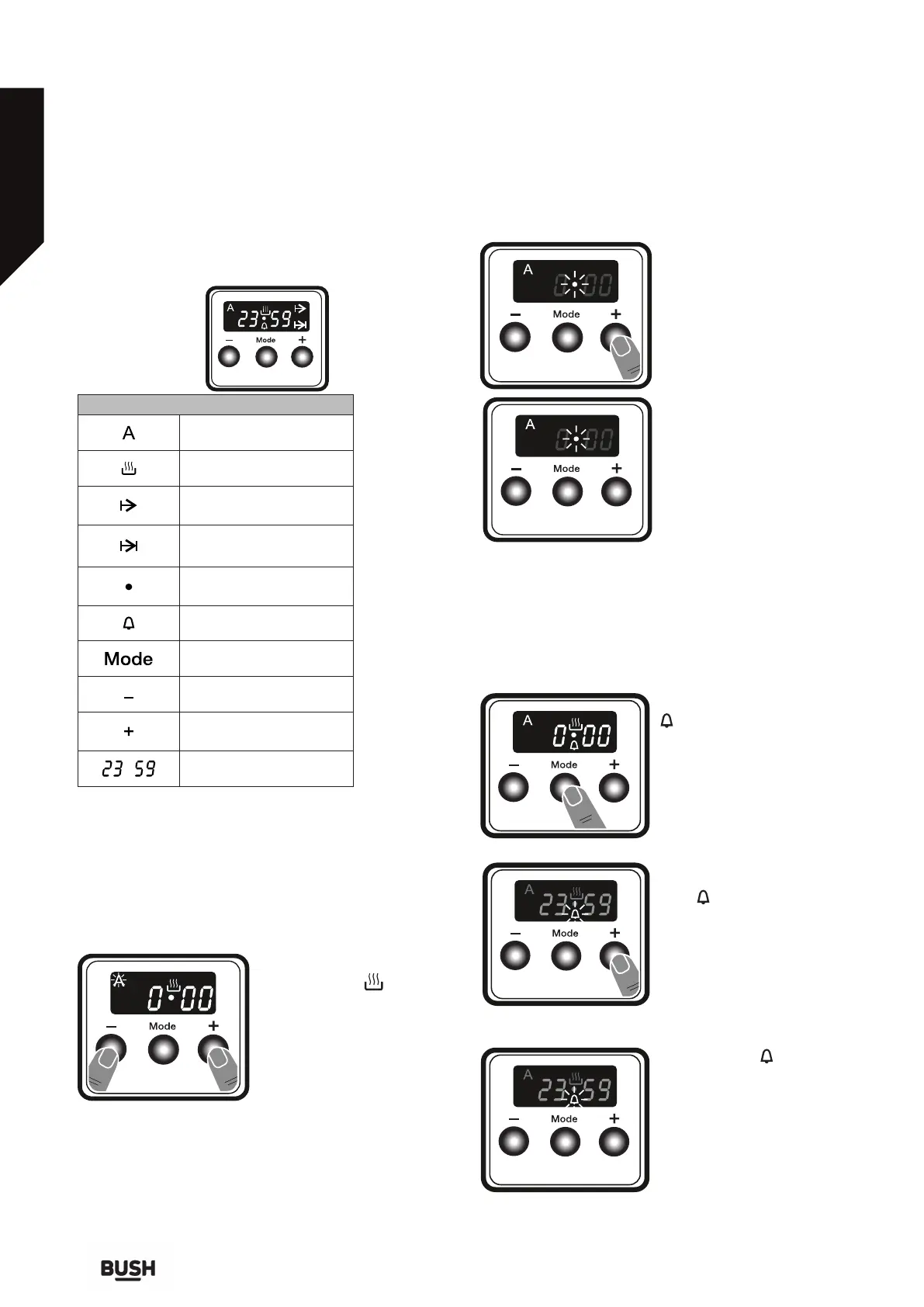
Use of the Digital Timer
Function Description
Auto cooking
Manual cooking
Cooking time
Cooking end time
Dot
Minute minder
Mode function
Decrease timer
Increase timer
Timer display
Time adjustment
The time must be set before you start using the oven.
Following the power connection, the symbol “A” and
“000” will flash on the display.
1. Press the “+” and “-” keys
simultaneously. Symbol
will appear, and the dot in the
middle of the screen will start
to flash.
2. Adjust the time while the
dot is flashing using the “+”
and “-” keys.
3. After a few seconds, the
dot will stop flashing and will
remain illuminated.
Audible warning time adjustment
The audible warning time can be set to any time
between 0:00 and 23:59 hours. The audible warning
time is for warning purposes only. The oven will not be
activated with this function.
1. Press “MODE”. The symbol
will begin to flash and
“000” will be displayed.
2. Select the desired time
period using the “+” and “-” keys
while is flashing.
3. The symbol will remain
illuminated, the time will be
saved and the warning will
be set.



 To Next Page