1
OK
2 3
4 5 6
7 8 9 0
+
CH
_
+
_
VOL
POWER
MUTE
AUDIO
RECALL
TV MENU SOURCE
CH.L IST
SOUND
EXIT
PIC
SLEEP ASPECT
TEXTTV/RADIOFREEZE
INFOFAVEPG
REVEAL
HOLD
LIST
INDEX
SUBPAGE SIZE MIX SUBTITLE
REP
Remote control
03
P.11
BUSH|Full HD 1080p LCD TV | User Manual | Helpline:0845 604 0105BUSH|Full HD 1080p LCD TV | User Manual | Helpline:0845 604 0105
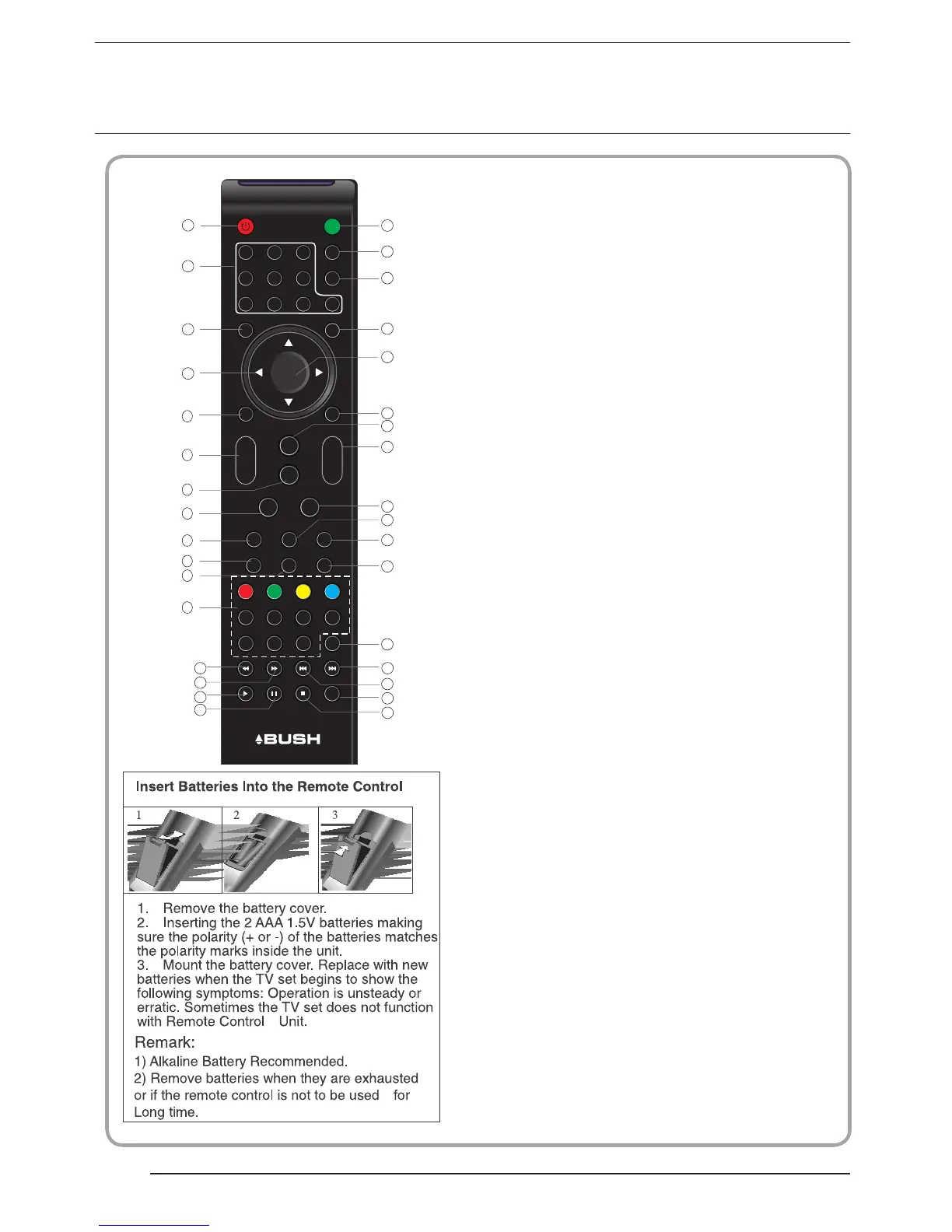
1:POWER:To set the TV to standby or power on.
2:NUMERIC KEY:
3:TV MENU:To display TV menu.
4:CURSOR:To move within the menu.
5:CH.LIST:To display the channels list.
6:VOL+/- :To adjust sound level.
7:PIC:To switch picture mode.
8:SLEEP:S
9:FREEZE : To freeze the picture.
10:EPG:T
11:FAV:T
12:TELETEXT KEYS: Please refer to next page.
13:MUTE:To disable or enable the sound output.
14: AUDIO:To select the available audio
/language of TV programs .
15: RECALL: To access the previously viewed
channel.
16: SOURCE: To select input source.
17: OK:To confirm selection.
18: EXIT:T
19: SOUND:To switch sound mode.
20: CH+/CH-:To access the next or previous
channels.
21: ASPECT: To change picture aspect ratio.
22:TV/RADIO:In DVB mode, it is u
Display/remove
23: TEXT:To enter or exit TELETEXT.
24: INFO:T
25: SUBTITLE:T
For direct access to channels.
et timer to turn off the TV.
o display information about the
program being viewed and what's on next in
DTV mode.
o access your favourite channels list
in TV or DTV mode.
o return to the previous menu
or exit menu.
sed to switch
between digital TV channels and radio
stations.
o display information about the
channel being viewed or further information
about the program when in small EPG
screen in DTV mode.
o switch between different
subtitles in DTV mode.
the programme
information.
25
14
15
20
18
16
13
17
19
21
23
24
22
8
2
3
4
5
7
12
1
6
9
10
11
26
27
28
29
30
31
32
33
26. To skip to the next file in USB mode.
27. To skip to the previous file in USB mode.
28. REP: Select Repeat mode.
29. Stop the media player in USB mode.
30. To scan in reverse, during USB, USB playback.
31. To scan in forward, during USB, USB playback.
32. Play the media player in USB mode.
33. Pause the media player in USB mode.



 To Next Page