18
7:00 PM. No Field Scan recording would occur from 8AM to 5:30PM,
or from 7PM to 6AM. Remember, Field Scan recording is independent
of normal triggers due to animal activity–even if no animals enter the IR
sensor coverage zone, an image or video will still be captured every 15
minutes during the block(s) of time. If an animal triggers the camera “in
between” the 15 minute intervals, it will be recorded, same as it would
if you had setup the camera with Field Scan turned Off. Note: Field
Scan settings of frequent intervals and/or long periods between
start and stop time can reduce battery life.
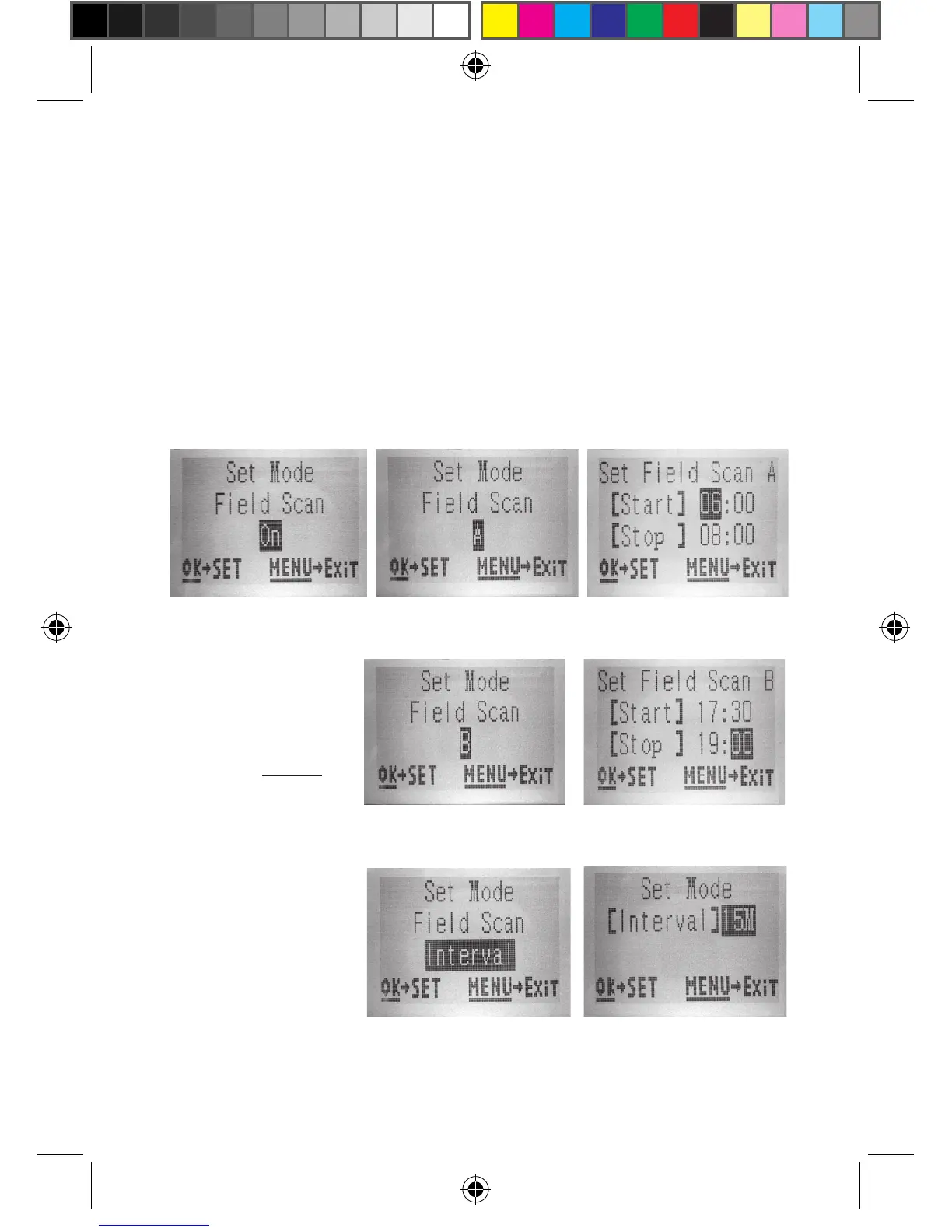
(Step 1)-set Field
Scan Mode to “On”
(Step 2)-select Field
Scan "A" (press OK)
(Step 3)-set Field
Scan "A" Stop & Start
(Step 4) (opt)-select Field
Scan "B" (press OK)
(Step 5) (opt)-set Field
Scan "B" Stop & Start
Steps 4 & 5 are
optional (only
required if you want
to set up a second
block of Field Scan
recording with
different stop and
start times)
(Step 6)-select Field
Scan "Interval"
(Step 7)-set Field
Scan Interval
Note: the Interval
Setting sets the
timing between each
image for both Field
Scan "A" and "B"
recording blocks.



 To Next Page