Applications
The Trophy Cam HD Essential E3 can be used as a trail camera for hunting
or scouting game. It is also suitable for surveillance usage.
PARTS AND CONTROLS
The Trophy Cam HD Essential E3 provides the following connections for
external devices: USB port and SD card slot (Fig. 1, next page).
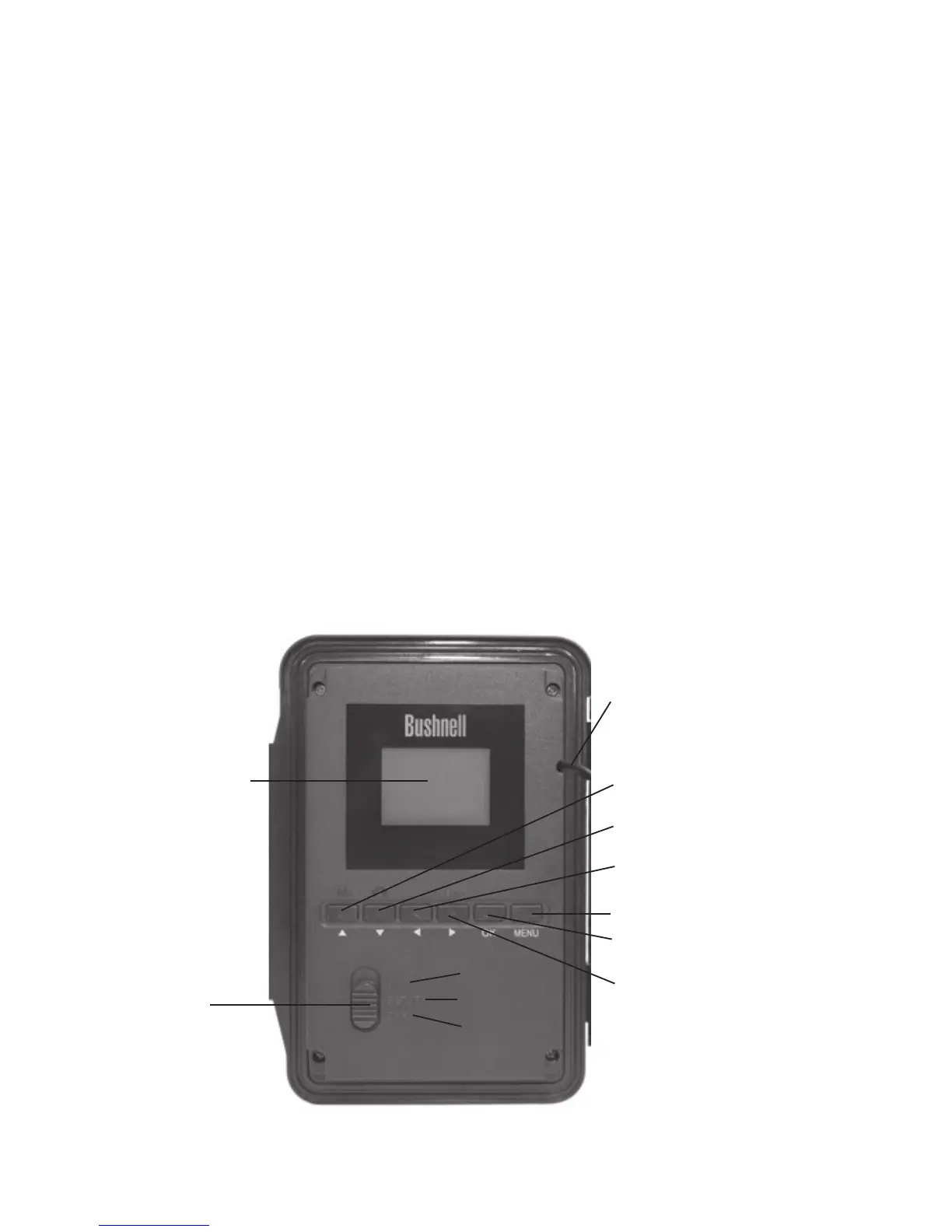
A 3-way power switch is used to select the main operating modes: OFF,
SETUP, and ON (Fig. 2).
A control key interface with six keys is primarily used in SETUP mode to
select operational functions and parameters. As shown in Fig. 2, these keys
are: UP, DOWN, LEFT, RIGHT, OK and MENU. Four of the keys can also
perform a second function (shortcut operations in SETUP mode) in addition
to their main function: The DOWN key can be used to set the camera to
Photo mode (still camera icon), and the UP key can set the camera to Video
mode (movie camera icon). The RIGHT key also serves as the manual shutter
Fig. 2: Button and
Switch Guide
BACK VIEW
ON
SETUP
OFF
LCD Screen
Power/Mode
Switch
UP/Video
DOWN/Photo
LEFT
MENU
OK/Replay
RIGHT/Shot
Cable to Battery
Compartment


 To Next Page