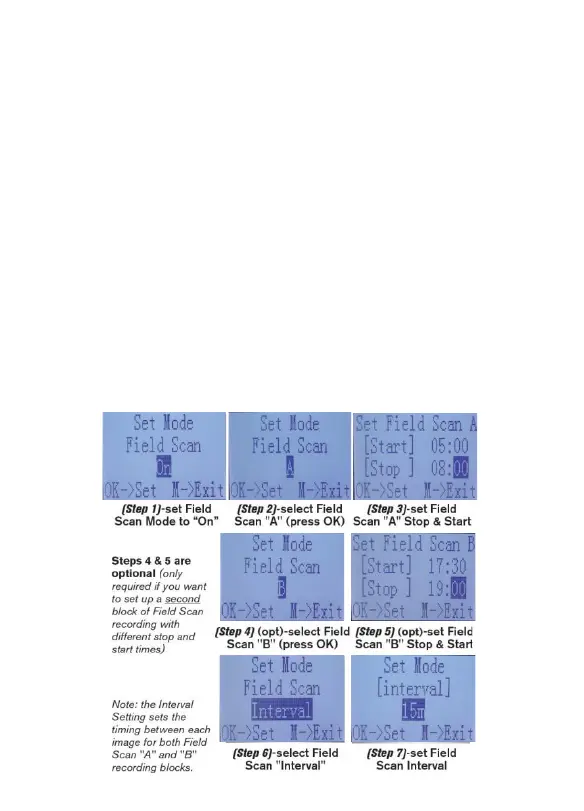
Field Scan: On
Field Scan A: [Start]: 6:00 [Stop]: 8:00
Field Scan B: [Start]: 17:30 [Stop]: 19:00
Interval: 15M
Note: avoid any “overlap” of Field Scan A & B recording blocks when setting their
start and stop times, to assure correct operation.
These settings would cause the camera to capture a photo once every 15 minutes,
beginning at 6 AM, until the Field Scan "A" recording block stops at 8:00 AM. Later
that day, the camera would again take a photo every 15 minutes between 5:30 PM
and 7:00 PM (during Field Scan time block "B"). The next day, the camera would
again record an image once every 15 minutes between 6:00 and 8:00 AM, and
between 5:30 and 7:00 PM. No Field Scan recording would occur from 8AM to
5:30PM, or from 7PM to 6AM. Remember, Field Scan recording is independent of
normal triggers due to animal activity – even if no animals enter the IR sensor
coverage zone, an image will still be captured every 15 minutes during the block(s)
of time. Note: Field Scan settings of frequent intervals and/or long periods between
start and stop time can reduce battery life.



 To Next Page