EasyManua.ls Logo

Bushnell Neo+ Watch - User Manual

Bushnell Neo+ Watch
28 pages
Print Icon
To Next Page IconTo Next Page
Loading...
User
Manual
Model # 368300
Lit # 98-2370/04-12
®
GPS
Rangender Watch
Question and Answer IconNeed help?

Do you have a question about the Bushnell Neo+ Watch and is the answer not in the manual?

Summary

Registration and Downloads

iGolf.com Registration

Steps to register your Neo+ Watch on iGolf.com.

Charging the Battery

About the Battery

Details on battery life, charging, and indicators.

Parts and Controls

Buttons and Functions

Explanation of each button's operation and purpose.

Operational Overview

Power On and Basic Operation

Guide to powering up and navigating the device menus.

Play Golf Mode

Using Play Golf Mode

How to select a course and view distances.

Button Functions in Play Golf Mode

Detailed functions of buttons within Play Golf mode.

Other Menu Options

Settings Menu Items

Settings Menu Items

System Reset

Resetting the device to factory default settings.

Troubleshooting; FAQ

Warranty

One Year Limited Warranty

Details of the product's limited warranty coverage and return process.

FCC Statement

Summary

Registration and Downloads

iGolf.com Registration

Steps to register your Neo+ Watch on iGolf.com.

Charging the Battery

About the Battery

Details on battery life, charging, and indicators.

Parts and Controls

Buttons and Functions

Explanation of each button's operation and purpose.

Operational Overview

Power On and Basic Operation

Guide to powering up and navigating the device menus.

Play Golf Mode

Using Play Golf Mode

How to select a course and view distances.

Button Functions in Play Golf Mode

Detailed functions of buttons within Play Golf mode.

Other Menu Options

Settings Menu Items

Settings Menu Items

System Reset

Resetting the device to factory default settings.

Troubleshooting; FAQ

Warranty

One Year Limited Warranty

Details of the product's limited warranty coverage and return process.

FCC Statement

Overview

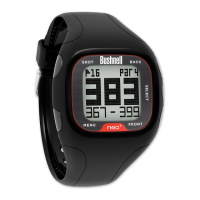
The Bushnell Neo+ GPS Rangefinder Watch is a golf accessory designed to provide golfers with accurate distance measurements to enhance their game. This user manual outlines the device's functions, usage, and maintenance.

Function Description

The Bushnell Neo+ GPS Rangefinder Watch is a GPS-enabled device preloaded with approximately 25,000 golf courses, making it ready for immediate use out of the box without requiring additional software downloads. Its primary function is to provide golfers with precise distances to the front, center, and back of the green for each hole. This information helps golfers make more informed shot decisions, potentially lowering their scores and improving their overall golfing experience.

Beyond golf-specific features, the Neo+ Watch also functions as an everyday timepiece, offering a standard alarm function and a countdown timer. It includes an odometer feature that tracks distance, speed, and total activity time once a GPS satellite signal is acquired. The device also provides GPS status information, indicating the number of satellites with signal lock-on and the Horizontal Dilution of Precision (HDOP), which reflects the accuracy of the position fix.

The watch is designed to be durable and waterproof, ensuring reliable operation in various environmental conditions. It features a rechargeable battery that offers up to 14 hours of golf use or up to one year of use as a time-only watch on a single charge.

Usage Features

To begin using the Neo+ Watch, ensure the battery is fully charged and you are outdoors with a clear view of the sky for optimal GPS signal reception. The device is powered on by pressing and holding the FRONT button.

The main operational mode for golf is "Play Golf." To enter this mode, press the MENU button, navigate to "Play Golf" using the FRONT or BACK buttons, and then press SELECT. The watch will then search for GPS satellite signals and display a list of nearby courses. Once a course is selected, the main screen will show the current hole number, par information, and distances to the front, center, and back of the green.

During "Play Golf" mode, several button functions are available:

  • SHOT Button: Used to track shot distance. Pressing it sets Point A to "0," and walking to your ball (Point B) will display the distance between the two points. It also controls the backlight, with a press and hold for night mode and a quick push to disable it.
  • MENU Button: Accesses the Golf Menu, allowing users to manually change holes, switch between yards and meters, check the current time, or exit the game.
  • BACK Button: Scrolls up through menu items and, in "Play Golf" mode, displays a larger "Back of Green" callout for 5 seconds before returning to the main screen.
  • SELECT Button: Used to select menu items.
  • FRONT Button: Scrolls down through menu items and, in "Play Golf" mode, displays a larger "Front of Green" callout for 5 seconds before returning to the main screen. It also serves as the power on/off button (press and hold).

The watch offers a "Golf Demo" mode, which provides an overview of "Play Golf" functionality without requiring a GPS signal. This mode displays sample screens of distances and hazards, useful for demonstration or familiarization.

The settings menu allows for customization of the watch:

  • Time & Date: Adjusts the time and date, sets the time zone, and configures GPS update settings (to automatically set time based on GPS signal) or allows for manual time setting.
  • Sound: Enables or disables key tones for button presses.
  • Units: Switches distance measurements between standard (yards/miles) and metric (meters/kilometers).
  • System Reset: Resets the watch to factory default settings.
  • About: Displays the firmware/software version.

For course management, users are required to register their Neo+ Watch on iGolf.com within 180 days of purchase. This registration updates preloaded course data and provides access to download additional or new golf courses. The watch can store up to 50 additional course downloads.

Maintenance Features

The Bushnell Neo+ Watch is designed for durability and is waterproof. To ensure its longevity and reliable performance, several maintenance guidelines are recommended:

  • Environmental Protection: Avoid exposing the watch to extreme environmental conditions and severe impacts.
  • Cleaning: The watch can be cleaned occasionally with a soft, damp cloth.
  • Contact Cleaning: Regularly brush the clip contacts at the bottom of the watch. Dirt buildup on these contact points can affect normal charging and data transfer. A soft-bristled brush should be used to avoid scratching the watch.
  • Chemical Avoidance: Do not expose the watch to strong chemicals like gasoline or alcohol, as these can damage the device.
  • Storage: Store the watch in a dry place when not in use.

Battery Management:

  • The rechargeable battery provides significant usage time. To check the remaining battery life, select "Battery" from Menu 1.
  • To recharge, connect the 4-pin end of the included USB cable to the contacts on the back of the watch and then to a computer or A/C style USB charger. The watch will display "CHARGING" and then "FULL" when complete.
  • Important Safety Note: The internal battery is not user-replaceable. Attempts to open, disassemble, or service the battery risk explosion. Battery replacement must be performed by a qualified technician. Do not crush, puncture, or short the battery's external contacts, and avoid exposing it to temperatures above 140° F (60° C). Always recycle or dispose of the battery properly, and never dispose of it in fire or water.

Software and Firmware Updates:

  • Users are encouraged to check www.bushnellgolf.com periodically for the latest firmware and software releases to ensure the device has the most up-to-date features and performance improvements.

Troubleshooting:

  • For minor issues, a software reset can be performed by selecting "Sys Reset" from the "Settings 2" menu.
  • If a software reset does not resolve the problem, a hardware reset can be performed by simultaneously pressing and holding the four "corner" buttons (Front, Back, Shot, & Menu) until the screen goes blank. The watch will then restart automatically.
  • For persistent issues not covered in the manual's FAQ section, Bushnell customer support is available for assistance.

Bushnell Neo+ Watch Specifications

General IconGeneral
TypeGPS Golf Watch
GPSYes
Weight2.1 oz (60 g)
DisplayLCD display
Water ResistanceYes
Battery LifeUp to 14 hours in GPS mode
CompatibilityWorks with Bushnell Golf App

Related product manuals