3
mechanism. If you are unable to bring the object into focus for your right eye by adjusting the diopter ring/eyecup,
make sure the left side is still in focus (repeat steps #2-4 if necessary). The diopter adjustment essentially provides “fine
focus” on one side of the binocular (right only) to allow for slight differences in the vision of your left and right eyes.
6. Your binocular should now be adjusted for your eyes. Focusing for any distance can now be done simply by turning
the center focus knob. Make a note of your diopter setting (position of plus and minus marks on diopter ring relative
to index mark on binocular below the ring) for future reference in case the ring is moved accidentally or by another
person using your binocular.
NECKSTRAP ATTACHMENT
To attach the neckstrap, thread the ends of the neckstrap through the strap lug (Fig.
5) on each side of the binocular, then back through the plastic buckle on the strap
(Fig. 6). Adjust the position of the binoculars on your chest as they hang around
your neck to your preference, by changing the length of the strap section which
passes through the strap channel and buckle by an equal amount on each side.
If you prefer to use an aftermarket strap that has metal O-rings, attach them to a
plastic zip tie placed on the strap lugs rather than installing them directly on the lug,
to avoid damaging the finish on the binocular via contact with the rings.
TRIPOD MOUNTING (compact models are not tripod adaptable)
To attach the binocular to a tripod or monopod, unscrew (10x42 model) or pull off (10x50,
12x50, 20x50 models) the cap which covers the threaded (1/4-20UNC) socket at the far end
of the center hinge (Fig. 7), and set it aside in a safe place. Use a compatible binocular tripod
adapter accessory (90
o
angle bracket), such as the Bushnell #161002CM, to attach your full size
PowerView 2 binocular on any standard tripod in a horizontal position, to provide a stable image
during prolonged viewing, or when using high power models such as the 20x50.
MULTI COATED OPTICS
All models have lenses with multiple, microthin layers of anti-re ective coating. This provides increased light transmission
for a brighter, clearer image. It’s important to take proper care of your binocular to avoid damage to these lens coatings
that could be caused by improper cleaning methods.
Fig. 5 Strap Lug
Fig. 6 Strap & Buckle
Fig. 7 Tripod Socket Cap
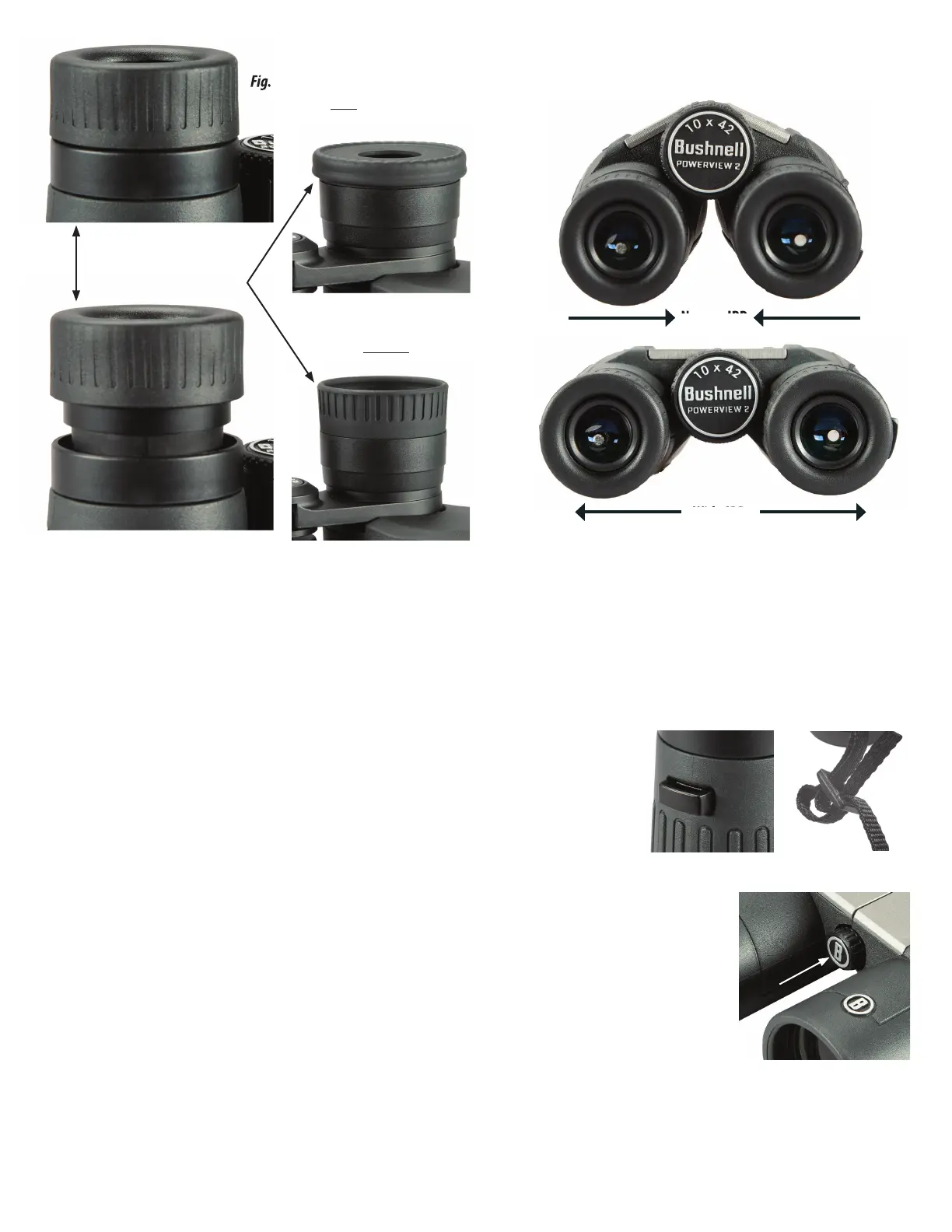
Fig. 3
Interpupillary Distance (IPD) Adjustment
Fig. 2 Eyecup in “Up” Position
(for use without glasses)
Fig. 1 Eyecup in “Down” Position
(for use with glasses)
Wide IPD
Narrow IPD
Fold Down Style
Twist-Up Style




 To Next Page